top of page

Additional Wix Apps

Embedding Songkick Tour Dates on Your Wix Site

Embed your tour dates from Songkick to your Wix site, by copying the embed code and pasting it in your editor.

Before you begin:

Your account needs to be set up as the manager of the requested artist.
A screenshot of the Songkick landing page.

To embed tour dates:

  1. Log in to Songkick.

  2. Go to the tour dates portal.

  3. Customize the options in the panel on the right.
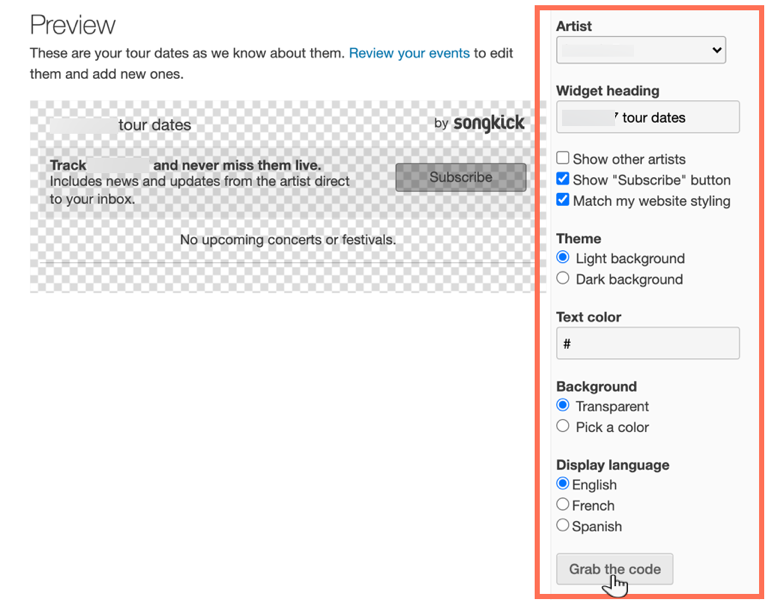
A screenshot of the tour dates widget in Songkick, showing the options to customize.

  1. Click Grab the code.

  2. Go to your Wix Editor.

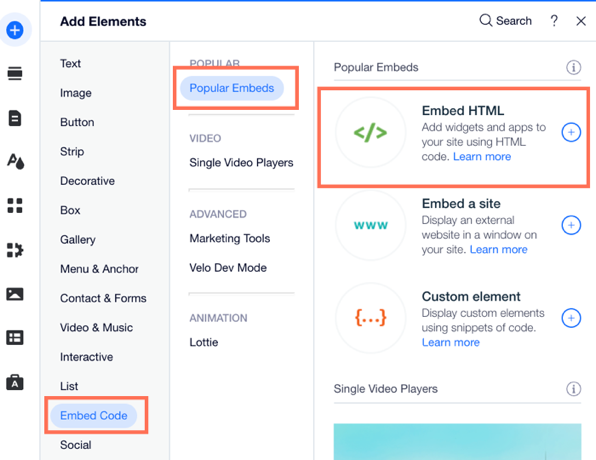
  3. Click Add Elements  on the left side of the Editor.

  4. Click Embed Code.

  5. Click Embed HTML.

A screenshot of the the Add Elements panel showing the option to Embed HTML.

  1. Paste the code you copied from step 4 into the Add your code here (HTTPS only) field.

  2. Click Update.

  3. (Optional) Enter alt text that describes what you're embedding in the What's in the embed? Tell Google field.

  4. When ready, publish your site.

Need A Professional Website?
Contact Us 
Today!

Wix Events: Adding Rich Media Content to an Event

Wix Events: Adding a Policy Checkbox

Wix Events: Optimizing SEO Settings

Wix Events: Setting Registration Opening & Closing Times in Advance

Wix Events: Customizing Registration Settings & Messages

Wix Events: Customizing the Registration Form for Ticketed Events

Wix Events: Customizing the Registration Form for RSVP Events

Wix Events: Troubleshooting Missing Emails

Wix Events: Managing Emails You Send and Receive

Wix Events: Creating a Hybrid Event

Wix Events: Creating a Private Event

Wix Events: Creating and Managing Event Categories

Wix Events: Creating an Event Schedule

Wix Events: Hosting a Live Streaming Event

Wix Events: Translating Your Event

Wix Events: Creating Online Events

Wix Events: Creating an Online Zoom Event

Wix Events: Hosting an Online Event With Wix Live

Wix Events: Creating a Recurring Event

Wix Events: Creating a Single Event

Wix Events: Understanding Different Types of Events

Wix Events: Understanding the Difference Between RSVP Events and Ticketed Events

Wix Events: Deleting Wix Events

Wix Events: Changing the Email Address for RSVP Notifications

Wix Events: Changing Your Currency

Wix Events: Editing the Date and Time Format

Wix Events: Upgrading Your Site

Wix Events: Adding Additional Event Pages to Your Site

Wix Events: Adding Wix Events to Your Site

Wix Events: About Wix Events

wix experts
Graphic2Traffic web design
©
bottom of page