top of page

Additional Wix Apps

Adding and Setting Up the Open for Business App

Important:

The Open for Business app is no longer available in the Wix App Market. The app will be removed from your site on December 11th 2024 and Wix will no longer support it. As an alternative solution, you can add the Business Open Hours Widget by Purple, to your site.

Use the Open for Business app to ensure your customers are always informed about your business hours and any updates, including unexpected changes or scheduled closures.
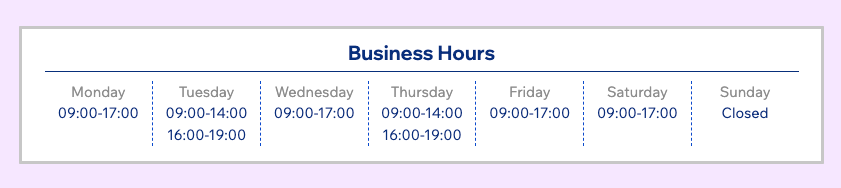
Set up the Open for Business app

Personalize the app's appearance to suit your brand's style by adjusting colors, fonts, layout, and the displayed information to blend with your site's look and feel.

To set up the Open for Business app:

  1. Select the Open for Business app in your editor.

  2. Click Settings.

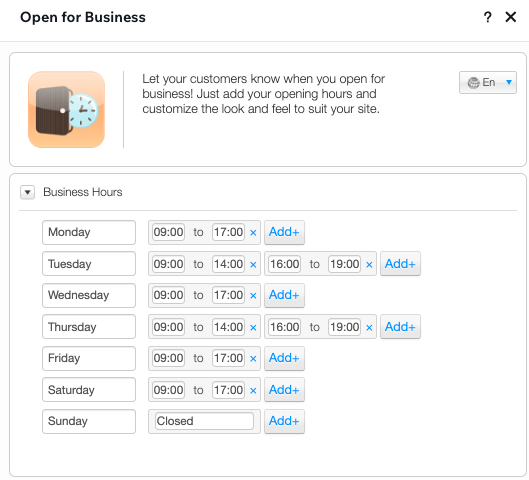
  3. In the Business Hours tab, edit the days and hours to suit your needs.

Note:

There's no need to delete any of the days, even if you're closed that day. In the Settings tab (step 4), you'll be able to select whether you want to display the "Closed" days at all.
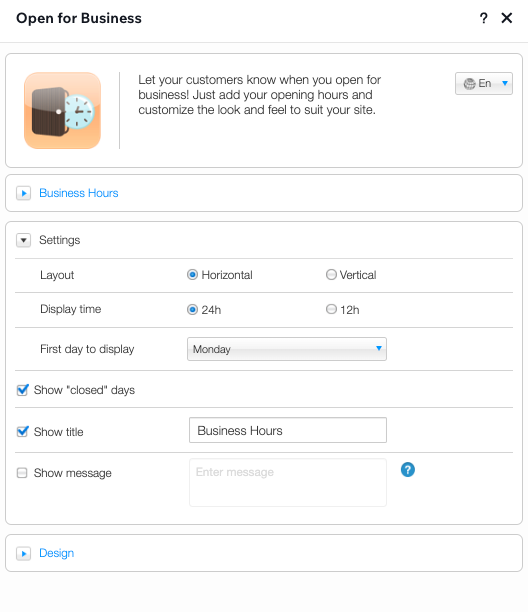
  1. Click to expand the Settings tab and customize the layout and display settings of the app.
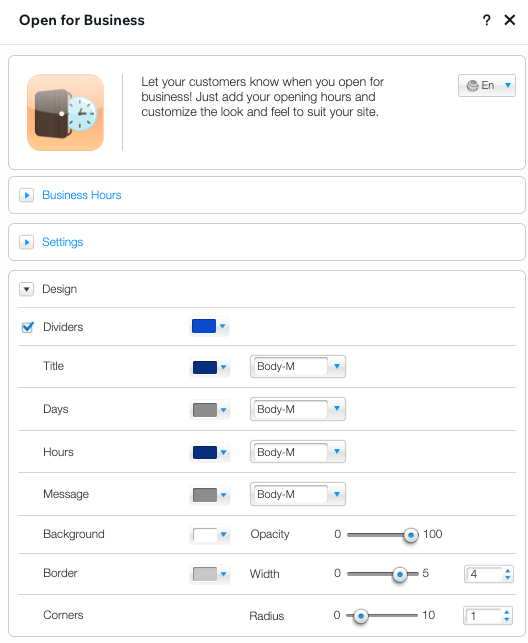
  1. Click to expand the Design tab and customize the colors, fonts, background and borders used in the app.
Tip:

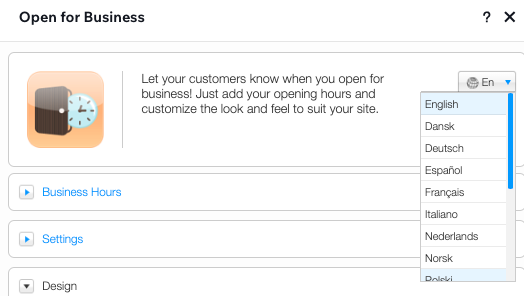
You can change the language of the app from the top of the Settings panel.
Need A Professional Website?
Contact Us 
Today!

Marking a Reservation as 'Paid' in Wix Hotels

Editing Your Confirmation Email in Wix Hotels

Receiving Notifications for Wix Hotels Reservations

Cancelling a Reservation in Wix Hotels

Marking Rooms as 'Not Available' in Wix Hotels

Manually Adding Reservations in Wix Hotels

Editing Your Reservations in Wix Hotels

Viewing Your Reservations in Wix Hotels

Upgrading Wix Hotels

Setting Up Tax in Wix Hotels

Setting Minimum and Maximum Stays for Seasonal Rules in Wix Hotels

Editing Your Property Rates Using Quick Rates

Setting Up PayPal as a Payment Method for Wix Hotels

Creating Coupons in Wix Hotels

Setting up Your Payment Method in Wix Hotels

Displaying Room Rates on Your Reservation Calendar

Adding a Deposit Fee to Reservations in Wix Hotels

Adding Extra Charges in Wix Hotels

Charging for Additional Guests in Wix Hotels

Charging Per Person in Wix Hotels

Adding Seasonal Rates in Wix Hotels

Setting a Weekly or Monthly Rate in Wix Hotels

Setting Weekend Rates for Rooms in Wix Hotels

Customizing Your Hotel Availability Calendar

Adding a Hotel Availability Calendar to Your Site

Adding a Hotel Search Bar to Your Site

About Wix Hotels Add-Ons

Customizing Your Room List in Wix Hotels

Removing the 'Kids' Option in Wix Hotels

Editing the Text in Wix Hotels

wix experts
Graphic2Traffic web design
©
bottom of page