top of page

Selling & renting your videos

Wix Video: Allowing Video Downloads

Wix Video lets you set download permissions for each video in your library. You can choose to allow downloads either for free or for a price, or prevent visitors from being able to download the video at all.

To allow video downloads:

  1. Go to your Video Library.

  2. Select the checkboxes next to the videos visitors can download.
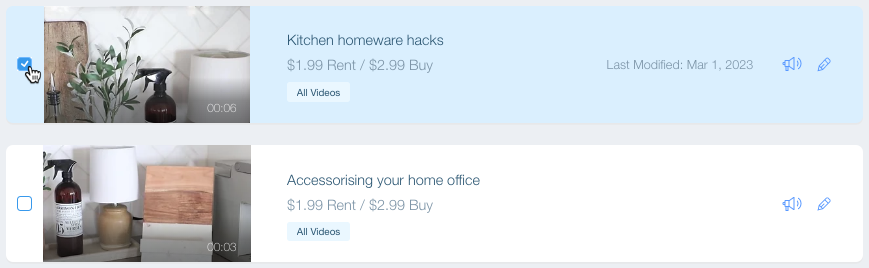
A screenshot showing a video in the Video Library being selected.

  1. Click Set Pricing at the top of the video list.

  2. Select an option:Free: Visitors can watch the videos for free. Click the Download options drop-down and select Allow download.

    Paid: Visitors must pay to watch the video.Select the Video can be purchased checkbox.
    Enter the video price.
    Click the Download options drop-down and select Allow downloads. Note: Videos which can only be rented cannot be downloaded.

  3. Click the Download options drop-down and select Allow downloads.

  4. (Optional) Enter the Price.

  5. Click Save.

Tip:

If you don't want visitors to be able to download your videos, simply select No downloads under the Download options, or offer your video for rent instead of purchase.

Note:

Visitors can only download videos when viewing your site on desktop. They cannot download videos on mobile.

Need A Professional Website?
Contact Us 
Today!

Accepting Payments: An Overview

Third-Party App: Adobe Express for Wix by Adobe

Third-Party App: Image Zoom by Widgetic

Third-Party App: Calculator Builder by Lumifish LABS

Third-Party App: Blocky IP & Country Blocker by Effective Apps

Third-Party Apps: Design Elements Apps

Third-Party App: Google Reviews by Elfsight

Third-Party App: Customer Reviews by Write a Customer Review

Third-Party App: Contact Management/CRM by vcita Inc.

Third-Party App: 123 Form Builder & Payments by 123FormBuilder

Third-Party Apps: Communications Apps

Third-Party App: Cookiebot™ for Wix by Usercentrics

Recommended Apps for Musicians

Third-Party App: Weglot Translate by Weglot

Third-Party Apps: Media and Content Apps

Third-Party App: Boom Event Calendar by BoomTech

Third-Party App: Cap Rate Calculator by Allioo.com

Third-Party App: Nash: All-in-1 Local Delivery by Nash Technologies Inc

Third-Party Apps: Hotel & Airbnbs Map

Third-Party App: Events Calendar by inlight Labs

Third-Party Apps: Services and Events Apps

Third-Party App: Mailchimp by Intuit Mailchimp

Third-Party App: ReConvert Upsell and Cross Sell by ReConvert

Third-Party App: Visitor Analytics by Visitor Analytics

Third-Party App: Site Booster by AppSharp

Third-Party App: rankingCoach SEO by rankingCoach

Third-Party App: Rabbit SEO by SEO Tools

Third-Party App: Mailchimp Integration by PoCo

Third-Party App: Mailchimp Forms by MailMunch

Third-Party App: GetTraffic by Infolinks Media

wix experts
Graphic2Traffic web design
©
bottom of page