top of page

Promoting stores sales

Wix Stores: Managing Your Coupons

Manage your coupons by activating the ones you want to offer customers and deactivating or deleting coupons you don't want to make available.

Note:

If you delete or deactivate a coupon, your customers won't be able to redeem it while checkout out.

Activating or deactivating a coupon

You can save time by creating a coupon once and then reusing it when needed. For example, you can create a Summer Sale Coupon and deactivate it when the sale it over. When summer rolls around again, just click the toggle to activate it.
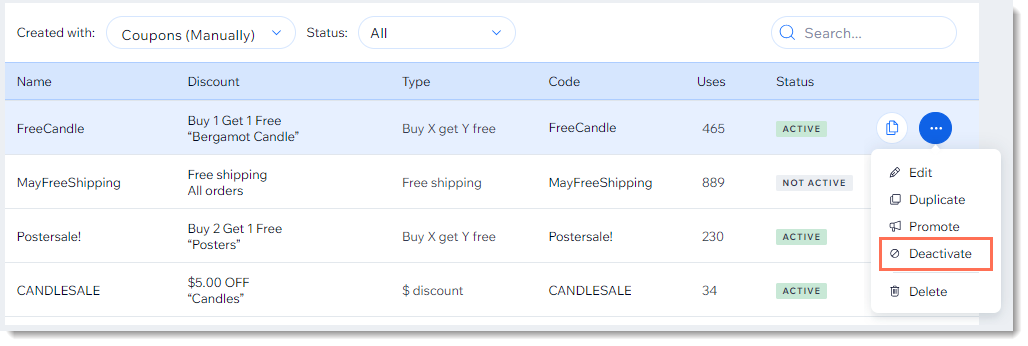
Screenshot of the coupon list in the Wix dashboard with the deactivate coupon option outlined

  1. Go to Coupons in your site's dashboard.

  2. Click the More Actions icon    next to the relevant coupon.

  3. Click Activate or Deactivate.

Deleting a coupon

Keep your Coupons page clean by deleting coupons that can no longer be used.

Note:

Once you delete a coupon, you can't undo this action. You can, however, recreate a coupon with the same details.
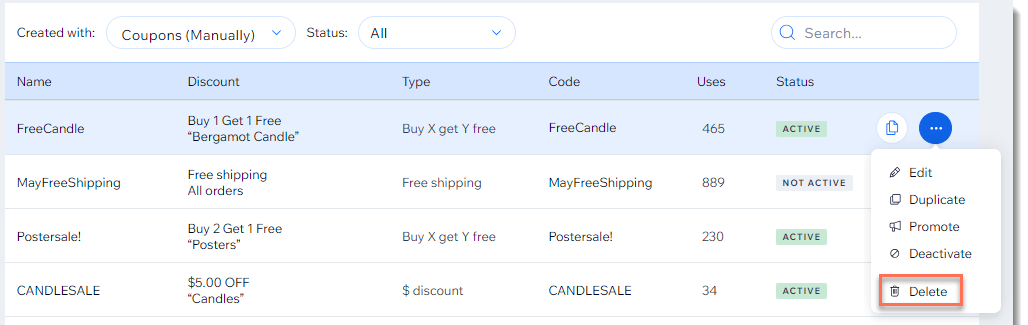
Screenshot of the coupon list in the Wix dashboard with the Delete  option outlined

To delete a coupon:

  1. Go to Coupons in your site's dashboard.

  2. Click the More Actions icon   at the top right of the coupon you want to delete.

  3. Click Delete.

  4. Click Yes, Delete to confirm.

Need A Professional Website?
Contact Us 
Today!

Accepting Payments: An Overview

Third-Party App: Adobe Express for Wix by Adobe

Third-Party App: Image Zoom by Widgetic

Third-Party App: Calculator Builder by Lumifish LABS

Third-Party App: Blocky IP & Country Blocker by Effective Apps

Third-Party Apps: Design Elements Apps

Third-Party App: Google Reviews by Elfsight

Third-Party App: Customer Reviews by Write a Customer Review

Third-Party App: Contact Management/CRM by vcita Inc.

Third-Party App: 123 Form Builder & Payments by 123FormBuilder

Third-Party Apps: Communications Apps

Third-Party App: Cookiebot™ for Wix by Usercentrics

Recommended Apps for Musicians

Third-Party App: Weglot Translate by Weglot

Third-Party Apps: Media and Content Apps

Third-Party App: Boom Event Calendar by BoomTech

Third-Party App: Cap Rate Calculator by Allioo.com

Third-Party App: Nash: All-in-1 Local Delivery by Nash Technologies Inc

Third-Party Apps: Hotel & Airbnbs Map

Third-Party App: Events Calendar by inlight Labs

Third-Party Apps: Services and Events Apps

Third-Party App: Mailchimp by Intuit Mailchimp

Third-Party App: ReConvert Upsell and Cross Sell by ReConvert

Third-Party App: Visitor Analytics by Visitor Analytics

Third-Party App: Site Booster by AppSharp

Third-Party App: rankingCoach SEO by rankingCoach

Third-Party App: Rabbit SEO by SEO Tools

Third-Party App: Mailchimp Integration by PoCo

Third-Party App: Mailchimp Forms by MailMunch

Third-Party App: GetTraffic by Infolinks Media

wix experts
Graphic2Traffic web design
©
bottom of page