top of page

Setting up shipping & fulfillment

Wix Stores: Integrating with Envia

Important:

To print shipping labels, you must first enter your business's address in the Business Info page. Learn how

Envia is a third-party app that integrates with Wix Stores so you can create domestic and international shipping labels with reliable couriers - all at a great price.
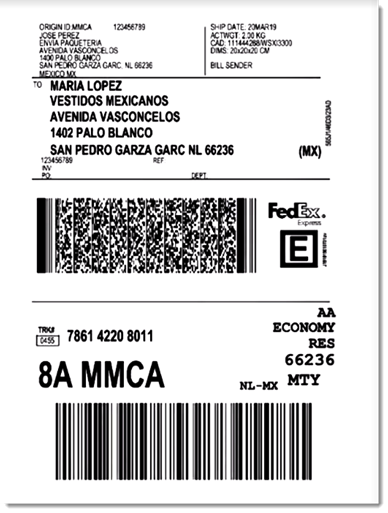
Sample shipping label created through Envia

Choose from a wide variety of shipping carriers, including:

  • FedEx

  • DHL

  • iVoy

  • Redpack

  • UPS

  • Sendex

  • Carssa

  • Paquete Express

  • 99 Minutos

  • Quiken

Notes:

  • Envia is currently available for stores located in the US, Mexico, Colombia, Spain, Brazil, Argentina, Chile, Guatemala, Canada, India, and Australia.

  • Envia is free to use. You pay only for the shipping labels you purchase.

  • You can connect one Wix store to one Envia account.

To integrate with Envia:

  1. Click here to access the app.

  2. Click Add to Site.

  3. Click Agree & Add.

  4. Click Continue.

  5. Enter your email address and click Continue.
    Note: You will be logged into your existing account or a new one will be created.

  6. For new accounts: Fill in the required information and click Continue.

  7. Select an address from the Saved addresses drop-down or complete the fields to add a new one.
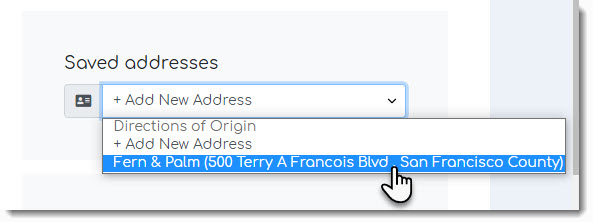
Screenshot of the address list drop-down in the Envia dashboard

  1. Click See Orders.

After integration, new Wix store orders appear in the Envia dashboard every time you make a sale. In the Envia dashboard you can manage your shipments, printing labels and track orders.

When a shipping label is created, the order in your Wix dashboard is updated so that the order status changes to "Fulfilled" and the tracking number is added.

To learn more, check out the Envia help center.

Need A Professional Website?
Contact Us 
Today!

Connecting PayU India as a Payment Provider

Connecting Paystack as a Payment Provider

Connecting Oceanpayment as a Payment Provider

Connecting DPO Group as a Payment Provider

Connecting Peach Payments as a Payment Provider

Connecting Portmone as a Payment Method

Connecting PayU as a Payment Provider

Connecting Bancontact as a Payment Method (Through Stripe)

Connecting KOMOJU as a Payment Provider

Connecting iyzico as a Payment Method

Connecting GMO-Epsilon as a Payment Provider

Connecting Privat24 as a Payment Method (Through Interkassa)

Connecting UniPAY Georgia as a Payment Provider

Connecting SumUp as a Payment Provider

Connecting YooKassa (YooMoney) as a Payment Provider

Connecting Square as a Payment Provider

Connecting Stripe as a Payment Provider

Connecting Online Bank Transfer by Klarna as a Payment Method (Through Stripe)

Connecting PayPal as a Payment Provider

Connecting Pay-Easy or Convenience Stores as a Payment Method (Through GMO)

Connecting PagueloFacil as a Payment Provider

Connecting PagSeguro as a Payment Provider

Connecting Mercado Pago as a Payment Provider

Connecting Max as a Payment Provider

Connecting Isracard Powered by PayMe as a Payment Provider

Connecting iDeal as a Payment Method (Through Stripe)

Connecting Fat Zebra as a Payment Provider

Connecting Eway as a Payment Provider

Connecting Braintree as a Payment Provider

Connecting AliPay as a Payment Method (Through Stripe)

wix experts
Graphic2Traffic web design
©
bottom of page