top of page

Managing products and categories

Wix Stores: Displaying the Product Price per Unit

Display a price breakdown to make it easy for customers to compare prices.

Tip:

Displaying a price per unit is required in some regions, such as Germany.
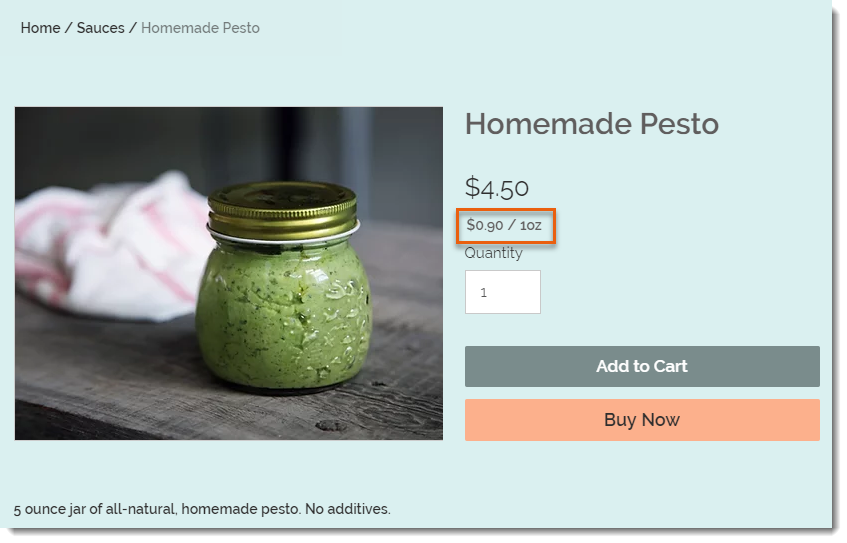
Screenshot of a product in a Wix store that has a price per unit display

To set up the price per unit display as in the image above, you need to select your type of unit (in this example, it's ounces), then enter the total weight of the product (it's a 5-ounce jar). Finally, you need to enter the unit you are using for your calculations (i.e. 1 ounce is the base unit in this example).
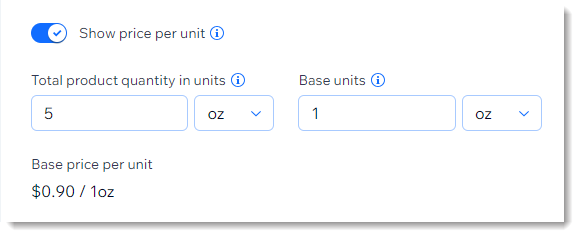
Screenshot of part of the product creation page showing the price per unit setup

After entering these parameters, the price per ounce (for example) is calculated automatically and appears on your live site under the product price.

After setup:

The price per unit calculation updates automatically whenever you:

  • Change the product price

  • Add a sale price

  • Add product variants with higher or lower prices

To add a price per unit display:

  1. Go to Products in your site's dashboard.

  2. Create a new physical product or edit an existing one.

  3. In the Pricing section, enable the Show price per unit toggle.

  4. Under Total product quantity in units, select the relevant type of unit (e.g. ounces) from the drop-down.
    Tip: You can switch between metric and imperial units in your regional settings.

  5. Under Total product quantity in units, enter the total product quantity in units (e.g. if you are selling a 5-ounce jar, enter "5").

  6. Enter the unit you want to measure by (e.g. enter 1 ounce to display a price per ounce).

  7. Click Save.

Need A Professional Website?
Contact Us 
Today!

Deleting Wix Hotels

Renting Multiple Properties in Different Locations

Adding Languages in Wix Hotels

Setting the Minimum and Maximum Nights in Wix Hotels

Changing Your Notification Email Address in Wix Hotels

Adding Your Hotels Policies

Adding and Managing Room Types in Wix Hotels

Renting Apartments Using Wix Hotels

Accessing Your Wix Hotels Dashboard

Adding and Setting Up Wix Hotels

About Wix Hotels

Music Apps: Adding and Setting Up an iTunes button

Music Apps: Adding and Setting Up a SoundCloud Player

Music Apps: Adding and Setting Up Your Spotify Player

Music Apps: Adding and Setting Up the Bandsintown App

Wix Podcast Player: General Troubleshooting

Wix Podcast Player: Adding and Setting Up the Wix Podcast Player

Wix Audio Player: Adding and Setting Up the Wix Audio Player

Wix Music: Allowing Fans to Download Your Music

Wix Music: Adding Links to Other Music Platforms

Wix Music: Allowing Your Fans to Name Their Price When Purchasing Your Music

About the Wix Audio Player

Wix Music: Setting Up Sales Notifications

Wix Music: Promoting Your Music using a Subscribe Form

Wix Music: Setting Up Your Payment Methods

Wix Music: Changing Your Currency

Wix Music: Viewing Your Transactions

Wix Music: Selling Your Music

Wix Music: Promoting Your Music With Email Campaigns

Wix Music: Displaying a 30 Second Preview of a Music Track

wix experts
Graphic2Traffic web design
©
bottom of page