top of page

Setting up your store

Wix Stores: Displaying Tax and Shipping Info with Product Prices

Make sure customers understand how your site calculates tax and how you charge for shipping by adding a brief message. The messages appear everywhere your product prices are displayed. You can choose whether to display tax info, shipping info, or both.

Screenshot of sample product in a Wix store with the shipping & tax info outlined

You can show or hide tax and shipping info from the Item price settings.

Show me how to access the Item price settings

  1. Go to your site's dashboard.

  2. Click Settings.

  3. Select Products & Inventory.

  4. Scroll down to the Price and shipping display.

In this article, learn more about:

Displaying tax messages next to product prices

In some countries, tax is included in the product price while in others, it's added at checkout. Make sure your customers understand when tax is added by displaying a "Sales Tax Included" or "Excluding Sales Tax" message.

  1. Go to the price and shipping settings in your site's dashboard.

  2. Enable the Show if tax is included or not toggle.
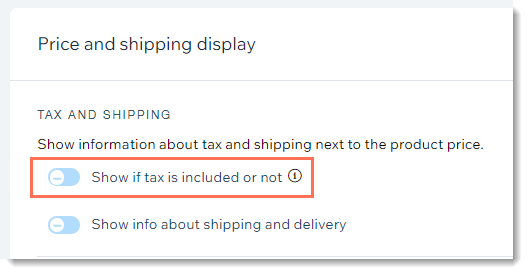
Screenshot of store settings in the dashboard with the tax display toggle outlined

Displaying shipping messages next to product prices

To let customers know your shipping policy, you can either display a short message (e.g. Free Shipping) or create a message that appears in a pop-up.

GIF showing what customers see on a Wix site when you display shipping and tax info

To display shipping info next to product prices:

  1. Go to the price and shipping settings in your site's dashboard.

  2. Enable the Show info about shipping and delivery toggle.
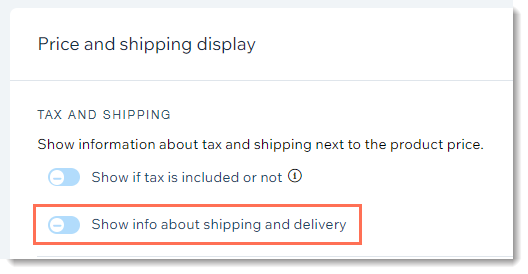
Screenshot of store settings in the dashboard with the shipping & delivery display toggle outlined

  1. Enter a shipping message (maximum 23 characters). This is the text customers see next to product prices.

  2. (Optional) Link the message to a pop-up:Select the Let customers click this text to open a pop-up with more information checkbox.
    Enter a title.
    Enter the shipping and delivery information.

Need A Professional Website?
Contact Us 
Today!

Wix Video: Selling Your Videos

Wix Video: Selling and Renting Videos

Wix Video: Allowing Video Downloads

Wix Video: Setting Up Your Payment Methods

Wix Video: Selling and Renting Options

Wix Video: Setting Up Free Video Viewing

Wix Video: Linking an Element to a Video or Channel

Wix Video: Troubleshooting Site Visitors Issues

Wix Video: Autoplay for Videos

Wix Video: Adding a Custom Logo to Videos When Embedded in Other Sites

Wix Video: Allowing Comments on Your Videos

Wix Video: Adding a Custom Logo to Videos When Embedded in Other Sites

Wix Video: Allowing Comments on Your Videos

Wix Video: Allowing Others to Embed Your Video on their Site

Wix Video: Displaying a Single Video in Your Wix Video Player

Wix Video: Customizing the Design of your Video Player

Wix Video: Changing Your Player Settings

Wix Video: Changing the Layout of Your Wix Video Player

Wix Video: Displaying a Channel in Your Wix Video Player

Wix Video: Deleting a Channel from Your Video Library

Wix Video: Scheduling A Publish Time for Videos

Wix Video: Managing Video Channels in the Wix App

Wix Video: Managing Channel Subscriptions (for Visitors)

Wix Video: Troubleshooting Issues with External Videos

Wix Video: Troubleshooting Issues when Uploading Videos

Wix Video: Deleting a Video from Your Video Library

Wix Video: Unavailable Videos in Your Video Library

Wix Video: Adding and Editing Action Cards

Wix Video: Errors when Uploading from Wix Video to Facebook

Wix Video: Errors when Uploading from Wix Video to YouTube

wix experts
Graphic2Traffic web design
©
bottom of page