top of page

Designing your store

Wix Stores: Customizing the Quick View in the Product Gallery

Quick view allows customers to view product details in a popup, without leaving your shop page. You can customize the quick view colors and fonts, as well as the "Quick View" and "Add to Cart" buttons.

Screenshot of a sample Grid Gallery in a Wix store

In this article, learn more about:

Enable or disable Quick View

You can add Quick View to any product gallery or to the Category page.

Important:

If the Add to Cart button is enabled and placed on top of the product image, the Quick View button won't be displayed. To customize the Add to Cart button placement, go to the Layout tab.

To enable or disable Quick View:

  1. Click the relevant Product Gallery or the Category Page in your editor.

  2. Click the Settings icon .

  3. Click the Display tab.

  4. Click the checkbox next to Quick View button to enable or disable it.

Customize the Quick View button

When Quick View is enabled and a customer on desktop hovers with their mouse over a product, the Quick View button appears. You can customize the button's colors, opacity, and font.
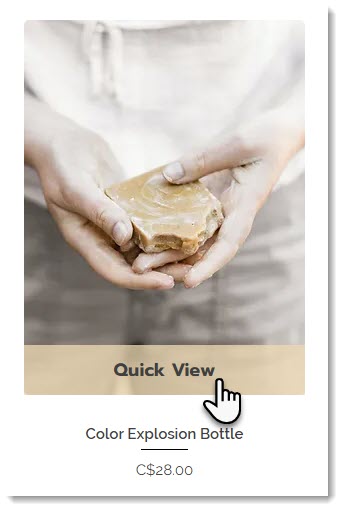
Screenshot of a product in a Wix store with the Quick View enabled

To customize the Quick View button:

  1. Click the relevant Product Gallery or the Category Page in your editor.

  2. Click the Settings icon .

  3. Click the Design tab.

  4. Select Quick View button.

  5. Customize the button using the available options.

Customizing the Quick View window

After a customer clicks the Quick View button, the Quick View window opens. You can customize the design of this window, so it matches your store's look and feel.

To customize the quick view:

  1. Click the relevant Product Gallery or the Category Page in your editor.

  2. Click the Settings icon .

  3. Click the Quick View tab.

  4. Customize the Quick View using the available options.

Need A Professional Website?
Contact Us 
Today!

Connecting PayU India as a Payment Provider

Connecting Paystack as a Payment Provider

Connecting Oceanpayment as a Payment Provider

Connecting DPO Group as a Payment Provider

Connecting Peach Payments as a Payment Provider

Connecting Portmone as a Payment Method

Connecting PayU as a Payment Provider

Connecting Bancontact as a Payment Method (Through Stripe)

Connecting KOMOJU as a Payment Provider

Connecting iyzico as a Payment Method

Connecting GMO-Epsilon as a Payment Provider

Connecting Privat24 as a Payment Method (Through Interkassa)

Connecting UniPAY Georgia as a Payment Provider

Connecting SumUp as a Payment Provider

Connecting YooKassa (YooMoney) as a Payment Provider

Connecting Square as a Payment Provider

Connecting Stripe as a Payment Provider

Connecting Online Bank Transfer by Klarna as a Payment Method (Through Stripe)

Connecting PayPal as a Payment Provider

Connecting Pay-Easy or Convenience Stores as a Payment Method (Through GMO)

Connecting PagueloFacil as a Payment Provider

Connecting PagSeguro as a Payment Provider

Connecting Mercado Pago as a Payment Provider

Connecting Max as a Payment Provider

Connecting Isracard Powered by PayMe as a Payment Provider

Connecting iDeal as a Payment Method (Through Stripe)

Connecting Fat Zebra as a Payment Provider

Connecting Eway as a Payment Provider

Connecting Braintree as a Payment Provider

Connecting AliPay as a Payment Method (Through Stripe)

wix experts
Graphic2Traffic web design
©
bottom of page