top of page

Managing products and categories

Wix Stores: Changing the Order of Products in a Category

Make sure your best products are noticed by placing them front and center.

To reorder products on your site, go to the Categories tab in your site's dashboard. When you reorder products there, it changes the order on your site, wherever you display that category.

To reorder products:

  1. Go to Categories in your site's dashboard.

  2. Select the relevant category.

  3. Click and drag the products to change the order.

  4. Click Save.

GIF showing how to reorder products in a category in Wix Stores

Tip:

If you're using the Category Page, you can override the product order you set in the dashboard.

To do so, click the Category Page in your editor, click Settings, and select the Sorting tab. You can select any of the following order choices from the Order products by drop-down.
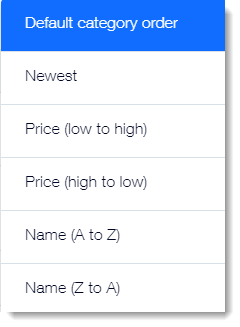
Screenshot of the order product options for the Category Page in  Wix Stores

Need A Professional Website?
Contact Us 
Today!

Connecting 2Checkout as a Payment Provider

Requesting Additional Payment Providers & Methods

Using a Different Account with the Same Payment Provider

Wix Payments: About Chargeback Fees

Wix Payments: About Suspicious Payments

Wix Payments: About the 'Liability Shift'

About Reserve Funds in Your Wix Payments Account

Wix Payments: Covering a Negative Balance

Adding Funds to Cover Refunds in Your Wix Payments Account

Wix Payments: Failed Payout

Working with Grouped Payment Methods in Wix Payments

Webinar: Chargebacks - Best Practices, Expert Tips & Tools

Wix Payments: Getting a 1099-K Form

Wix Payments: PCI Compliance

Wix Payments: Account Has Been Closed

Wix Payments: Pandemic Driven Sales Rules

Accessing the Wix Payments Dashboard After Disconnecting Your Account

Connecting Giropay as a Payment Method (Through Wix Payments)

Wix Payments: Adding iDeal as a Payment Method

Connecting Pay Now by Klarna as a Payment Method (Through Wix Payments)

Understanding Your Chargeback Ratio

Chargebacks in Wix Payments

Wix Payments: Declined Payment Due to Suspected Fraud

Wix Payments: Declined Payment Due to Suspected Fraud

Wix Payments: Transaction Declined Reasons

Wix Payments: Understanding Your Payments Table

Wix Payments: Refunding Customers

Wix Payments: Understanding Your Monthly Fees Invoice

Wix Payments: Viewing Your Settlement Report

Wix Payments: Changing Your Payout Schedule

wix experts
Graphic2Traffic web design
©
bottom of page