top of page

Managing products and categories

Wix Stores: Allowing Customers to Add a Message When Purchasing a Product

Add a custom text box to your Product Page so that your customers can leave you a message when they purchase a specific product. This could be used to add personalization options to products, or for adding gift wrap options.

Screenshot of a product displayed on the product page in a Wix stores with a customer message field outlined

To add a custom text field to your Product Page:

  1. Go to Products in your site's dashboard.

  2. Select the relevant product or click New Product to add a new one.

  3. Scroll down and click Add Custom Text Field.

  4. Enter the title of the text field (e.g. What name should we engrave?).

  5. Enter the character limit for the text field.

  6. Select or deselect the Mandatory field checkbox:Selected: The customer must fill in the text field.
    Deselected: The customer can leave it blank.

  7. (Optional) Click Add Another to add a second custom text field.
    Tip: You can add up to 2 fields.

  8. Click Save.

After a customer makes an order, you can see the information they wrote in the Orders tab.
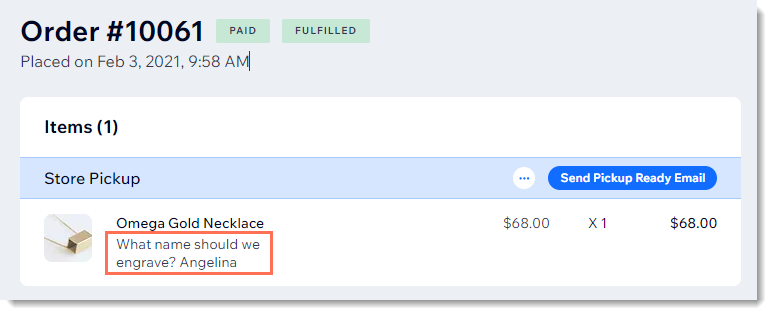
Screenshot of a store order in the Wix dashboard with a customer's message outlined

Need A Professional Website?
Contact Us 
Today!

Accepting Payments: An Overview

Third-Party App: Adobe Express for Wix by Adobe

Third-Party App: Image Zoom by Widgetic

Third-Party App: Calculator Builder by Lumifish LABS

Third-Party App: Blocky IP & Country Blocker by Effective Apps

Third-Party Apps: Design Elements Apps

Third-Party App: Google Reviews by Elfsight

Third-Party App: Customer Reviews by Write a Customer Review

Third-Party App: Contact Management/CRM by vcita Inc.

Third-Party App: 123 Form Builder & Payments by 123FormBuilder

Third-Party Apps: Communications Apps

Third-Party App: Cookiebot™ for Wix by Usercentrics

Recommended Apps for Musicians

Third-Party App: Weglot Translate by Weglot

Third-Party Apps: Media and Content Apps

Third-Party App: Boom Event Calendar by BoomTech

Third-Party App: Cap Rate Calculator by Allioo.com

Third-Party App: Nash: All-in-1 Local Delivery by Nash Technologies Inc

Third-Party Apps: Hotel & Airbnbs Map

Third-Party App: Events Calendar by inlight Labs

Third-Party Apps: Services and Events Apps

Third-Party App: Mailchimp by Intuit Mailchimp

Third-Party App: ReConvert Upsell and Cross Sell by ReConvert

Third-Party App: Visitor Analytics by Visitor Analytics

Third-Party App: Site Booster by AppSharp

Third-Party App: rankingCoach SEO by rankingCoach

Third-Party App: Rabbit SEO by SEO Tools

Third-Party App: Mailchimp Integration by PoCo

Third-Party App: Mailchimp Forms by MailMunch

Third-Party App: GetTraffic by Infolinks Media

wix experts
Graphic2Traffic web design
©
bottom of page