top of page

Setting up shipping & fulfillment

Wix Stores: About Delivery to Pickup Points

Offer customers the convenience of collecting their orders from pickup points nearby.

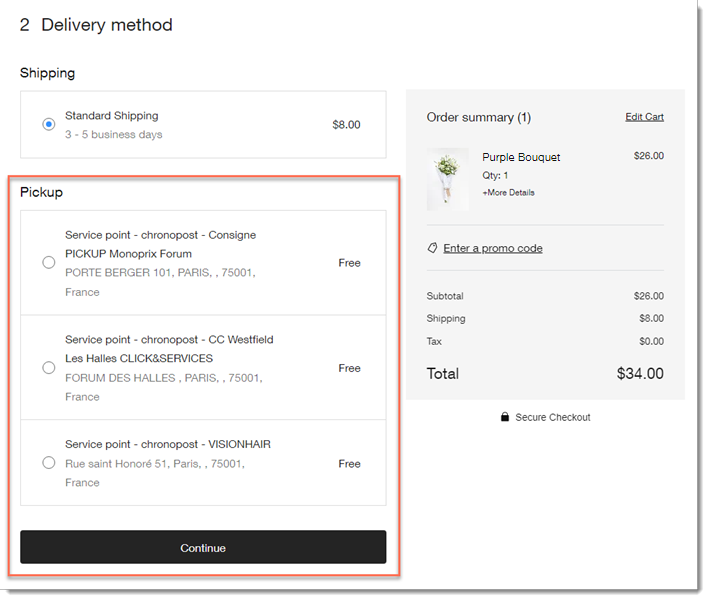
During checkout, the customer enters their address. Then, when they select how they want their order shipped, they can see nearby pickup points.
Setting up delivery to pickup points

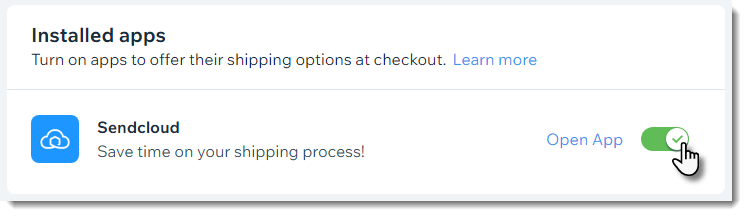
Shipping to pickup points is offered through 3rd-party apps - Boxtal or Sendcloud. After adding one of these apps and integrating it with your store, you can configure and enable it in relevant locations.
Then, when you receive an order, you send it to one of the relevant carriers' pickup points and they'll make sure it gets to the location your customer selected.

Available pickup point apps

You can integrate your store with any of the following third-party shipping apps to offer delivery to pickup points:

  • Pickup Points via BoxtalAvailable to merchants in France

    Delivers to pickup points in the following regions:Belgium
    France
    Italy
    Germany
    Luxembourg
    Netherlands
    Portugal
    Spain
    Sweden
    United Kingdom

  • Pickup Points via Sendcloud -
    Sendcloud is available to merchants located in the following countries:Andorra
    Austria
    Belgium
    Denmark
    France
    Germany
    Great Britain
    Italy
    Luxembourg
    Monaco
    Netherlands
    Portugal
    Spain

    Pickup Point via ColissimoFrance

Need A Professional Website?
Contact Us 
Today!

Receiving Your Payouts from Wix Payments

Wix Payments: Receiving Your First Payout

Wix Payments: Viewing Your Payouts

Managing Business Owners in Wix Payments

Wix Payments: Updating Your Account Settings

Wix Payments: Understanding the Status of Your Account

Wix Payments: Accessing Your Account Dashboard

Wix Payments: Troubleshooting Site Access Issues

Wix Payments: Adding Klarna as a Payment Method

Wix Payments: Adding Affirm as a Payment Method

Wix Payments: Adding Afterpay as a Payment Method

Wix Payments: Assigning Payments Roles

Wix Payments: Adding Tap to Pay on Mobile as a Payment Method

Wix Payments: Adding Google Pay as a Payment Method

Wix Payments: Enabling Point of Sale (POS)

Wix Payments: Adding Apple Pay as a Payment Method

Wix Payments Terms of Service

Wix Payments: Service Fees

Customizing Your Wix Payments Statement Descriptor

Wix Payments: Ensuring Your Business is Ready for Sales

Best Practices for Merchants Using Wix Payments

Wix Payments: Prohibited Products and Services

Wix Payments: Guidelines for Uploading Documentation

Wix Payments: Verifying Your Employer Identification Number (EIN)

Adding Business Owners to Your Wix Payments Account

Wix Payments: The Difference Between Account Types

Wix Payments Verification Process

Completing Your Wix Payments Account Setup

Switching to Wix Payments

Wix Payments: Creating an Account

wix experts
Graphic2Traffic web design
©
bottom of page