top of page

Managing Retail POS staff and reports

Wix Retail POS: Viewing Your Sales Report

Important:

  • This article is about Wix Retail POS tablet for brick & mortar businesses.

  • For info on using POS on a mobile device, click here.

Access your sales report to get an overview of the day at your business. See details like the total amount collected in cash and credit, as well as any discounts and taxes you've applied.

To view your sales report:

  1. Open the POS tablet.

  2. Tap the Menu icon at the bottom left.

  3. Tap Reports.

  4. Tap Sales Reports.

  5. Select the dates you want to view at the top.

  6. (Optional) Print or email the report:Tap Print at the top right to print the report using your HP Receipt Printer.
    Tap Email at the top right and enter the email address the report should be sent to.
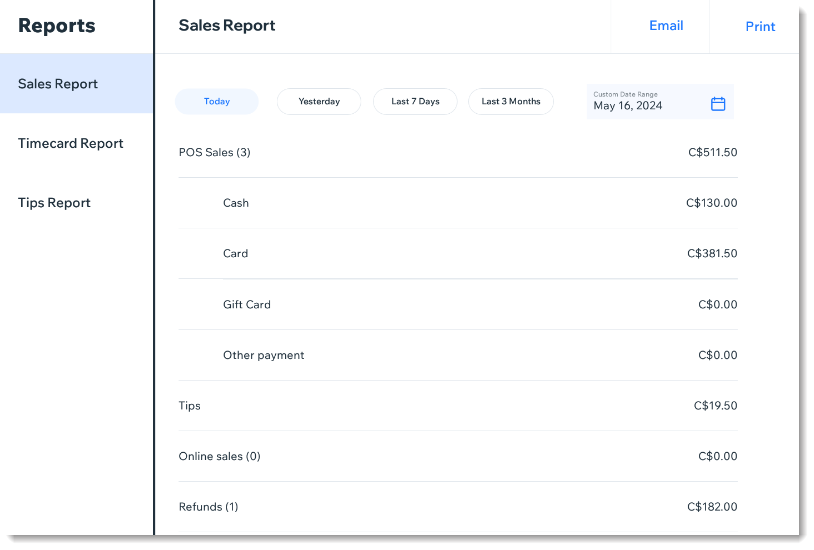
Screenshot of a sales report in the Wix Retail POS tablet

Tip:

Go to Wix Analytics reports in the Wix dashboard to view reports on sales by employee, sales by channel and more.

Need A Professional Website?
Contact Us 
Today!

Connecting 2Checkout as a Payment Provider

Requesting Additional Payment Providers & Methods

Using a Different Account with the Same Payment Provider

Wix Payments: About Chargeback Fees

Wix Payments: About Suspicious Payments

Wix Payments: About the 'Liability Shift'

About Reserve Funds in Your Wix Payments Account

Wix Payments: Covering a Negative Balance

Adding Funds to Cover Refunds in Your Wix Payments Account

Wix Payments: Failed Payout

Working with Grouped Payment Methods in Wix Payments

Webinar: Chargebacks - Best Practices, Expert Tips & Tools

Wix Payments: Getting a 1099-K Form

Wix Payments: PCI Compliance

Wix Payments: Account Has Been Closed

Wix Payments: Pandemic Driven Sales Rules

Accessing the Wix Payments Dashboard After Disconnecting Your Account

Connecting Giropay as a Payment Method (Through Wix Payments)

Wix Payments: Adding iDeal as a Payment Method

Connecting Pay Now by Klarna as a Payment Method (Through Wix Payments)

Understanding Your Chargeback Ratio

Chargebacks in Wix Payments

Wix Payments: Declined Payment Due to Suspected Fraud

Wix Payments: Declined Payment Due to Suspected Fraud

Wix Payments: Transaction Declined Reasons

Wix Payments: Understanding Your Payments Table

Wix Payments: Refunding Customers

Wix Payments: Understanding Your Monthly Fees Invoice

Wix Payments: Viewing Your Settlement Report

Wix Payments: Changing Your Payout Schedule

wix experts
Graphic2Traffic web design
©
bottom of page