top of page

Setting up Retail POS sales

Wix Retail POS: Organizing Your Favorites Screen

Important:

  • This article is about Wix Retail POS tablet for brick & mortar stores.

  • For info on using POS on a mobile device, click here.

Make sure your most popular products, discounts, and more are easily accessible by adding them to your Favorites. Your Favorites screen can include:

  • Products

  • Product categories

  • Discounts

  • Gift cards

When you're processing a sale, you can tap the Favorites tab and then add one of these items to the sale.
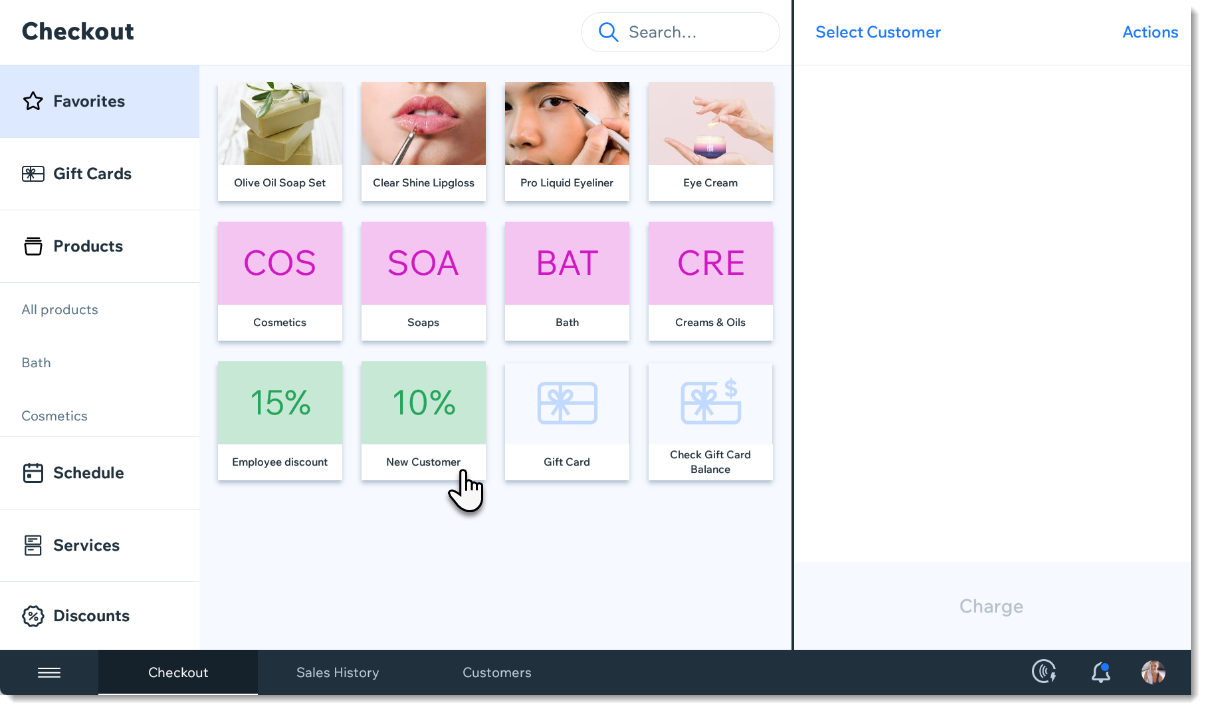
Screenshot of the Favorites tab in the checkout screen in the Wix Retail POS tablet

Adding items to your Favorites

  1. Open the POS tablet.

  2. Tap the Menu icon at the bottom left.

  3. Tap Settings.

  4. Tap Manage next to Favorites.

  5. Add an item to your Favorites.Tap the Add icon .
    Select Products, Categories, Discounts, or Gift Cards.
    Tap the item you want to add to your Favorites.

  6. (Optional) Drag items to reorder them.

  7. Tap Save.

FAQs

Click a question to learn more.

How can I remove an item from my Favorites?

To remove an item, go back to the Settings, tap Manage next to Favorites, then tap the X that appears in the top left corner of an item to delete it.

Screenshot of an item in the Favorites, in the Wix Retail POS system

Can I customize the color of the categories, discounts, and gift cards?

These colors cannot be customized.

Need A Professional Website?
Contact Us 
Today!

Accepting Payments: An Overview

Third-Party App: Adobe Express for Wix by Adobe

Third-Party App: Image Zoom by Widgetic

Third-Party App: Calculator Builder by Lumifish LABS

Third-Party App: Blocky IP & Country Blocker by Effective Apps

Third-Party Apps: Design Elements Apps

Third-Party App: Google Reviews by Elfsight

Third-Party App: Customer Reviews by Write a Customer Review

Third-Party App: Contact Management/CRM by vcita Inc.

Third-Party App: 123 Form Builder & Payments by 123FormBuilder

Third-Party Apps: Communications Apps

Third-Party App: Cookiebot™ for Wix by Usercentrics

Recommended Apps for Musicians

Third-Party App: Weglot Translate by Weglot

Third-Party Apps: Media and Content Apps

Third-Party App: Boom Event Calendar by BoomTech

Third-Party App: Cap Rate Calculator by Allioo.com

Third-Party App: Nash: All-in-1 Local Delivery by Nash Technologies Inc

Third-Party Apps: Hotel & Airbnbs Map

Third-Party App: Events Calendar by inlight Labs

Third-Party Apps: Services and Events Apps

Third-Party App: Mailchimp by Intuit Mailchimp

Third-Party App: ReConvert Upsell and Cross Sell by ReConvert

Third-Party App: Visitor Analytics by Visitor Analytics

Third-Party App: Site Booster by AppSharp

Third-Party App: rankingCoach SEO by rankingCoach

Third-Party App: Rabbit SEO by SEO Tools

Third-Party App: Mailchimp Integration by PoCo

Third-Party App: Mailchimp Forms by MailMunch

Third-Party App: GetTraffic by Infolinks Media

wix experts
Graphic2Traffic web design
©
bottom of page