top of page

Managing your Store in Retail POS

Wix Retail POS: Creating Product Categories

Important:

  • This article is about Wix Retail POS tablet for brick & mortar businesses.

  • For info on using POS on a mobile device, click here.

Using product categories, you can organize your store products to help you locate them more quickly at your point of sale.

Note:

Product categories were previously called product collections.

All your products are automatically added to the "All Products" category. You can also add products to other categories so that they appear in more than one category. For example, if you have a pet shop, you can create a "Dog" category and a "Cat" category, that contain dog and cat food respectively. You can also create a general "Pet Food" category that includes the same products that are in the other categories.
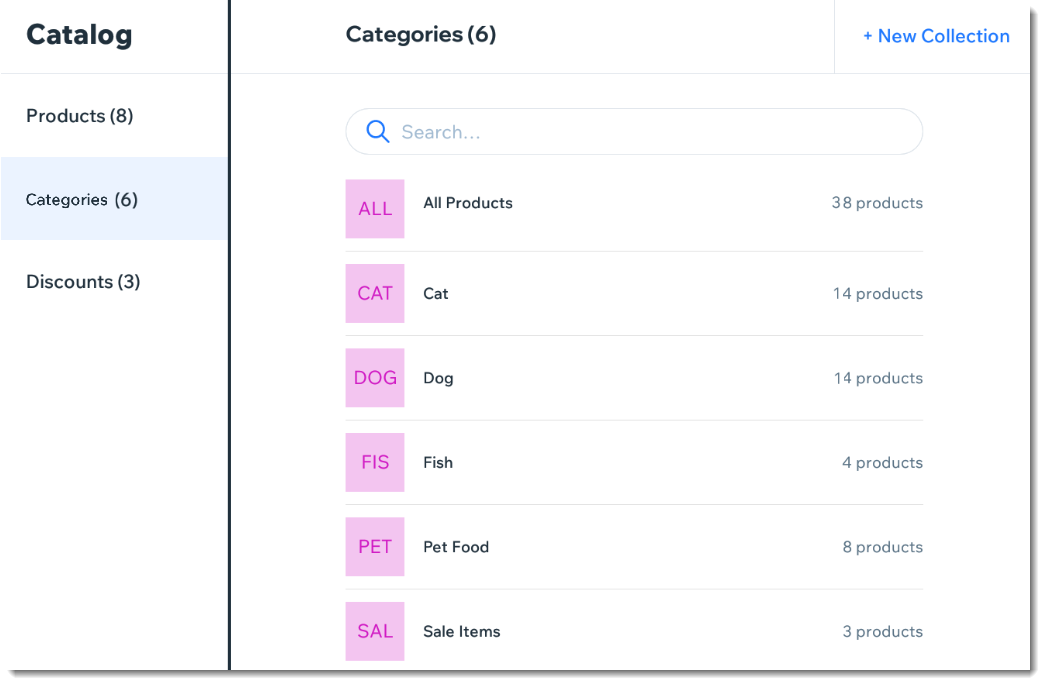
Screenshot of the Categories page in the Wix Retail POS tablet

Note:

Any product categories you create on the POS tablet also appear in your dashboard on desktop and vice versa. You can use categories in your live site to display different types of products on different pages.

To create a product category:

  1. Open the POS tablet.

  2. Tap the Menu icon  at the bottom left.

  3. Tap Catalog.

  4. Tap Categories.

  5. Tap + New Category.

  6. Enter a name for your category and tap Save.

  7. Add products to your new category:Tap Add Products.
    Select the checkboxes next to the products you want to add.
    Note: You can use the search bar to find specific products.
    Tap Add.

Notes:

  • To delete a product category, select the category and tap Delete at the top right. Deleting a category does not delete the products.

  • To remove a product from a category, tap the Remove iconnext to the product.

Need A Professional Website?
Contact Us 
Today!

Connecting PayU India as a Payment Provider

Connecting Paystack as a Payment Provider

Connecting Oceanpayment as a Payment Provider

Connecting DPO Group as a Payment Provider

Connecting Peach Payments as a Payment Provider

Connecting Portmone as a Payment Method

Connecting PayU as a Payment Provider

Connecting Bancontact as a Payment Method (Through Stripe)

Connecting KOMOJU as a Payment Provider

Connecting iyzico as a Payment Method

Connecting GMO-Epsilon as a Payment Provider

Connecting Privat24 as a Payment Method (Through Interkassa)

Connecting UniPAY Georgia as a Payment Provider

Connecting SumUp as a Payment Provider

Connecting YooKassa (YooMoney) as a Payment Provider

Connecting Square as a Payment Provider

Connecting Stripe as a Payment Provider

Connecting Online Bank Transfer by Klarna as a Payment Method (Through Stripe)

Connecting PayPal as a Payment Provider

Connecting Pay-Easy or Convenience Stores as a Payment Method (Through GMO)

Connecting PagueloFacil as a Payment Provider

Connecting PagSeguro as a Payment Provider

Connecting Mercado Pago as a Payment Provider

Connecting Max as a Payment Provider

Connecting Isracard Powered by PayMe as a Payment Provider

Connecting iDeal as a Payment Method (Through Stripe)

Connecting Fat Zebra as a Payment Provider

Connecting Eway as a Payment Provider

Connecting Braintree as a Payment Provider

Connecting AliPay as a Payment Method (Through Stripe)

wix experts
Graphic2Traffic web design
©
bottom of page