top of page

Taking online orders

Wix Restaurants: Using Wix Restaurants to Offer Catering Services

Important:

Catering services are services that customers can order in advance for a specific date and time. You can offer catering using the Wix Restaurants online ordering feature. You'll just have to make a few updates to the pickup and delivery settings, and set how far in advance customers can place their orders.

Before you begin:

Make sure you've already set up online ordering for your restaurant site.

To offer catering services using Wix Restaurants:

  1. Go to Order Settings in your site's dashboard.

  2. Click the Pickup tab.Set the pickup time for 0 minutes.
    Click Save at the top right.

  3. Click the Delivery tab.Click into each delivery area to edit them.
    Set the Maximum Delivery Time to 0 minutes.
    Click Save at the top right.

  4. Click the Order scheduling tab.Click the Scheduled orders toggle to enable it and set how far in advance customers can place orders:
    Minimum time: Enter a number and select Minutes, Hours or Days from the drop-down list.
    Note: This is the minimum time customers can place a future order in advance.
    Maximum time: Enter a maximum number and select Minutes, Hours or Days from the drop-down list.
    Note: This is the maximum time customers can place a future order in advance.
    Disable the ASAP toggle.
    Click Save at the top right.
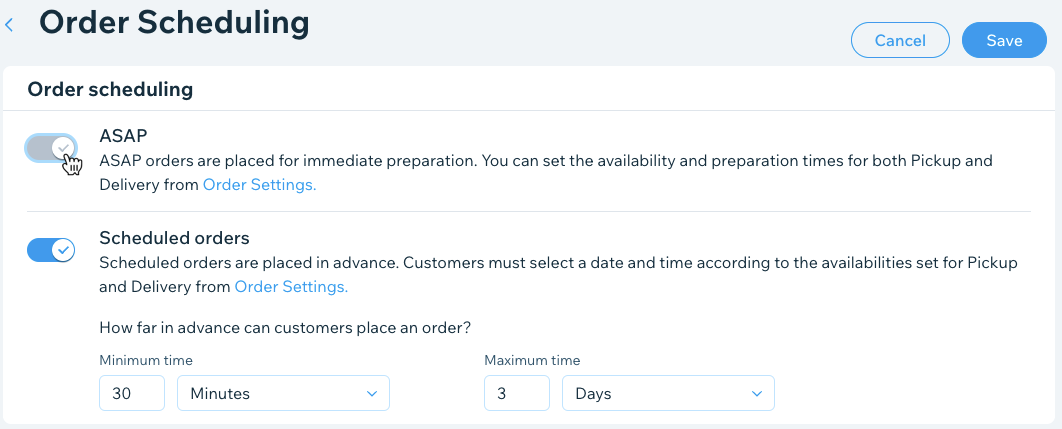
A screenshot of toggling of ASAP orders in order scheduling.

Need A Professional Website?
Contact Us 
Today!

Wix Stores: Customizing the New Product Page

Wix Stores: Adding and Optimizing a Search Box for Stores

Wix Stores: Displaying Available Payment Methods on Your Live Site

Wix Stores: Hiding Product Prices

Wix Stores: Setting How Store Images Are Displayed

Wix Stores: Adding and Setting Up a Wishlist

Wix Stores: Customizing Your Product Page

Wix Stores: Adding and Setting Up an 'Add to Cart' Button

Wix Stores: Adding and Setting Up the Product Widget

Wix Stores: Adding and Setting Up a Currency Converter

Wix Stores: Setting How Customers View More Products in Your Product Gallery

Wix Stores: Customizing the Quick View in the Product Gallery

Wix Stores: Adding Filters and Sorting Options to Your Product Gallery

Wix Stores: Adding a Related Products Gallery

Wix Stores: Customizing Product Galleries

Wix Stores: Adding and Setting Up Product Galleries

Wix Stores: Adding Store Elements

Wix Stores: About Your Store Pages

Wix Stores: Designing Your Storefront

Wix Stores: Adding and Setting Up the Wix Checkout Requirements App

Wix Stores: Setting Up Tax

Wix Stores Troubleshooting: Customers Unable to Checkout from Your Store

Wix Stores: Letting Customers Pay in Installments

Wix Stores: Setting a Minimum Order Amount

Wix Stores: Customer Checkout with Apple Pay or Google Pay

Wix Stores: Understanding Customer Checkout with PayPal

Wix Stores: Accessing the Payment Setup

Wix Stores: Printing Shipping Labels with the Shippo 3rd-Party-App

Wix Stores: Offering Delivery to Pickup Points with ShipStation

Wix Stores: Handling Orders with Amazon MCF

wix experts
Graphic2Traffic web design
©
bottom of page