top of page

Creating your Wix Restaurants menu

Wix Restaurants: Deleting the Menus by Wix Restaurants App

Important:

This article is about the original Wix Restaurants Menus App. Try out our new menu app. Learn how to add and set up Wix Restaurants Menus (New) app.

Menus by Wix Restaurants is a full-page app, therefore in order to delete the app, you must delete the page itself from your site's Editor.

Important:

When you delete your Menus app, any menus and orders associated with it will be permanently deleted.

Wix Editor

Editor X

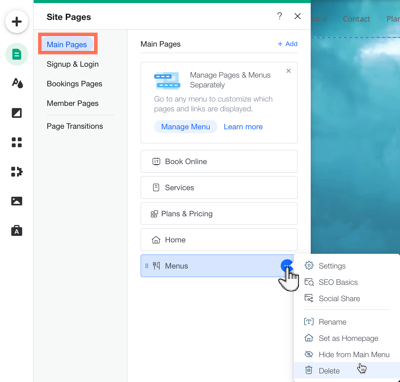
  1. Click the Pages iconon the left side of the Editor.

  2. Click Main Pages.

  3. Hover over the Menus page and click the More Actions icon .

  4. Click Delete.

  5. Click Delete to confirm.

A screenshot of clicking the more actions over menus in your editor.

Need A Professional Website?
Contact Us 
Today!

Online Programs: Managing Your Sections and Steps

Online Programs: Adding Sections and Steps to Your Program

Online Programs: Editing Your Program Settings

Online Programs: Creating a New Program

Online Programs: Adding and Setting Up Online Programs

Online Programs: An Overview

Wix Art Store: Available Print Sizes

Wix Art Store: Order A Print Product Availability

Wix Art Store: Printing and Shipping Issues in the Wix Art Store

Wix Art Store: Image Quality Web Ready vs. Original File

Wix Art Store: Test Ordering Your Printed Merchandise in Wix Art Store

Wix Art Store: Creating Special Offers in Your Art Store

Wix Art Store: Setting Up Wix Art Store to Sell Digital Images

Wix Art Store: Setting Up Wix Art Store to Sell Digital Images and Prints

Wix Art Store: Withdrawing Your Earnings in the Wix Art Store

Wix Art Store: Changing Your Currency in Wix Art Store

Wix Art Store: Setting Prices in Your Wix Art Store

Wix Art Store: Choosing What Types of Files to Sell

Wix Art Store: No Longer Available in the App Market

Wix Art Store: About the Wix Art Store

Wix Photo Albums: Reordering the Products in Your Photo Album Store

Wix Photo Albums: Editing the 'Buy Now' Button

Wix Photo Albums: Viewing Available Print Sizes

Wix Photo Albums: Adding Watermarks to Your Photos

Wix Photo Albums: Setting Prices in the Wix Photo Albums Store

Wix Photo Albums: Withdrawing Your Earnings in the Wix Photo Albums Store

Wix Photo Albums: Test Ordering Your Printed Merchandise in the Wix Photo Album Store

Wix Photo Albums: Store Image Quality Web Ready vs. Original File

Wix Photo Albums: Selecting a Payment Method in Wix Photo Albums Store

Wix Photo Albums: Changing Your Currency in the Wix Photo Albums Store

wix experts
Graphic2Traffic web design
©
bottom of page