top of page

Taking online orders

Wix Restaurants: Allowing Customers to Add a Tip to an Order

Important:

Make payments easier for customers with a good checkout experience by allowing them to add a tip to their credit card when paying. You can customize the default tip options and allow customers to leave a tip in their requested amount.
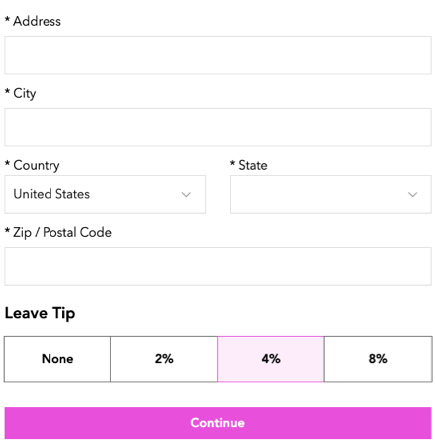
A screenshot of how customers can leave a tip.

Before you begin:

Verify that you have set up your payment methods in your payment settings. Tips don't work with manual/offline payments.

To allow customers to add a tip:

  1. Go to Order Settings in your site's dashboard.

  2. Click the Advanced tab at the bottom.

  3. Enable the Tips toggle to allow customers to leave a tip when placing an order.
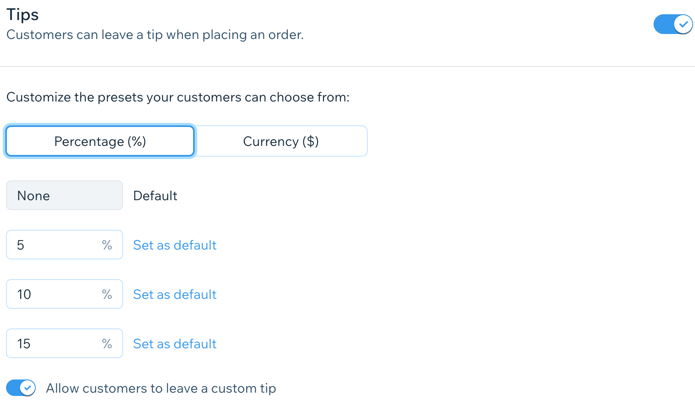
A screenshot of setting up tips.

  1. (Optional) Customize the preset tip options:Click to select a default unit for the tip (Percentage or Currency).
    Enter 3 different values for the preset tip in the text fields.
    Note: You can click Set as default by one of the preset amounts to select it as the default for tips.

  2. Enable the Allow customers to leave a custom tip toggle to allow customers to leave a tip in their desired amount.

  3. Click Save.

Need A Professional Website?
Contact Us 
Today!

Deleting Wix Hotels

Renting Multiple Properties in Different Locations

Adding Languages in Wix Hotels

Setting the Minimum and Maximum Nights in Wix Hotels

Changing Your Notification Email Address in Wix Hotels

Adding Your Hotels Policies

Adding and Managing Room Types in Wix Hotels

Renting Apartments Using Wix Hotels

Accessing Your Wix Hotels Dashboard

Adding and Setting Up Wix Hotels

About Wix Hotels

Music Apps: Adding and Setting Up an iTunes button

Music Apps: Adding and Setting Up a SoundCloud Player

Music Apps: Adding and Setting Up Your Spotify Player

Music Apps: Adding and Setting Up the Bandsintown App

Wix Podcast Player: General Troubleshooting

Wix Podcast Player: Adding and Setting Up the Wix Podcast Player

Wix Audio Player: Adding and Setting Up the Wix Audio Player

Wix Music: Allowing Fans to Download Your Music

Wix Music: Adding Links to Other Music Platforms

Wix Music: Allowing Your Fans to Name Their Price When Purchasing Your Music

About the Wix Audio Player

Wix Music: Setting Up Sales Notifications

Wix Music: Promoting Your Music using a Subscribe Form

Wix Music: Setting Up Your Payment Methods

Wix Music: Changing Your Currency

Wix Music: Viewing Your Transactions

Wix Music: Selling Your Music

Wix Music: Promoting Your Music With Email Campaigns

Wix Music: Displaying a 30 Second Preview of a Music Track

wix experts
Graphic2Traffic web design
©
bottom of page