top of page

Taking online orders

Wix Restaurants: Allowing Customers to Add a Tip to an Order

Important:

Make payments easier for customers with a good checkout experience by allowing them to add a tip to their credit card when paying. You can customize the default tip options and allow customers to leave a tip in their requested amount.
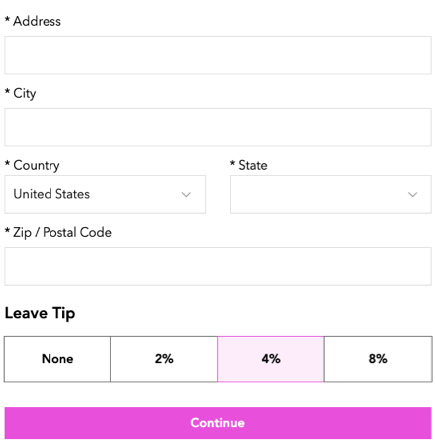
A screenshot of how customers can leave a tip.

Before you begin:

Verify that you have set up your payment methods in your payment settings. Tips don't work with manual/offline payments.

To allow customers to add a tip:

  1. Go to Order Settings in your site's dashboard.

  2. Click the Advanced tab at the bottom.

  3. Enable the Tips toggle to allow customers to leave a tip when placing an order.
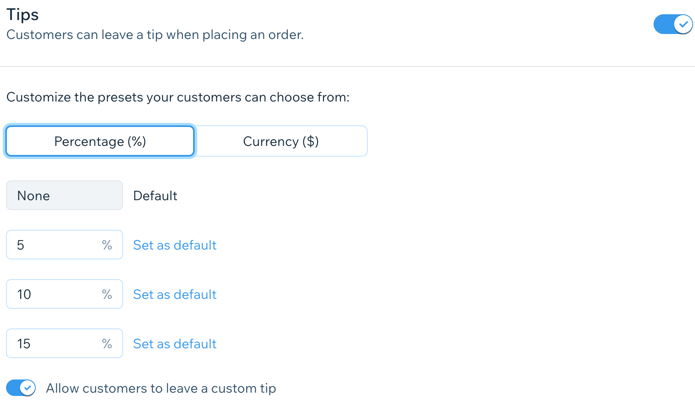
A screenshot of setting up tips.

  1. (Optional) Customize the preset tip options:Click to select a default unit for the tip (Percentage or Currency).
    Enter 3 different values for the preset tip in the text fields.
    Note: You can click Set as default by one of the preset amounts to select it as the default for tips.

  2. Enable the Allow customers to leave a custom tip toggle to allow customers to leave a tip in their desired amount.

  3. Click Save.

Need A Professional Website?
Contact Us 
Today!

Connecting PayU India as a Payment Provider

Connecting Paystack as a Payment Provider

Connecting Oceanpayment as a Payment Provider

Connecting DPO Group as a Payment Provider

Connecting Peach Payments as a Payment Provider

Connecting Portmone as a Payment Method

Connecting PayU as a Payment Provider

Connecting Bancontact as a Payment Method (Through Stripe)

Connecting KOMOJU as a Payment Provider

Connecting iyzico as a Payment Method

Connecting GMO-Epsilon as a Payment Provider

Connecting Privat24 as a Payment Method (Through Interkassa)

Connecting UniPAY Georgia as a Payment Provider

Connecting SumUp as a Payment Provider

Connecting YooKassa (YooMoney) as a Payment Provider

Connecting Square as a Payment Provider

Connecting Stripe as a Payment Provider

Connecting Online Bank Transfer by Klarna as a Payment Method (Through Stripe)

Connecting PayPal as a Payment Provider

Connecting Pay-Easy or Convenience Stores as a Payment Method (Through GMO)

Connecting PagueloFacil as a Payment Provider

Connecting PagSeguro as a Payment Provider

Connecting Mercado Pago as a Payment Provider

Connecting Max as a Payment Provider

Connecting Isracard Powered by PayMe as a Payment Provider

Connecting iDeal as a Payment Method (Through Stripe)

Connecting Fat Zebra as a Payment Provider

Connecting Eway as a Payment Provider

Connecting Braintree as a Payment Provider

Connecting AliPay as a Payment Method (Through Stripe)

wix experts
Graphic2Traffic web design
©
bottom of page