top of page

Sending invoices & price quotes

Wix Price Quotes: Converting Price Quotes into Invoices

Price Quotes is closely connected to Wix Invoices. After a client accepts your price quote, you can convert it into an invoice to receive the payment. All the information from the quote will automatically be included in the invoice.

Enabling automatic conversion to invoices

By default, price quotes do not automatically convert to invoices when they are accepted. You can choose to enable the auto-conversion so that your price quotes are automatically turned into invoices when they're accepted.

To enable auto-conversion:

  1. Go to Settings in your site's dashboard.

  2. Click Getting Paid Settings.

  3. Click Price Quotes.

  4. Enable the Convert accepted quotes toggle.
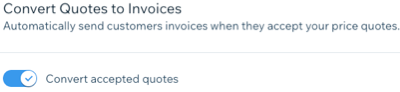
A sccrenshot showing the convert accepted quotes toggle in price quotes under getting paid settings in the dashboard.

Manually converting a price quote to an invoice

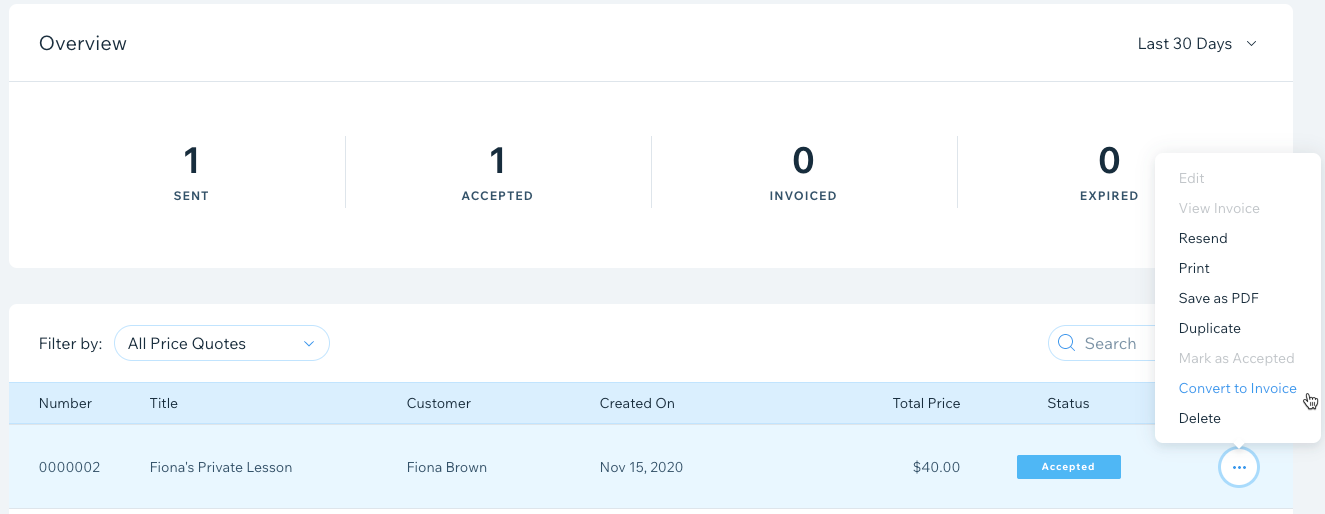
If auto-conversion is disabled, follow the steps below to convert a price quote into an invoice automatically.

To manually convert a price quote into an invoice:

  1. Go to Price Quotes in your site's dashboard.

  2. Click the More Actions icon  next to the price quote you want to convert.

  3. Click Convert to Invoice.

A screenshot showing how to manually convert a price quote to an invoice in the dashboard.

  1. Click Convert to confirm.

Need A Professional Website?
Contact Us 
Today!

Connecting 2Checkout as a Payment Provider

Requesting Additional Payment Providers & Methods

Using a Different Account with the Same Payment Provider

Wix Payments: About Chargeback Fees

Wix Payments: About Suspicious Payments

Wix Payments: About the 'Liability Shift'

About Reserve Funds in Your Wix Payments Account

Wix Payments: Covering a Negative Balance

Adding Funds to Cover Refunds in Your Wix Payments Account

Wix Payments: Failed Payout

Working with Grouped Payment Methods in Wix Payments

Webinar: Chargebacks - Best Practices, Expert Tips & Tools

Wix Payments: Getting a 1099-K Form

Wix Payments: PCI Compliance

Wix Payments: Account Has Been Closed

Wix Payments: Pandemic Driven Sales Rules

Accessing the Wix Payments Dashboard After Disconnecting Your Account

Connecting Giropay as a Payment Method (Through Wix Payments)

Wix Payments: Adding iDeal as a Payment Method

Connecting Pay Now by Klarna as a Payment Method (Through Wix Payments)

Understanding Your Chargeback Ratio

Chargebacks in Wix Payments

Wix Payments: Declined Payment Due to Suspected Fraud

Wix Payments: Declined Payment Due to Suspected Fraud

Wix Payments: Transaction Declined Reasons

Wix Payments: Understanding Your Payments Table

Wix Payments: Refunding Customers

Wix Payments: Understanding Your Monthly Fees Invoice

Wix Payments: Viewing Your Settlement Report

Wix Payments: Changing Your Payout Schedule

wix experts
Graphic2Traffic web design
©
bottom of page