top of page

Setting up Photo Albums

Wix Photo Albums: Publishing Your Album

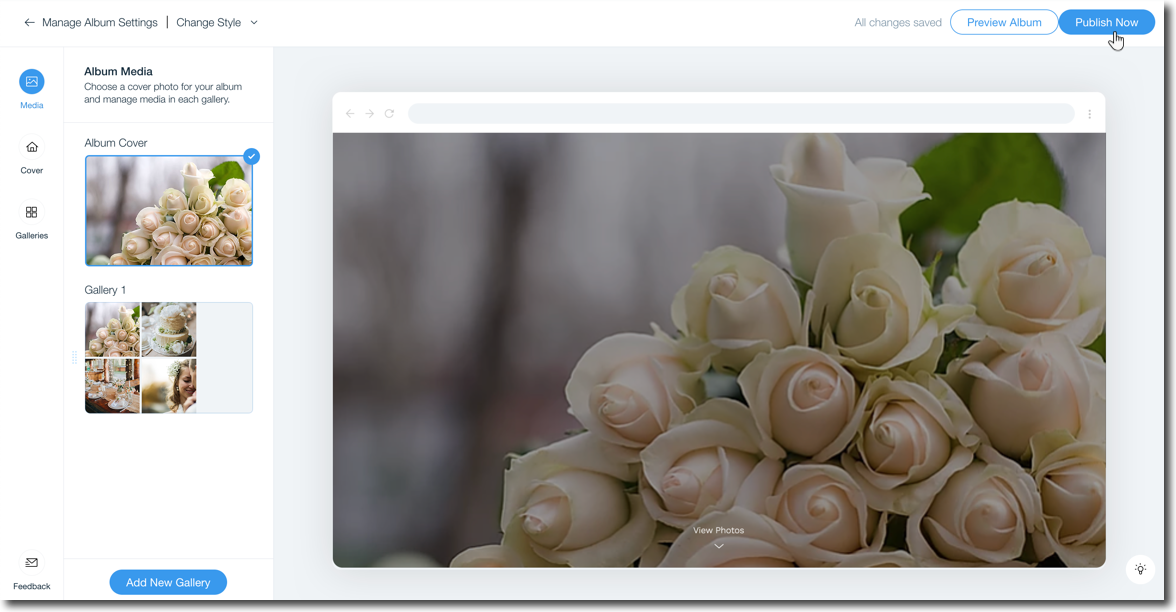
Once you're finished creating and editing your photo album, go ahead and publish it to make it live. Make sure to review your album name before publishing. The name is used in your album's URL which is a subdomain of your site's domain.

In this article, learn more about:

Publishing your photo album

Ready to go live with your latest photo album? You can publish the album directly from your album editor.

To publish your photo album:

  1. Go to Photo Albums in your site's dashboard.

  2. Click Edit next to the relevant album.

  3. Click Publish Now at the top right.

A screenshot showing the option to publish your album in the album editor.

FAQs

Click a question below to learn more about publishing your photo album.

What blockers might I face when trying to publish my album?

You cannot publish your album if:

  • You have not made any changes since the last time you published.

  • You did not upload any of your own photos.

  • You are not the owner of the site (if you are a site collaborator).

Can I unpublish an album I no longer need?

No, it is not possible to unpublish a photo album. You can only hide or delete the album.

I made changes to my URL, does it take long to update?

It can take up to 24 hours for the live URL to update to include your domain.

My domain is connected to Wix via Pointing, can I connect a subdomain?

Subdomains cannot be connected to a domain that is connected to Wix via Pointing. Learn how to switch your domain connection method.

Why do I have a Wix Promo banner on my album?

Photo Albums published to free sites without a custom domain or premium plan will display a Wix promo banner at the top similar to other site pages

Need A Professional Website?
Contact Us 
Today!

Wix Stores: Setting Up Amazon Multi-Channel Fulfillment

Wix Stores: Offering Delivery to Pickup Points with Sendcloud

Wix Stores: Offering Delivery to Pickup Points with Boxtal

Wix Stores: About Delivery to Pickup Points

Wix Stores: Integrating with PrettyDamnQuick Logistics

Wix Stores: Offering Real Time Shipping Rates via Third-Party Apps

Wix Stores: Deleting or Deactivating a Shipping Rule

Wix Stores: Fulfilling Orders with the ShipBob Fulfillment Service

Wix Stores: Sending Orders by Email to Fulfillers

Wix Stores: Understanding Order Fulfillment

Wix Stores: Integrating with Envia

Wix Stores: Integrating with Melhor Envio

Wix Stores: Integrating with Boxtal

Wix Stores: Printing Shipping Labels with Wix Shipping

Wix Stores: Shipping Orders Using ShipStation

Wix Stores: Integrating with ShipStation

Wix Stores: Fulfilling Subscriptions

Wix Stores: About Shipping Labels

Wix Stores: Adding a Handling Fee

Wix Stores: Setting Up Local Delivery

Wix Stores: Setting Up Store Pickup as a Delivery Option

Wix Stores: Real Time Correios Shipping Calculation with Meu Frete

Wix Stores: Backup Shipping Rates for Real Time Shipping Calculations with USPS

Wix Stores: Setting Up Real Time Shipping Calculation with USPS

Wix Stores: Setting Up Free Shipping Above a Set Price

Wix Stores: Setting Up Shipping Rate By Product

Wix Stores: Setting Up Free Shipping

Wix Stores: Setting Up Shipping By Price

Wix Stores: Setting Up Shipping By Weight

Wix Stores: Setting Up a Flat Rate Shipping Rule

wix experts
Graphic2Traffic web design
©
bottom of page