top of page

Selling and promoting your music

Wix Music: Setting Up Your Payment Methods

Your fans can buy your music in Wix Music and Wix does not charge a cent.

Important:

  • Set up your payment methods by following the steps below before selling your music.

  • The album should not be edited after a purchase is made as this can cause an error with the download link.

To set up your payments:

  1. Go to Accept Payments in your site's dashboard.

  2. Set up the payment methods you want to use.

To change your currency:

  1. Go to Music Library in your site's dashboard.

  2. Hover over the relevant single/album/playlist and click the More Actions icon.

  3. Click Edit.

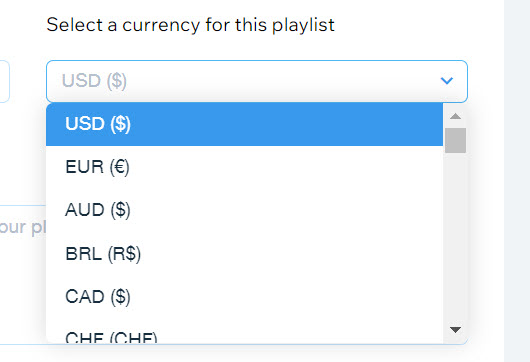
  4. Click the drop-down under Select a currency for this playlist.

  5. Select a currency.

  6. Click Save.

A screenshot of the currency selection drop-down menu.

Notes:

  • Currently, the following payment processors are not supported with Wix Music:pagueloFacil
    Isracard
    Offline.

  • For Wix Payments, there is a minimum amount of $1 per transaction. Make sure your release/track/album's price is over $1 if you're using this payment processor.

Need A Professional Website?
Contact Us 
Today!

Wix Hotels by HotelRunner: Connecting Booking.com to Your Site

Wix Hotels by Hotelrunner: Changing the ‘Room’ Text on Your Site

Wix Hotels by HotelRunner: Adding Room Types

Wix Hotels by HotelRunner: Creating and Managing Your Tax Categories

Wix Hotels by HotelRunner: Troubleshooting "There Are No Available Rooms" Error

Wix Hotels by HotelRunner: Switching to the New Wix Hotels

Wix Hotels by HotelRunner: Customizing Your Email Templates

Wix Hotels by HotelRunner: Managing Your Reservation Settings

Wix Hotels by HotelRunner: Managing Your Reservations

Wix Hotels by HotelRunner: Managing Your Site Languages

Wix Hotels by HotelRunner: Making Bulk Updates

Wix Hotels by HotelRunner: Setting Your Open Seasons, Pricing and General Info

Wix Hotels by HotelRunner: Managing Prices and Availability with the Inventory Calendar

Wix Hotels by HotelRunner: Creating and Managing Your Cancellation and Deposit Policies

Wix Hotels by HotelRunner: Creating and Managing Your Rate Plans

Wix Hotels by HotelRunner: Adding and Setting up Your Hotel

Wix Hotels by HotelRunner: An Overview

Removing Imported Reservations from Your Wix Hotels Reservation Calendar

Troubleshooting the Wix Hotels Channel Manager

Disconnecting a Channel in the Channel Manager (HotelRunner)

Importing Reservations from an External Calendar (iCal) to Wix Hotels

Exporting Your Reservations from Wix Hotels

Wix Hotels Channel Manager Fees

Checklist for Connecting Wix Hotels to the Channel Manager (HotelRunner)

Connecting Your Hotel to Booking Channels Using the Channel Manager

Connecting Wix Hotels with External Services

Wix Hotels: About the Channel Manager

About the Wix Hotels Checkout Process

Managing Wix Hotels Reservations from the Wix App

Changing the Status of a Hotel Reservation in Wix Hotels

wix experts
Graphic2Traffic web design
©
bottom of page