top of page

Selling and promoting your music

Wix Music: Setting Up Your Payment Methods

Your fans can buy your music in Wix Music and Wix does not charge a cent.

Important:

  • Set up your payment methods by following the steps below before selling your music.

  • The album should not be edited after a purchase is made as this can cause an error with the download link.

To set up your payments:

  1. Go to Accept Payments in your site's dashboard.

  2. Set up the payment methods you want to use.

To change your currency:

  1. Go to Music Library in your site's dashboard.

  2. Hover over the relevant single/album/playlist and click the More Actions icon.

  3. Click Edit.

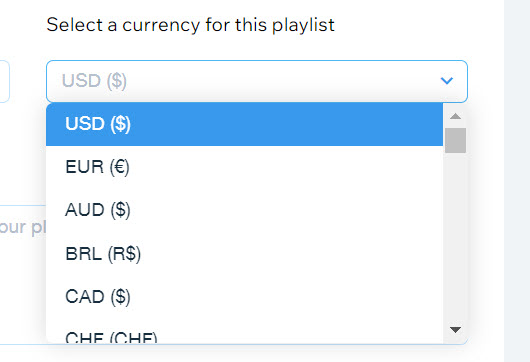
  4. Click the drop-down under Select a currency for this playlist.

  5. Select a currency.

  6. Click Save.

A screenshot of the currency selection drop-down menu.

Notes:

  • Currently, the following payment processors are not supported with Wix Music:pagueloFacil
    Isracard
    Offline.

  • For Wix Payments, there is a minimum amount of $1 per transaction. Make sure your release/track/album's price is over $1 if you're using this payment processor.

Need A Professional Website?
Contact Us 
Today!

Accepting Payments: An Overview

Third-Party App: Adobe Express for Wix by Adobe

Third-Party App: Image Zoom by Widgetic

Third-Party App: Calculator Builder by Lumifish LABS

Third-Party App: Blocky IP & Country Blocker by Effective Apps

Third-Party Apps: Design Elements Apps

Third-Party App: Google Reviews by Elfsight

Third-Party App: Customer Reviews by Write a Customer Review

Third-Party App: Contact Management/CRM by vcita Inc.

Third-Party App: 123 Form Builder & Payments by 123FormBuilder

Third-Party Apps: Communications Apps

Third-Party App: Cookiebot™ for Wix by Usercentrics

Recommended Apps for Musicians

Third-Party App: Weglot Translate by Weglot

Third-Party Apps: Media and Content Apps

Third-Party App: Boom Event Calendar by BoomTech

Third-Party App: Cap Rate Calculator by Allioo.com

Third-Party App: Nash: All-in-1 Local Delivery by Nash Technologies Inc

Third-Party Apps: Hotel & Airbnbs Map

Third-Party App: Events Calendar by inlight Labs

Third-Party Apps: Services and Events Apps

Third-Party App: Mailchimp by Intuit Mailchimp

Third-Party App: ReConvert Upsell and Cross Sell by ReConvert

Third-Party App: Visitor Analytics by Visitor Analytics

Third-Party App: Site Booster by AppSharp

Third-Party App: rankingCoach SEO by rankingCoach

Third-Party App: Rabbit SEO by SEO Tools

Third-Party App: Mailchimp Integration by PoCo

Third-Party App: Mailchimp Forms by MailMunch

Third-Party App: GetTraffic by Infolinks Media

wix experts
Graphic2Traffic web design
©
bottom of page