top of page

Wix Mobile POS

Wix Mobile POS: Collecting Tips

Important:

  • This article is about Wix Mobile POS for mobile phones.

  • For info on Wix Retail POS for brick and mortar stores, click here.

Let clients who want to leave a tip do so right in your Mobile POS. You can display preset tip percentages or allow customers to decide on the tip.
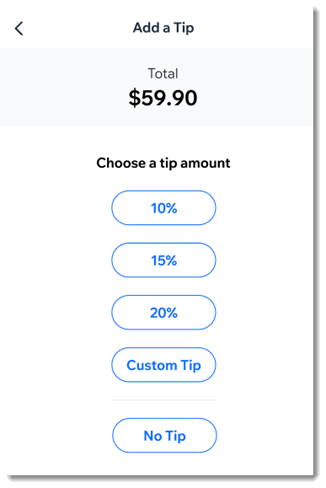
An example of the tip screen customers see on the mobile POS

After you enable tipping, you'll see the option to add a tip as part of the checkout.

Notes:

  • To collect tips, Wix Payments must be your payment provider.

  • It's not possible to collect tips for cash payment or when processing split payments.

  • Tips are available with Wix Stores, Wix Booking, and  Wix Restaurants Orders (New) .

To enable tipping:

  1. Go to your site in the Wix app.

  2. Tap Manage  at the bottom.

  3. Scroll down to the Get Paid section and tap Point of Sale.

  4. Tap the More Actions icon   at the top right.

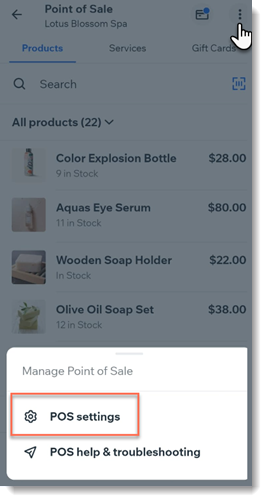
  5. Tap POS settings.
    Note: If you don't have the POS settings option, see the note below.

  6. Select Tips.

  7. Tap the Collect tips toggle to enable it.

  8. (Optional) Change the preset tip percentages:Tap the tip option you want to update.
    Enter a new percentage.

  9. (Optional) Tap the Allow a custom tip amount toggle to enable it.

  10. Tap Save.

Adding POS settings:

Normally, you should be able to access the POS Settings by clicking the More Actions icon  at the top right.
Screenshot of a Wix App point of sale page after clicking the More Actions button with POS settings outlined
If the settings aren't displayed, you can access them by adding Wix Stores to your site.
Note: Make sure you hide store pages from your live site.

Need A Professional Website?
Contact Us 
Today!

Wix Stores: Setting Up Amazon Multi-Channel Fulfillment

Wix Stores: Offering Delivery to Pickup Points with Sendcloud

Wix Stores: Offering Delivery to Pickup Points with Boxtal

Wix Stores: About Delivery to Pickup Points

Wix Stores: Integrating with PrettyDamnQuick Logistics

Wix Stores: Offering Real Time Shipping Rates via Third-Party Apps

Wix Stores: Deleting or Deactivating a Shipping Rule

Wix Stores: Fulfilling Orders with the ShipBob Fulfillment Service

Wix Stores: Sending Orders by Email to Fulfillers

Wix Stores: Understanding Order Fulfillment

Wix Stores: Integrating with Envia

Wix Stores: Integrating with Melhor Envio

Wix Stores: Integrating with Boxtal

Wix Stores: Printing Shipping Labels with Wix Shipping

Wix Stores: Shipping Orders Using ShipStation

Wix Stores: Integrating with ShipStation

Wix Stores: Fulfilling Subscriptions

Wix Stores: About Shipping Labels

Wix Stores: Adding a Handling Fee

Wix Stores: Setting Up Local Delivery

Wix Stores: Setting Up Store Pickup as a Delivery Option

Wix Stores: Real Time Correios Shipping Calculation with Meu Frete

Wix Stores: Backup Shipping Rates for Real Time Shipping Calculations with USPS

Wix Stores: Setting Up Real Time Shipping Calculation with USPS

Wix Stores: Setting Up Free Shipping Above a Set Price

Wix Stores: Setting Up Shipping Rate By Product

Wix Stores: Setting Up Free Shipping

Wix Stores: Setting Up Shipping By Price

Wix Stores: Setting Up Shipping By Weight

Wix Stores: Setting Up a Flat Rate Shipping Rule

wix experts
Graphic2Traffic web design
©
bottom of page