top of page

Wix Forms FAQ

Wix Forms: Creating a Coupon

Coupons are a great way to give people an incentive to purchase a product or service through your form. You can offer a discount either as a percentage off the total price or as a fixed monetary amount.

You can also choose whether a coupon applies for all your forms or specific ones, such as seasonal products or services.
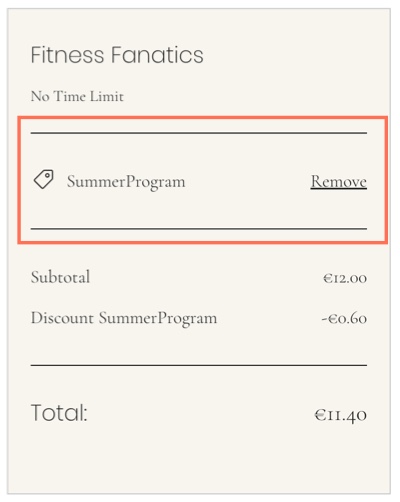
A screenshot of the applying a coupon code.

Before you begin:

Make sure to add a payment form to your site.

To create a coupon:

  1. Go to Coupons in your site's dashboard.

  2. Click New Coupon.

  3. Select the type of coupon you want to offer:$ Discount: Offer a fixed monetary discount amount.
    % Discount: Offer a percentage discount.

  4. Enter the Coupon code participants need to use the coupon.

  5. Enter the Coupon name for your own records.

  6. Enter the Discount you want to offer.

  7. Select the relevant form from the Apply to drop-down:All Forms: Participants can use the discount on all forms.
    Specific Forms: The discount is available on the forms you choose. Select the relevant form from the Form drop-down.

  8. Select the dates the coupon is valid between.

  9. (Optional) Select the Limit uses checkbox(s) to:Limit the total number of uses for this coupon: Set the number of times the coupon can be used.
    Limit to one use per customer: The same participant can't use the coupon more than once.

  10. Click Create Coupon.

Need A Professional Website?
Contact Us 
Today!

Connecting PayU India as a Payment Provider

Connecting Paystack as a Payment Provider

Connecting Oceanpayment as a Payment Provider

Connecting DPO Group as a Payment Provider

Connecting Peach Payments as a Payment Provider

Connecting Portmone as a Payment Method

Connecting PayU as a Payment Provider

Connecting Bancontact as a Payment Method (Through Stripe)

Connecting KOMOJU as a Payment Provider

Connecting iyzico as a Payment Method

Connecting GMO-Epsilon as a Payment Provider

Connecting Privat24 as a Payment Method (Through Interkassa)

Connecting UniPAY Georgia as a Payment Provider

Connecting SumUp as a Payment Provider

Connecting YooKassa (YooMoney) as a Payment Provider

Connecting Square as a Payment Provider

Connecting Stripe as a Payment Provider

Connecting Online Bank Transfer by Klarna as a Payment Method (Through Stripe)

Connecting PayPal as a Payment Provider

Connecting Pay-Easy or Convenience Stores as a Payment Method (Through GMO)

Connecting PagueloFacil as a Payment Provider

Connecting PagSeguro as a Payment Provider

Connecting Mercado Pago as a Payment Provider

Connecting Max as a Payment Provider

Connecting Isracard Powered by PayMe as a Payment Provider

Connecting iDeal as a Payment Method (Through Stripe)

Connecting Fat Zebra as a Payment Provider

Connecting Eway as a Payment Provider

Connecting Braintree as a Payment Provider

Connecting AliPay as a Payment Method (Through Stripe)

wix experts
Graphic2Traffic web design
©
bottom of page