top of page

Designing Wix Events

Wix Events: Displaying a Standalone Wix Events Button

If you write about an event somewhere on your site other than the Wix Events page, you can add a standalone event button. This makes it easy for interested site visitors to book.

Note:

The standalone event button is currently not available in Editor X.

To add an event button:

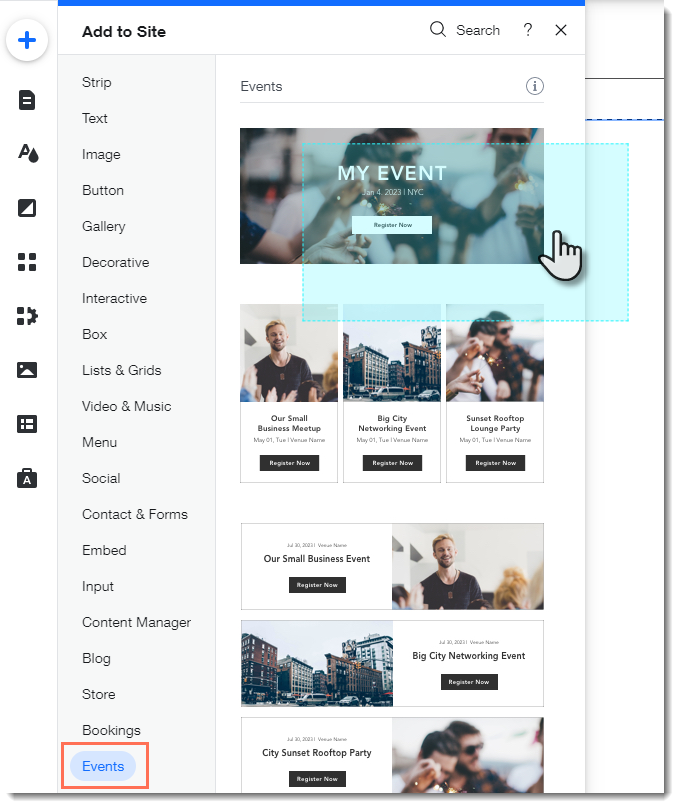
  1. Click Addon the left side of the Editor.

  2. Select Events.

  3. Drag the single event display to the page.
  1. Click the Wix Events app in the Editor.

  2. Click Display Events.

  3. Under What do you want to show?, select A Single Event.

  4. Select the relevant event.

  5. Click the Layout tab.

  6. Select Button.

  7. (Optional) Edit the button:Click the Text tab to edit the button text or add a label.
    Click the Design tab to edit the look of the button.

Need A Professional Website?
Contact Us 
Today!

Deleting Wix Hotels

Renting Multiple Properties in Different Locations

Adding Languages in Wix Hotels

Setting the Minimum and Maximum Nights in Wix Hotels

Changing Your Notification Email Address in Wix Hotels

Adding Your Hotels Policies

Adding and Managing Room Types in Wix Hotels

Renting Apartments Using Wix Hotels

Accessing Your Wix Hotels Dashboard

Adding and Setting Up Wix Hotels

About Wix Hotels

Music Apps: Adding and Setting Up an iTunes button

Music Apps: Adding and Setting Up a SoundCloud Player

Music Apps: Adding and Setting Up Your Spotify Player

Music Apps: Adding and Setting Up the Bandsintown App

Wix Podcast Player: General Troubleshooting

Wix Podcast Player: Adding and Setting Up the Wix Podcast Player

Wix Audio Player: Adding and Setting Up the Wix Audio Player

Wix Music: Allowing Fans to Download Your Music

Wix Music: Adding Links to Other Music Platforms

Wix Music: Allowing Your Fans to Name Their Price When Purchasing Your Music

About the Wix Audio Player

Wix Music: Setting Up Sales Notifications

Wix Music: Promoting Your Music using a Subscribe Form

Wix Music: Setting Up Your Payment Methods

Wix Music: Changing Your Currency

Wix Music: Viewing Your Transactions

Wix Music: Selling Your Music

Wix Music: Promoting Your Music With Email Campaigns

Wix Music: Displaying a 30 Second Preview of a Music Track

wix experts
Graphic2Traffic web design
©
bottom of page