top of page

Designing Wix Events

Wix Events: Displaying a Standalone Wix Events Button

If you write about an event somewhere on your site other than the Wix Events page, you can add a standalone event button. This makes it easy for interested site visitors to book.

Note:

The standalone event button is currently not available in Editor X.

To add an event button:

  1. Click Addon the left side of the Editor.

  2. Select Events.

  3. Drag the single event display to the page.
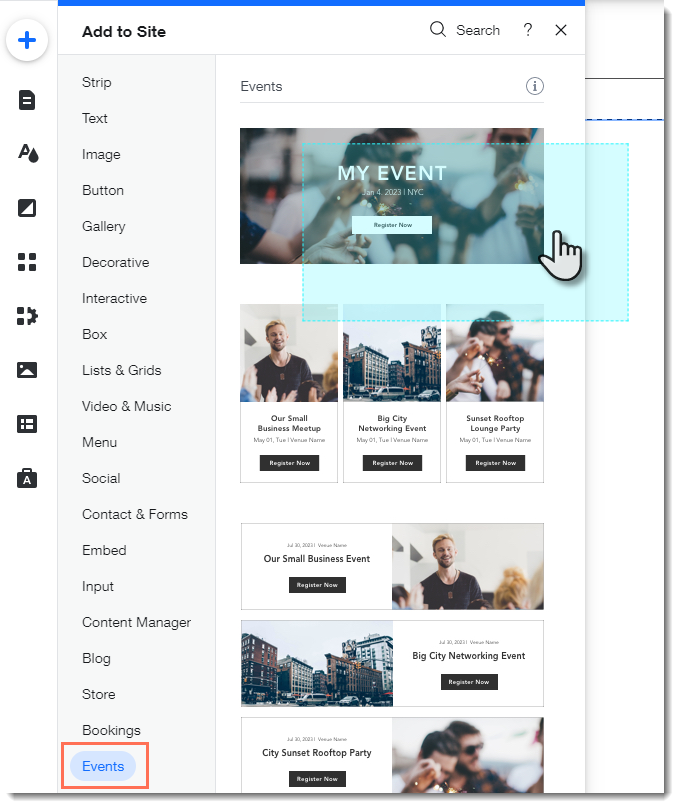
  1. Click the Wix Events app in the Editor.

  2. Click Display Events.

  3. Under What do you want to show?, select A Single Event.

  4. Select the relevant event.

  5. Click the Layout tab.

  6. Select Button.

  7. (Optional) Edit the button:Click the Text tab to edit the button text or add a label.
    Click the Design tab to edit the look of the button.

Need A Professional Website?
Contact Us 
Today!

About Wix Payments

Enabling or Disabling a Payment Method on Your Checkout

Accepting Donation Payments

Accepting Payments by Manual Card Entry

Best Practices for Accepting Card Payments

Troubleshooting Issues for Accepting Payments

Setting Up a Grace Period for Subscriptions (e.g. Stores, Pricing Plans, Recurring Invoices)

Understanding Double Charges on Your Customers' Bank Statements

Setting Your Location for Accepting Payments

Email from Wix Regarding Changes to Your Payment Method Settings

Accepting Payments from Your Customers with SCA (PSD2)

Selling CBD on Your Wix Site

Compliance with Local Payment Laws

Accepting Payments in Installments (BNPL)

Accepting Recurring Payments

Adding and Setting Up a Pay Button

Handling Chargebacks from Your Customers

Getting an Overview of Your Payments on Mobile

Getting an Overview of Your Payments

Setting Your Currency for Accepting Payments

Disconnecting a Payment Provider

Changing Your Payment Provider for Accepting Credit Card Payments

Connecting a Payment Provider

Available Payment Providers for Selling CBD on Wix

Setting Up Manual (Offline) Payments

Available Payment Providers in Your Country

Adding Goods / Services that may be Prohibited by Your Payment Provider

Accepting Payments by Credit Card

Using the Accept Payments Tab

Checking for Restricted Products & Services when Setting Up Your Payments

wix experts
Graphic2Traffic web design
©
bottom of page