


Managing your events
Wix Events: Canceling an Event
If you need to cancel a published event, you can do so in a few clicks. Once you cancel an event, all registered guests automatically receive a cancellation email.
Before you cancel:
Check to see that cancellation emails are enabled and decide if you want to customize the message inside the email. Learn how to enable and edit cancellation emails.
You cannot restore an event once you cancel it. However, you can duplicate the canceled event and publish it again.
In this article, learn more about:
Canceling an event
You can cancel a published event from your site's dashboard or the Wix mobile apps. Circumstances for canceling an event are entirely up to you.
Important:
For ticketed events with ticket sales, you need to cancel the event and refund orders.
Dashboard
Wix app
Wix Studio app
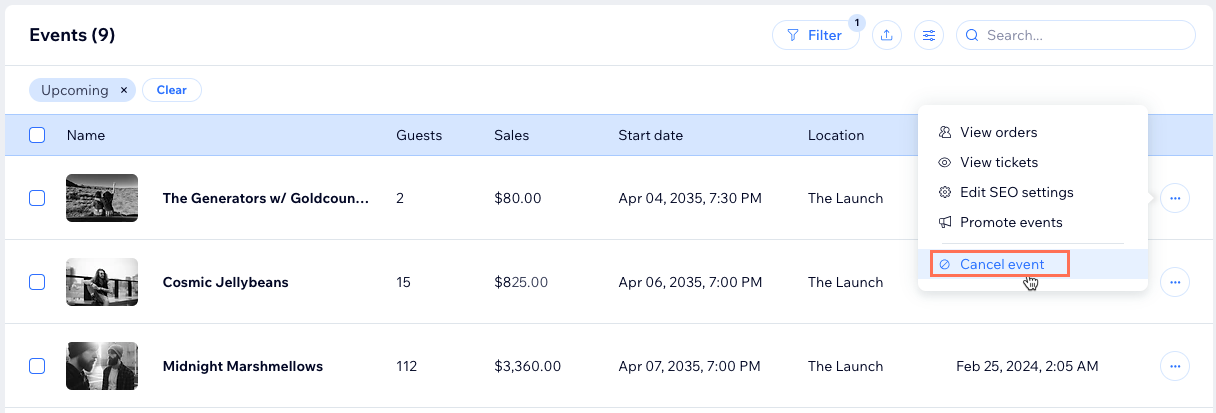
Go to Events in your site's dashboard.
Click the More Actions icon
 next to the published event you want to cancel.
Click Cancel event.
Click Cancel Event to confirm.
FAQs
Click a question to learn more about canceling events.
How can I duplicate an event that I canceled?
Go to Events in your site's dashboard.
Hover over the relevant event and click the Duplicate as Draft icon
 .
.Click Save, then click Publish when you're ready.

How can I access the guest list of a canceled event?
Go to Events in your site's dashboard.
Click Filter and select Canceled.
Select the relevant event and view the guests in the Guests tab.
Are guests automatically added back to a duplicated event?
No. However, you can manually add guests to your event after you duplicate and publish it.