top of page

Creating your event

Wix Events: Adding a Policy Checkbox

You can add a policy checkbox that your guests see during checkout. Guests must agree to your policies to register for an event.
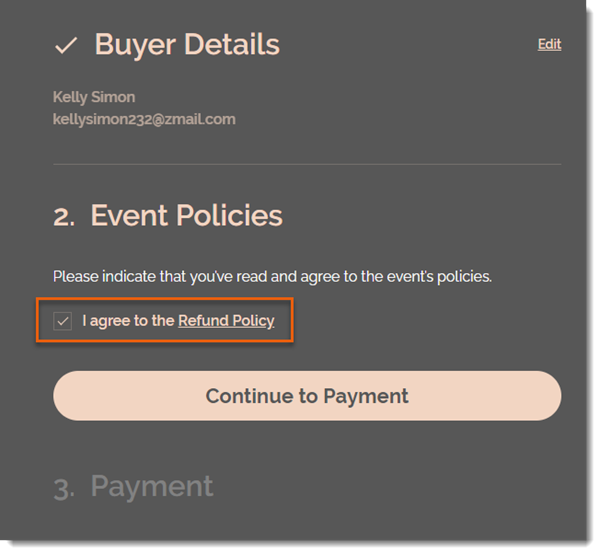
To add a policy checkbox:

  1. Go to Events in your site's dashboard.

  2. Select the relevant event.

  3. Click the Settings tab.

  4. Click Edit next to Event Policies.

  5. Scroll down and click Edit next to Event Policies.

  6. Click Create Policy.

  7. Enter a policy name (e.g. Refund Policy).

  8. Enter the policy details (e.g. You can receive a full refund up to 7 days before the event).
    Note: Guests can click the link to read your policy.

  9. Click Create Policy.

  10. (Optional) Click +Add Custom Policy and repeat steps 6 and 7 to add an additional policy.

Note:

You can add up to 3 policies. The checkbox applies to all the policies you add. It's not possible to add a separate checkbox for each policy.

Need A Professional Website?
Contact Us 
Today!

Accepting Payments: An Overview

Third-Party App: Adobe Express for Wix by Adobe

Third-Party App: Image Zoom by Widgetic

Third-Party App: Calculator Builder by Lumifish LABS

Third-Party App: Blocky IP & Country Blocker by Effective Apps

Third-Party Apps: Design Elements Apps

Third-Party App: Google Reviews by Elfsight

Third-Party App: Customer Reviews by Write a Customer Review

Third-Party App: Contact Management/CRM by vcita Inc.

Third-Party App: 123 Form Builder & Payments by 123FormBuilder

Third-Party Apps: Communications Apps

Third-Party App: Cookiebot™ for Wix by Usercentrics

Recommended Apps for Musicians

Third-Party App: Weglot Translate by Weglot

Third-Party Apps: Media and Content Apps

Third-Party App: Boom Event Calendar by BoomTech

Third-Party App: Cap Rate Calculator by Allioo.com

Third-Party App: Nash: All-in-1 Local Delivery by Nash Technologies Inc

Third-Party Apps: Hotel & Airbnbs Map

Third-Party App: Events Calendar by inlight Labs

Third-Party Apps: Services and Events Apps

Third-Party App: Mailchimp by Intuit Mailchimp

Third-Party App: ReConvert Upsell and Cross Sell by ReConvert

Third-Party App: Visitor Analytics by Visitor Analytics

Third-Party App: Site Booster by AppSharp

Third-Party App: rankingCoach SEO by rankingCoach

Third-Party App: Rabbit SEO by SEO Tools

Third-Party App: Mailchimp Integration by PoCo

Third-Party App: Mailchimp Forms by MailMunch

Third-Party App: GetTraffic by Infolinks Media

wix experts
Graphic2Traffic web design
©
bottom of page