top of page

Designing Wix Events

Wix Events: Adding a Members Area

Add a Members Area to your site so guests who log in can easily access information about upcoming and past events.

Members can:

  • View complete events details

  • Download tickets (for ticketed events)

  • Save their details so they can quickly sign up for future events

  • See who else is going to an event (if enabled)

  • Share events on social media (if enabled)

  • and more

Tip:

You can limit registration for an event to site members only.

In this article, learn how to:

Adding a Members Area:

If your site doesn't have a Members Area, you can add one in just a few clicks.

Wix Editor | Show me how

  1. Click Add on the left side of the Editor.

  2. Click the Community tab.

  3. Click Members.

  4. Click Add to Site.

Editor X | Show me how

  1. Click Add Elements   at the top bar of Editor X.

  2. Click the Members tab.

  3. Click Add to Site.

Adding Wix Events to Your Members Area

If your site has an older version of the Members Area, it may not include a Wix Events section.
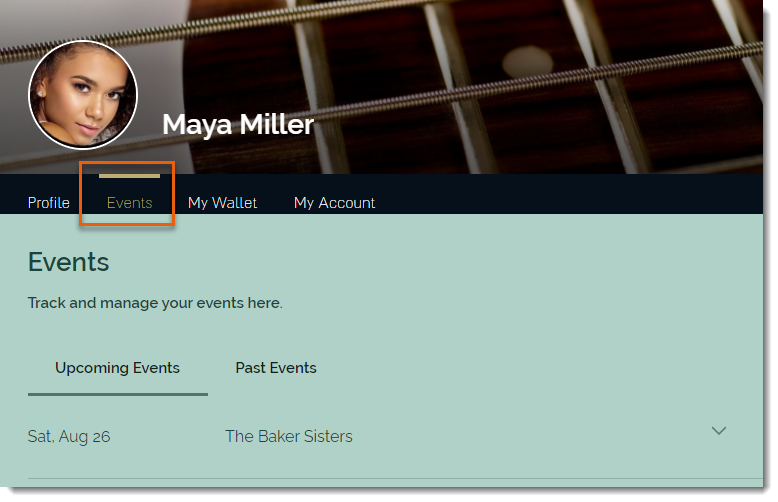
You can update the Members Area to add Wix Events.

To update the Members Area to include Wix Events:

  1. Click the Wix Events app in the Editor.

  2. Click the Settings icon .

  3. Click the Members tab.

  4. Click Add Now.

Need A Professional Website?
Contact Us 
Today!

Receiving Your Payouts from Wix Payments

Wix Payments: Receiving Your First Payout

Wix Payments: Viewing Your Payouts

Managing Business Owners in Wix Payments

Wix Payments: Updating Your Account Settings

Wix Payments: Understanding the Status of Your Account

Wix Payments: Accessing Your Account Dashboard

Wix Payments: Troubleshooting Site Access Issues

Wix Payments: Adding Klarna as a Payment Method

Wix Payments: Adding Affirm as a Payment Method

Wix Payments: Adding Afterpay as a Payment Method

Wix Payments: Assigning Payments Roles

Wix Payments: Adding Tap to Pay on Mobile as a Payment Method

Wix Payments: Adding Google Pay as a Payment Method

Wix Payments: Enabling Point of Sale (POS)

Wix Payments: Adding Apple Pay as a Payment Method

Wix Payments Terms of Service

Wix Payments: Service Fees

Customizing Your Wix Payments Statement Descriptor

Wix Payments: Ensuring Your Business is Ready for Sales

Best Practices for Merchants Using Wix Payments

Wix Payments: Prohibited Products and Services

Wix Payments: Guidelines for Uploading Documentation

Wix Payments: Verifying Your Employer Identification Number (EIN)

Adding Business Owners to Your Wix Payments Account

Wix Payments: The Difference Between Account Types

Wix Payments Verification Process

Completing Your Wix Payments Account Setup

Switching to Wix Payments

Wix Payments: Creating an Account

wix experts
Graphic2Traffic web design
©
bottom of page