top of page

Designing Wix Events

Wix Events: Adding a Members Area

Add a Members Area to your site so guests who log in can easily access information about upcoming and past events.

Members can:

  • View complete events details

  • Download tickets (for ticketed events)

  • Save their details so they can quickly sign up for future events

  • See who else is going to an event (if enabled)

  • Share events on social media (if enabled)

  • and more

Tip:

You can limit registration for an event to site members only.

In this article, learn how to:

Adding a Members Area:

If your site doesn't have a Members Area, you can add one in just a few clicks.

Wix Editor | Show me how

  1. Click Add on the left side of the Editor.

  2. Click the Community tab.

  3. Click Members.

  4. Click Add to Site.

Editor X | Show me how

  1. Click Add Elements   at the top bar of Editor X.

  2. Click the Members tab.

  3. Click Add to Site.

Adding Wix Events to Your Members Area

If your site has an older version of the Members Area, it may not include a Wix Events section.
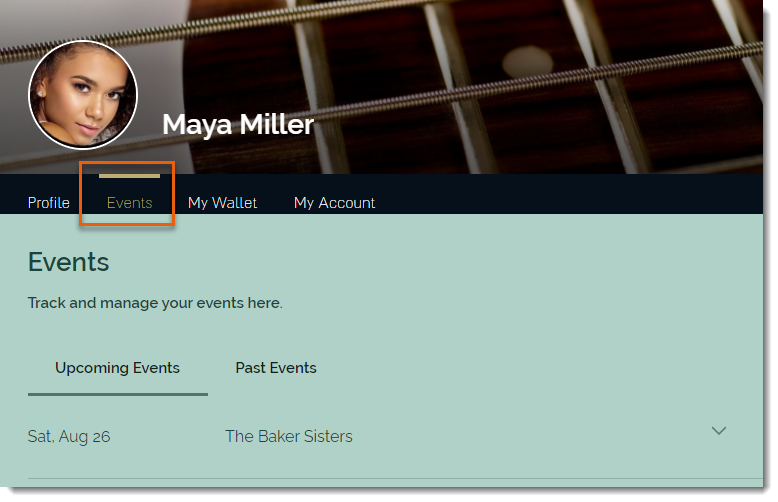
You can update the Members Area to add Wix Events.

To update the Members Area to include Wix Events:

  1. Click the Wix Events app in the Editor.

  2. Click the Settings icon .

  3. Click the Members tab.

  4. Click Add Now.

Need A Professional Website?
Contact Us 
Today!

Connecting 2Checkout as a Payment Provider

Requesting Additional Payment Providers & Methods

Using a Different Account with the Same Payment Provider

Wix Payments: About Chargeback Fees

Wix Payments: About Suspicious Payments

Wix Payments: About the 'Liability Shift'

About Reserve Funds in Your Wix Payments Account

Wix Payments: Covering a Negative Balance

Adding Funds to Cover Refunds in Your Wix Payments Account

Wix Payments: Failed Payout

Working with Grouped Payment Methods in Wix Payments

Webinar: Chargebacks - Best Practices, Expert Tips & Tools

Wix Payments: Getting a 1099-K Form

Wix Payments: PCI Compliance

Wix Payments: Account Has Been Closed

Wix Payments: Pandemic Driven Sales Rules

Accessing the Wix Payments Dashboard After Disconnecting Your Account

Connecting Giropay as a Payment Method (Through Wix Payments)

Wix Payments: Adding iDeal as a Payment Method

Connecting Pay Now by Klarna as a Payment Method (Through Wix Payments)

Understanding Your Chargeback Ratio

Chargebacks in Wix Payments

Wix Payments: Declined Payment Due to Suspected Fraud

Wix Payments: Declined Payment Due to Suspected Fraud

Wix Payments: Transaction Declined Reasons

Wix Payments: Understanding Your Payments Table

Wix Payments: Refunding Customers

Wix Payments: Understanding Your Monthly Fees Invoice

Wix Payments: Viewing Your Settlement Report

Wix Payments: Changing Your Payout Schedule

wix experts
Graphic2Traffic web design
©
bottom of page