top of page

Setting rates & payments

Setting a Weekly or Monthly Rate in Wix Hotels

Important:

This article refers to the original Wix Hotels. If you are using the new Wix Hotels by HotelRunner, which is not yet available to all users, please read the information here. Learn how to check which version of Wix Hotels you are using.

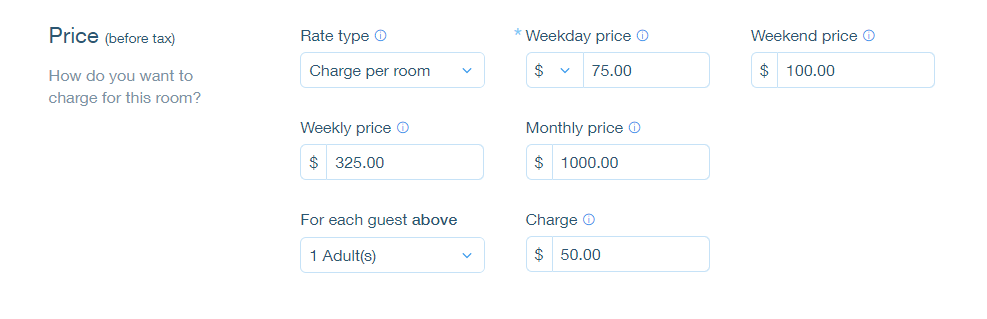
The weekly rate is the rate a guest pays when booking for 7 nights. The monthly rate is the rate a guest pays when booking for 28 nights. Wix Hotels allows you to set the rate at which you want to charge your an individual unit.

To set weekly or monthly rates:

  1. Go to your dashboard.

  2. Click the Hotels tab.

  3. Click the Rooms tab.

  4. Click the Edit icon for an existing room or click Create New to add a new one.

  5. Scroll down to the Price section.

  6. Click More Pricing Options.

  7. Enter the weekly and/or monthly price.

  8. Click Save.

Tip:

  • If a guest books for 8 nights, the rate is calculated as the weekly rate + the daily or weekend rate.

  • If a guest books for 29 nights, the rate is calculated as the monthly rate + the daily or weekend rate.

Need A Professional Website?
Contact Us 
Today!

Connecting 2Checkout as a Payment Provider

Requesting Additional Payment Providers & Methods

Using a Different Account with the Same Payment Provider

Wix Payments: About Chargeback Fees

Wix Payments: About Suspicious Payments

Wix Payments: About the 'Liability Shift'

About Reserve Funds in Your Wix Payments Account

Wix Payments: Covering a Negative Balance

Adding Funds to Cover Refunds in Your Wix Payments Account

Wix Payments: Failed Payout

Working with Grouped Payment Methods in Wix Payments

Webinar: Chargebacks - Best Practices, Expert Tips & Tools

Wix Payments: Getting a 1099-K Form

Wix Payments: PCI Compliance

Wix Payments: Account Has Been Closed

Wix Payments: Pandemic Driven Sales Rules

Accessing the Wix Payments Dashboard After Disconnecting Your Account

Connecting Giropay as a Payment Method (Through Wix Payments)

Wix Payments: Adding iDeal as a Payment Method

Connecting Pay Now by Klarna as a Payment Method (Through Wix Payments)

Understanding Your Chargeback Ratio

Chargebacks in Wix Payments

Wix Payments: Declined Payment Due to Suspected Fraud

Wix Payments: Declined Payment Due to Suspected Fraud

Wix Payments: Transaction Declined Reasons

Wix Payments: Understanding Your Payments Table

Wix Payments: Refunding Customers

Wix Payments: Understanding Your Monthly Fees Invoice

Wix Payments: Viewing Your Settlement Report

Wix Payments: Changing Your Payout Schedule

wix experts
Graphic2Traffic web design
©
bottom of page