top of page

Managing purchased plans

Pricing Plans: Checking How Many Package Sessions Were Used

After you sell a package to a client (e.g. a package that allows clients access to six classes per month), you can view how many sessions they have booked.

To view the number of sessions that have been used:

  1. Go to the Subscriptions tab in your site's dashboard.

  2. Select a purchased plan from the list.

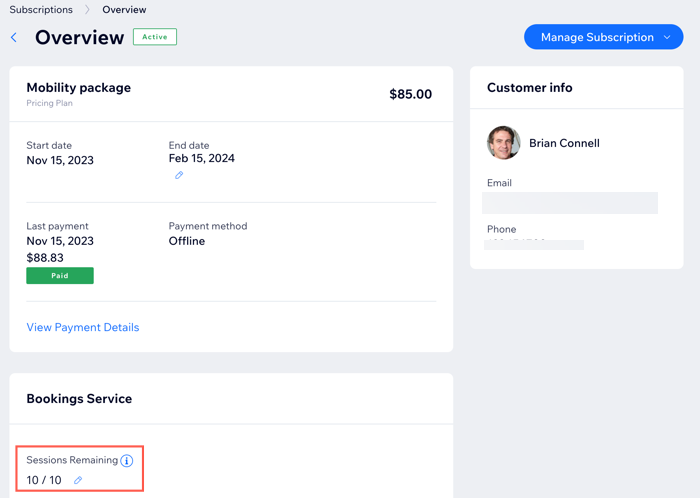
A screenshot showing a package in the Subscriptions tab in the dashboard.

  1. View the number of sessions remaining.

  2. (Optional) Click the Edit icon to manually add or remove sessions.

A screenshot showing how many sessions a client has left in their package in the subscriptions tab in the dashboard.

Tip:

To check package usage in the Wix app, just tap the Subscription shortcut.

Need A Professional Website?
Contact Us 
Today!

Connecting 2Checkout as a Payment Provider

Requesting Additional Payment Providers & Methods

Using a Different Account with the Same Payment Provider

Wix Payments: About Chargeback Fees

Wix Payments: About Suspicious Payments

Wix Payments: About the 'Liability Shift'

About Reserve Funds in Your Wix Payments Account

Wix Payments: Covering a Negative Balance

Adding Funds to Cover Refunds in Your Wix Payments Account

Wix Payments: Failed Payout

Working with Grouped Payment Methods in Wix Payments

Webinar: Chargebacks - Best Practices, Expert Tips & Tools

Wix Payments: Getting a 1099-K Form

Wix Payments: PCI Compliance

Wix Payments: Account Has Been Closed

Wix Payments: Pandemic Driven Sales Rules

Accessing the Wix Payments Dashboard After Disconnecting Your Account

Connecting Giropay as a Payment Method (Through Wix Payments)

Wix Payments: Adding iDeal as a Payment Method

Connecting Pay Now by Klarna as a Payment Method (Through Wix Payments)

Understanding Your Chargeback Ratio

Chargebacks in Wix Payments

Wix Payments: Declined Payment Due to Suspected Fraud

Wix Payments: Declined Payment Due to Suspected Fraud

Wix Payments: Transaction Declined Reasons

Wix Payments: Understanding Your Payments Table

Wix Payments: Refunding Customers

Wix Payments: Understanding Your Monthly Fees Invoice

Wix Payments: Viewing Your Settlement Report

Wix Payments: Changing Your Payout Schedule

wix experts
Graphic2Traffic web design
©
bottom of page