top of page

Using the Wix app for Online Programs

Online Programs: Connecting a Group to Your Program in the Wix App

Connect a group to your program using the Wix app. This gives participants a place to discuss their progress and share updates to motivate each other to complete the program. You can connect an existing group or create a new one straight from the app.

To connect a group to your program in the Wix app:

  1. Go to your site in the Wix app.

  2. Tap Manage  at the bottom.

  3. Tap Online Programs.

  4. Tap the More Actions icon  next to the relevant program.

  5. Tap the Edit.

  6. Scroll down to Group and tap Connect a Group.

  7. Choose what you want to do:Connect an existing group to the program: Select a group from the list and tap Done.
    Note: Once a group is linked to the program, anyone who joins your program automatically joins the group.

    Create a new group for the program:Tap Create New Group.
    Enter the group details including the name, cover image, and privacy setting. Learn more about creating a group using the Wix app.
    Tap Done.

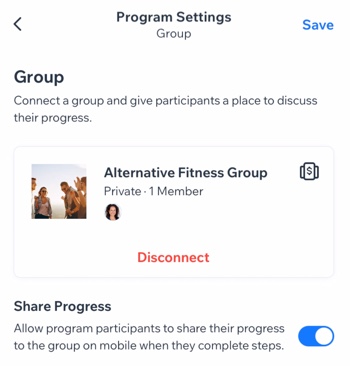
  8. (Optional) Enable the Share Progress toggle to allow participants to share their progress to the group when they complete steps.

  9. Tap Save.

A screenshot of the Program Settings panel with a connected group.

Want to disconnect the group?

If the group is no longer relevant to your program (e.g. the program has ended or you want to add different one), you can remove the group from your program. Tap Disconnect under the group.

Need A Professional Website?
Contact Us 
Today!

Wix Stores: Setting Up Amazon Multi-Channel Fulfillment

Wix Stores: Offering Delivery to Pickup Points with Sendcloud

Wix Stores: Offering Delivery to Pickup Points with Boxtal

Wix Stores: About Delivery to Pickup Points

Wix Stores: Integrating with PrettyDamnQuick Logistics

Wix Stores: Offering Real Time Shipping Rates via Third-Party Apps

Wix Stores: Deleting or Deactivating a Shipping Rule

Wix Stores: Fulfilling Orders with the ShipBob Fulfillment Service

Wix Stores: Sending Orders by Email to Fulfillers

Wix Stores: Understanding Order Fulfillment

Wix Stores: Integrating with Envia

Wix Stores: Integrating with Melhor Envio

Wix Stores: Integrating with Boxtal

Wix Stores: Printing Shipping Labels with Wix Shipping

Wix Stores: Shipping Orders Using ShipStation

Wix Stores: Integrating with ShipStation

Wix Stores: Fulfilling Subscriptions

Wix Stores: About Shipping Labels

Wix Stores: Adding a Handling Fee

Wix Stores: Setting Up Local Delivery

Wix Stores: Setting Up Store Pickup as a Delivery Option

Wix Stores: Real Time Correios Shipping Calculation with Meu Frete

Wix Stores: Backup Shipping Rates for Real Time Shipping Calculations with USPS

Wix Stores: Setting Up Real Time Shipping Calculation with USPS

Wix Stores: Setting Up Free Shipping Above a Set Price

Wix Stores: Setting Up Shipping Rate By Product

Wix Stores: Setting Up Free Shipping

Wix Stores: Setting Up Shipping By Price

Wix Stores: Setting Up Shipping By Weight

Wix Stores: Setting Up a Flat Rate Shipping Rule

wix experts
Graphic2Traffic web design
©
bottom of page