top of page

Additional Wix Apps

Embedding Songkick Tour Dates on Your Wix Site

Embed your tour dates from Songkick to your Wix site, by copying the embed code and pasting it in your editor.

Before you begin:

Your account needs to be set up as the manager of the requested artist.
A screenshot of the Songkick landing page.

To embed tour dates:

  1. Log in to Songkick.

  2. Go to the tour dates portal.

  3. Customize the options in the panel on the right.
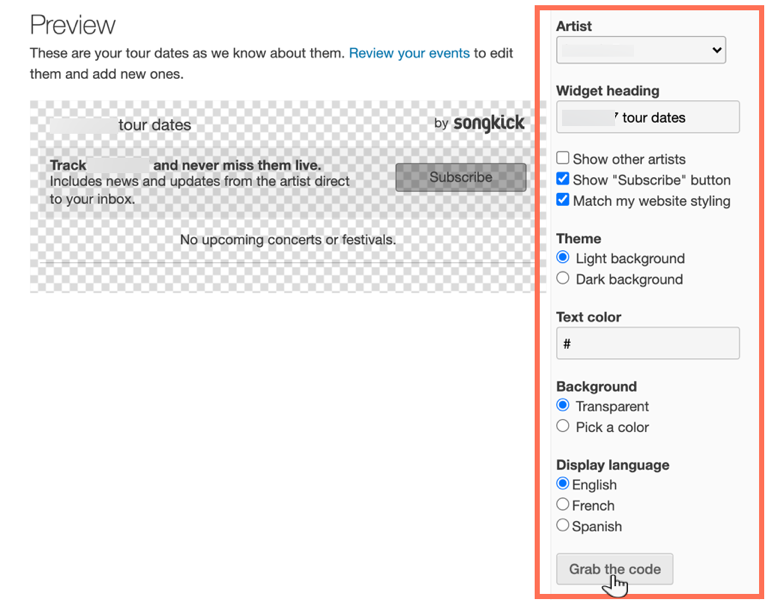
A screenshot of the tour dates widget in Songkick, showing the options to customize.

  1. Click Grab the code.

  2. Go to your Wix Editor.

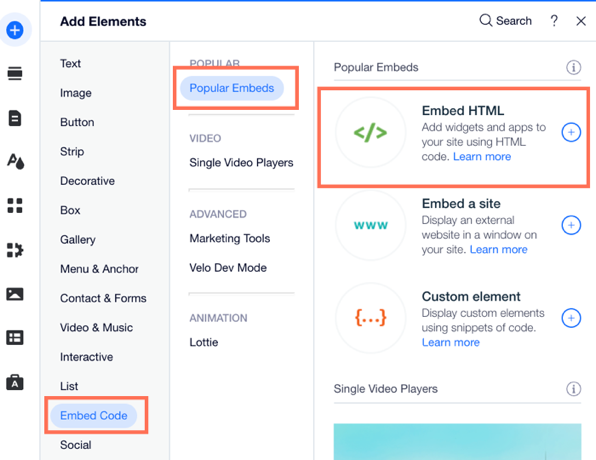
  3. Click Add Elements  on the left side of the Editor.

  4. Click Embed Code.

  5. Click Embed HTML.

A screenshot of the the Add Elements panel showing the option to Embed HTML.

  1. Paste the code you copied from step 4 into the Add your code here (HTTPS only) field.

  2. Click Update.

  3. (Optional) Enter alt text that describes what you're embedding in the What's in the embed? Tell Google field.

  4. When ready, publish your site.

Need A Professional Website?
Contact Us 
Today!

Wix Hotels by HotelRunner: Connecting Booking.com to Your Site

Wix Hotels by Hotelrunner: Changing the ‘Room’ Text on Your Site

Wix Hotels by HotelRunner: Adding Room Types

Wix Hotels by HotelRunner: Creating and Managing Your Tax Categories

Wix Hotels by HotelRunner: Troubleshooting "There Are No Available Rooms" Error

Wix Hotels by HotelRunner: Switching to the New Wix Hotels

Wix Hotels by HotelRunner: Customizing Your Email Templates

Wix Hotels by HotelRunner: Managing Your Reservation Settings

Wix Hotels by HotelRunner: Managing Your Reservations

Wix Hotels by HotelRunner: Managing Your Site Languages

Wix Hotels by HotelRunner: Making Bulk Updates

Wix Hotels by HotelRunner: Setting Your Open Seasons, Pricing and General Info

Wix Hotels by HotelRunner: Managing Prices and Availability with the Inventory Calendar

Wix Hotels by HotelRunner: Creating and Managing Your Cancellation and Deposit Policies

Wix Hotels by HotelRunner: Creating and Managing Your Rate Plans

Wix Hotels by HotelRunner: Adding and Setting up Your Hotel

Wix Hotels by HotelRunner: An Overview

Removing Imported Reservations from Your Wix Hotels Reservation Calendar

Troubleshooting the Wix Hotels Channel Manager

Disconnecting a Channel in the Channel Manager (HotelRunner)

Importing Reservations from an External Calendar (iCal) to Wix Hotels

Exporting Your Reservations from Wix Hotels

Wix Hotels Channel Manager Fees

Checklist for Connecting Wix Hotels to the Channel Manager (HotelRunner)

Connecting Your Hotel to Booking Channels Using the Channel Manager

Connecting Wix Hotels with External Services

Wix Hotels: About the Channel Manager

About the Wix Hotels Checkout Process

Managing Wix Hotels Reservations from the Wix App

Changing the Status of a Hotel Reservation in Wix Hotels

wix experts
Graphic2Traffic web design
©
bottom of page