top of page

Additional Wix Apps

Embedding Songkick Tour Dates on Your Wix Site

Embed your tour dates from Songkick to your Wix site, by copying the embed code and pasting it in your editor.

Before you begin:

Your account needs to be set up as the manager of the requested artist.

A screenshot of the Songkick landing page.

To embed tour dates:

  1. Log in to Songkick.

  2. Go to the tour dates portal.

  3. Customize the options in the panel on the right.
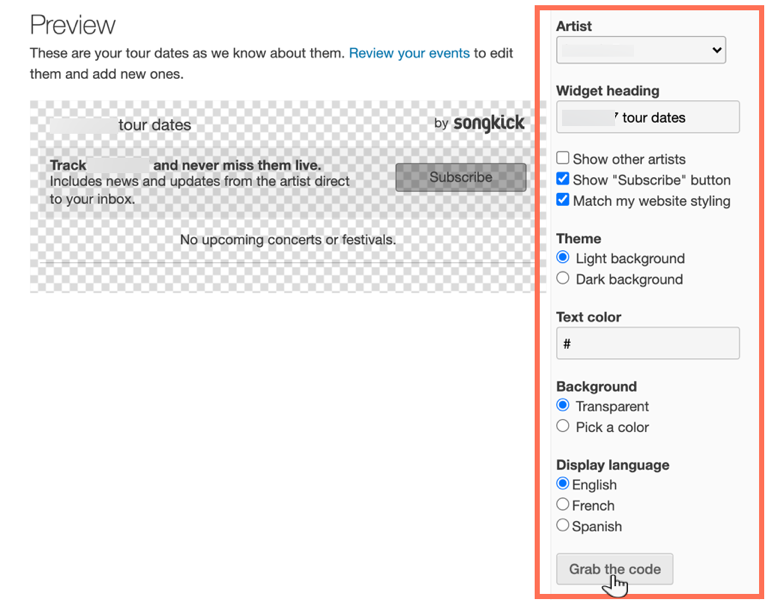
A screenshot of the tour dates widget in Songkick, showing the options to customize.

  1. Click Grab the code.

  2. Go to your Wix Editor.

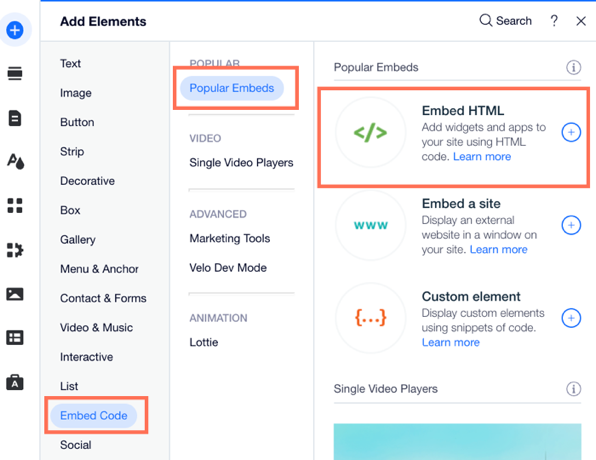
  3. Click Add Elements  on the left side of the Editor.

  4. Click Embed Code.

  5. Click Embed HTML.

A screenshot of the the Add Elements panel showing the option to Embed HTML.

  1. Paste the code you copied from step 4 into the Add your code here (HTTPS only) field.

  2. Click Update.

  3. (Optional) Enter alt text that describes what you're embedding in the What's in the embed? Tell Google field.

  4. When ready, publish your site.

Need A Professional Website?
Contact Us 
Today!

Connecting 2Checkout as a Payment Provider

Requesting Additional Payment Providers & Methods

Using a Different Account with the Same Payment Provider

Wix Payments: About Chargeback Fees

Wix Payments: About Suspicious Payments

Wix Payments: About the 'Liability Shift'

About Reserve Funds in Your Wix Payments Account

Wix Payments: Covering a Negative Balance

Adding Funds to Cover Refunds in Your Wix Payments Account

Wix Payments: Failed Payout

Working with Grouped Payment Methods in Wix Payments

Webinar: Chargebacks - Best Practices, Expert Tips & Tools

Wix Payments: Getting a 1099-K Form

Wix Payments: PCI Compliance

Wix Payments: Account Has Been Closed

Wix Payments: Pandemic Driven Sales Rules

Accessing the Wix Payments Dashboard After Disconnecting Your Account

Connecting Giropay as a Payment Method (Through Wix Payments)

Wix Payments: Adding iDeal as a Payment Method

Connecting Pay Now by Klarna as a Payment Method (Through Wix Payments)

Understanding Your Chargeback Ratio

Chargebacks in Wix Payments

Wix Payments: Declined Payment Due to Suspected Fraud

Wix Payments: Declined Payment Due to Suspected Fraud

Wix Payments: Transaction Declined Reasons

Wix Payments: Understanding Your Payments Table

Wix Payments: Refunding Customers

Wix Payments: Understanding Your Monthly Fees Invoice

Wix Payments: Viewing Your Settlement Report

Wix Payments: Changing Your Payout Schedule

wix experts
Graphic2Traffic web design
©
bottom of page