top of page

Adding videos & channels

Wix Video: Scheduling A Publish Time for Videos

You can set times for your videos to appear on your site whenever you need. This is a great way to ensure that videos are automatically and regularly published to your site, without having to manually publish them.
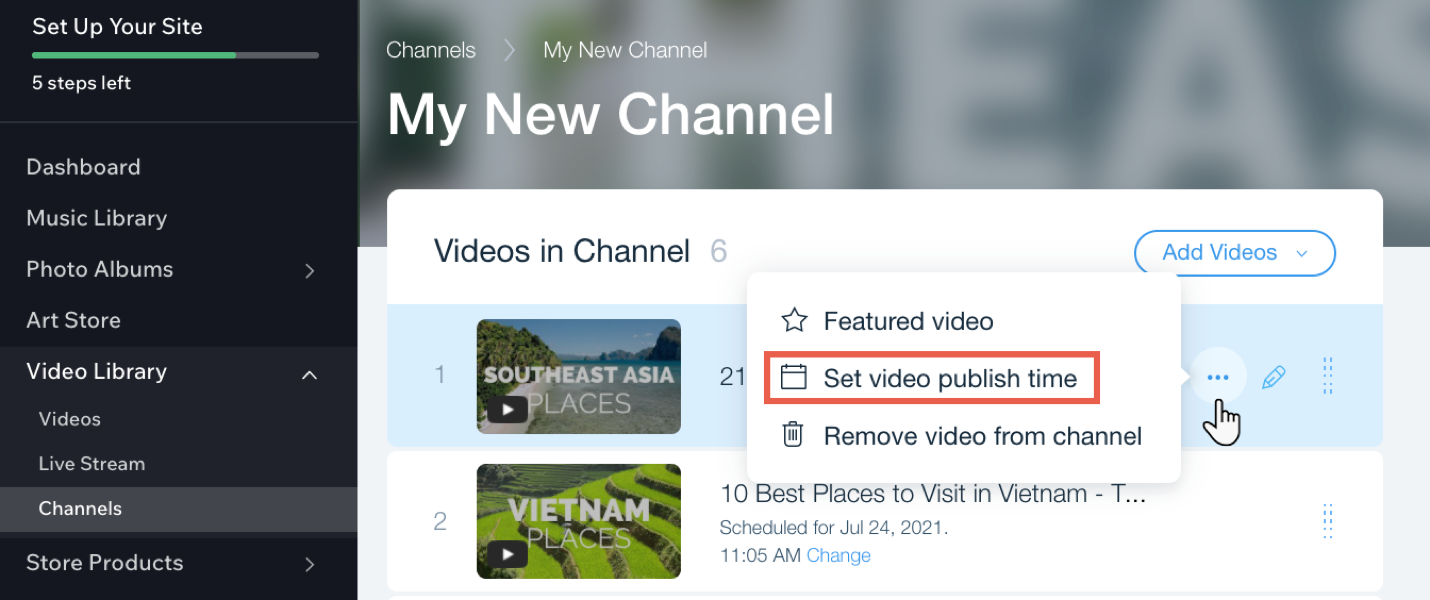
Notes:

  • You need to add the video first before you can schedule it.

  • Once you've scheduled the video, it won't appear on your site until the specified publish date and time.

To schedule a publish time for videos in your channel:

  1. Go to Video Library in your site's dashboard.

  2. Click the Channels tab.

  3. Click the relevant channel.

  4. Hover over the relevant video and click the Show more icon .

  5. Click Set video publish time.

  6. Select a date and time.

  7. Click Save.

Tip:

You can change the time of a video by clicking Change next to the current scheduled time.

Need A Professional Website?
Contact Us 
Today!

Migrating from Shopify to Wix Stores

Migrating from Other eCommerce Platforms to Wix Stores

Displaying Tax and Shipping Info with Product Prices

Tracking Sales with a Meta Conversion Pixel

Changing Your Currency

About Your Storefront

The 10 Essential Steps to Creating Your Online Store

Translating Your Store

Adding Wix Stores

Adding Missing Alt Text to Your Images

Use Different SEO Title Tags for Different Pages

Troubleshooting Connecting Your Website to Google

Wix SEO Checklist: Problems with Your Homepage Title

How Wix's SEO Checklist Helps Your Website's SEO

Improve Your Online Presence with the Wix SEO Setup Checklist

What business apps can I use in Wix Studio? How have they been improved?

What does responsive AI mean?

What AI features will be available in Wix Studio?

What new design tools does Wix Studio offer?

How to restore a previous version of your site?

How to add booking functionality to a Wix site?

How to create a membership site?

How to link social media accounts?

How to create email campaigns with Wix?

How to transfer a domain to Wix?

How to connect a domain to Wix?

How to write a blog post on Wix?

How to add a blog to your Wix site?

How to set up payment methods?

How to add products to your store?

wix experts
Graphic2Traffic web design
©
bottom of page