top of page

Adding videos & channels

Wix Video: Scheduling A Publish Time for Videos

You can set times for your videos to appear on your site whenever you need. This is a great way to ensure that videos are automatically and regularly published to your site, without having to manually publish them.
Notes:

  • You need to add the video first before you can schedule it.

  • Once you've scheduled the video, it won't appear on your site until the specified publish date and time.

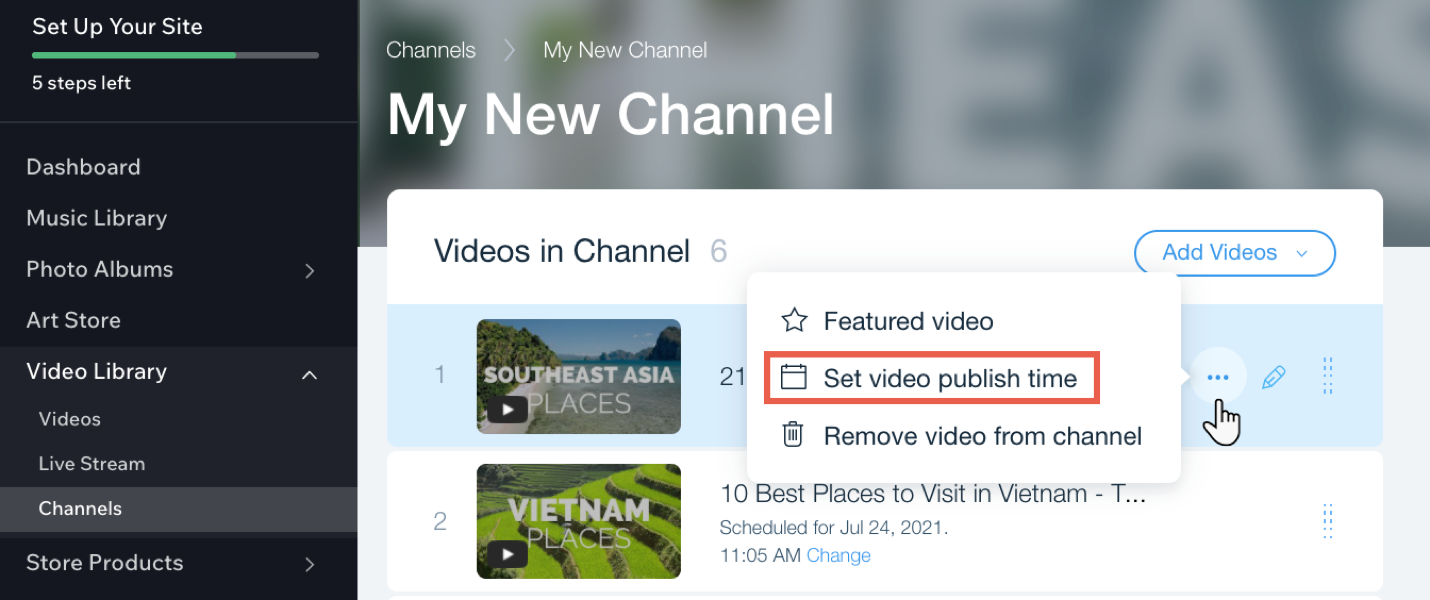
To schedule a publish time for videos in your channel:

  1. Go to Video Library in your site's dashboard.

  2. Click the Channels tab.

  3. Click the relevant channel.

  4. Hover over the relevant video and click the Show more icon .

  5. Click Set video publish time.

  6. Select a date and time.

  7. Click Save.

Tip:

You can change the time of a video by clicking Change next to the current scheduled time.

Need A Professional Website?
Contact Us 
Today!

Wix Photo Albums: Printing and Shipping Issues in the Wix Photo Albums Store

Wix Photo Albums: Printing and Shipping Issues in the Wix Photo Albums Store

Wix Photo Albums: Setting Up Your Photo Albums Store

Wix Photo Albums Store: No Longer Available

Wix Photo Albums: Managing Your Photo Album

Wix Photo Albums: Managing Photo Albums in the Wix App

Wix Photo Albums: Duplicating Your Photo Album

Wix Photo Albums: Changing Your Album's Privacy Permissions

Wix Photo Albums: Enabling Downloading of an Entire Photo Album

Wix Photo Albums: Changing the Album URL

Wix Photo Albums: Troubleshooting Album URL Issues

Wix Photo Albums: Displaying Specific Albums on Different Pages

Wix Photo Albums: Showing or Hiding an Album on Your Site

Wix Photo Albums: Sharing Your Album

Wix Photo Albums: Displaying a Single Photo Album

Wix Photo Albums: Supported Media Sizes and Formats

Wix Photo Albums: Deleting Photo Albums

Wix Photo Albums: Adding New Galleries to an Album

Wix Photo Albums: Changing the Layout of Your Galleries

Wix Photo Albums: Creating a Favorites List for Clients (Proofing)

Wix Photo Albums: Managing Your Favorites Lists

Wix Photo Albums: Communicating With Clients Using Your Favorites List

Wix Photo Albums: Updating Your Old Albums to the New Templates

Wix Photo Albums: Uploading Photos from Lightroom Classic

Wix Photo Albums: Viewing Your Photo Album Statistics

Wix Photo Albums: Upgrading Your Photo Albums Storage

Wix Photo Albums: Removing Wix Ads from Your Photo Album

Wix Photo Albums: Organizing Your Album

Wix Photo Albums: Adding Titles and Descriptions to Photos

Wix Photo Albums: Editing Your Album's Cover Information

wix experts
Graphic2Traffic web design
©
bottom of page