top of page

Live streaming your videos

Wix Video: Downloading a Live Stream Encoder

In order to stream videos live from your computer you'll need an encoder. An encoder is the software that connects your computer's camera to the stream.

Important:

  • The output needs to be set to 'Simple'. If it set to 'Advanced' it can cause issues with the live stream.

  • In this article, we discuss downloading the OBS encoder, but you can choose to download any one you want as long as it supports custom keys.

Step 1 | Download the Installer from OBS Studio

  1. Go to the OBS Studio downloading page.

  2. On the download page, select your computer's operating system.

  3. Scroll down and click Download Installer.
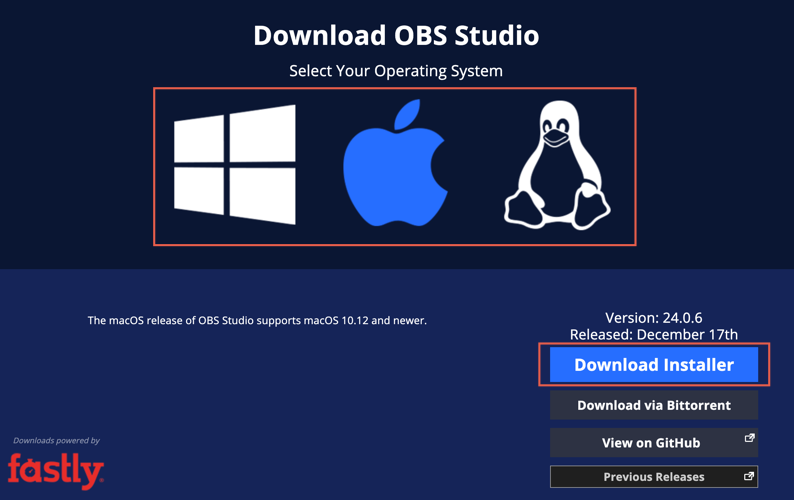
A screenshot of the OBS download page with Download Installer highlighted.

Step 2 | Install the Encoder on Your Computer

  1. On your computer, open the OBS Installer.
    Note: If you see a verification window, click Install anyway.

  2. Click Next.

  3. Click I Agree.

  4. Choose where the file should go and click Next.

  5. Review the components and click Install.

  6. Click Finish.

Step 3 | Connect Your Camera to the Encoder

  1. On your computer, open the OBS Studio Encoder. This is what the icon looks like:

2.  On the bottom left, under Sources, click Add .

3.  From the list, select Video Capture Device.

4.  Select Create New and name your camera and click OK.

5.  From the Device drop-down list, select your computer's integrated camera and click OK.
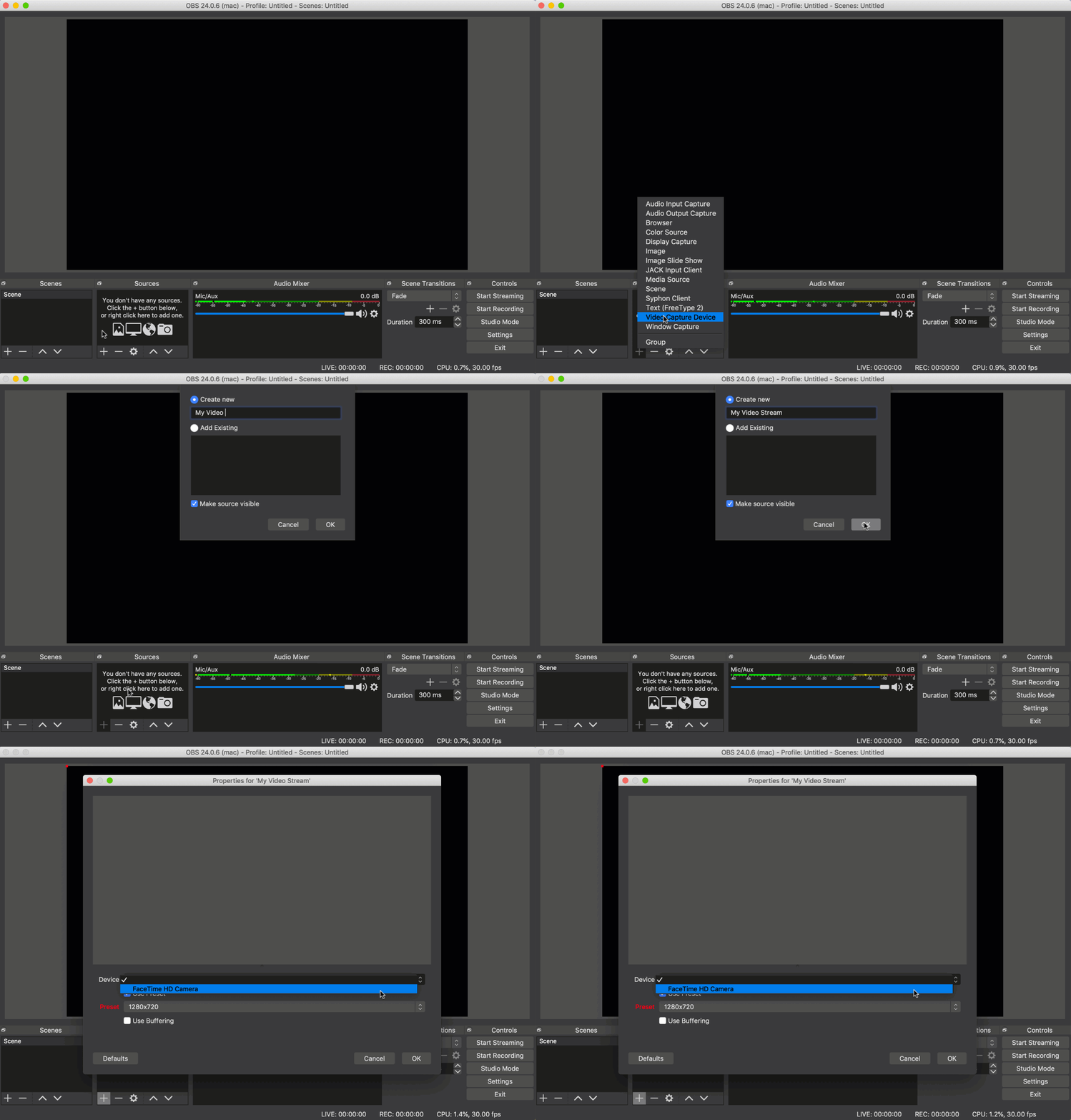
A GIF of connecting a camera source in OBS.

Step 4 | Change Your Streaming Settings

  1. Open the OBS Studio Encoder on your computer.

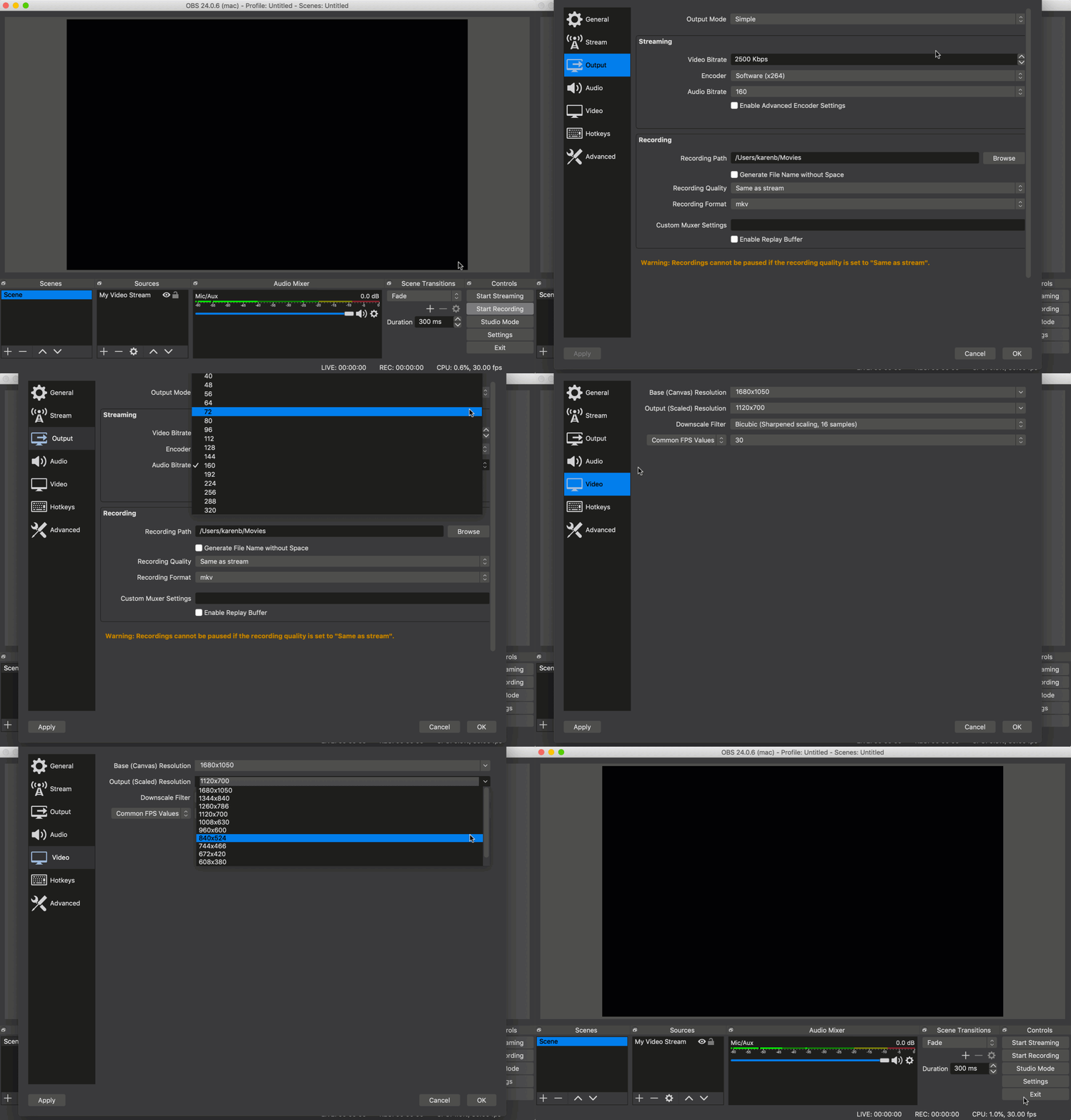
  2. Click Settings on the bottom right.

  3. Select the Output tab to change the codec, audio and video bitrates.

  4. Select the Video tab to change the video resolution.

Note: To get the best results, make sure you don't exceed the following settings:

  • Video Resolution: 720p (1280x720)

  • Codec: x264

  • Video bitrate: ~2500 kbps

  • Audio bitrate: AAC 44.1kHz ~128kbps

A GIF showing different settings in OBS.

Finished these steps and ready to go live?

Learn more about taking your stream online.

Note:

Currently, Wix Video only offers support and troubleshooting for the OBS Studio encoder  - other encoders may not connect with Wix Video. If you want to use a different encoder, make sure you know where to enter the Server URL and the stream key.

Need A Professional Website?
Contact Us 
Today!

Google Workspace Error Message: "Your subscription has been suspended by your reseller"

Google Workspace Error Message: Service Is Temporarily Suspended until Your Customer Accepts the New Terms of Service

Google Workspace Error Message: "You already have a Google Workspace business email account. You can manage it from the Google Admin Console"

Google Workspace: Data Migration from an External Email to Your Google Workspace

Google Workspace: Revoking Admin Status to Delete a Workspace Account

Google Workspace: Connecting Your Business Email to a Mail Client Using IMAP and SMTP

Google Workspace: Changing the Language of Your Business Email

Google Workspace: Emails Missing from Your Business Email

Google Workspace: Allowing Access for ‘Less Secure Apps’ in Your Business Email

Google Workspace: Adding Google Workspace MX Records to Your Wix Account

Google Workspace: Setting Up a Domain Alias

Google Workspace: Manually Verifying Your Domain with Google

Google Workspace: Connecting a Business Email for a Domain Pointing to Wix

Google Workspace: Setting Up an Email Alias for an Existing Workspace User Email Address

Google Workspace: Resetting a Workspace User's Password

Google Workspace: Renaming a Workspace User

Google Workspace: Accessing Your Additional Workspace Users

Google Workspace: Purchasing Additional Business Emails from Wix

Google Workspace: Setting Up Business Email Users

Gemini for Google Workspace: An Overview

Google Workspace: Upgrading a Workspace Plan

Google Workspace: Choosing a Plan

Google Workspace: Business Email Sending Limits

Google Workspace: Forwarding Emails From Your Business Email to Another Email Address

Google Workspace: Resetting Your Admin Password

Google Workspace: Accessing Your Admin Console

Google Workspace: Identifying Your Admin Workspace User

Google Workspace: Setting Up Your Business Email on Mobile Devices

Google Workspace: Username and Password Guidelines

Google Workspace: Accessing your Business Email Through Your Wix Account

wix experts
Graphic2Traffic web design
©
bottom of page