top of page

Promoting stores sales

Wix Stores: Managing Your Coupons

Manage your coupons by activating the ones you want to offer customers and deactivating or deleting coupons you don't want to make available.

Note:

If you delete or deactivate a coupon, your customers won't be able to redeem it while checkout out.

Activating or deactivating a coupon

You can save time by creating a coupon once and then reusing it when needed. For example, you can create a Summer Sale Coupon and deactivate it when the sale it over. When summer rolls around again, just click the toggle to activate it.
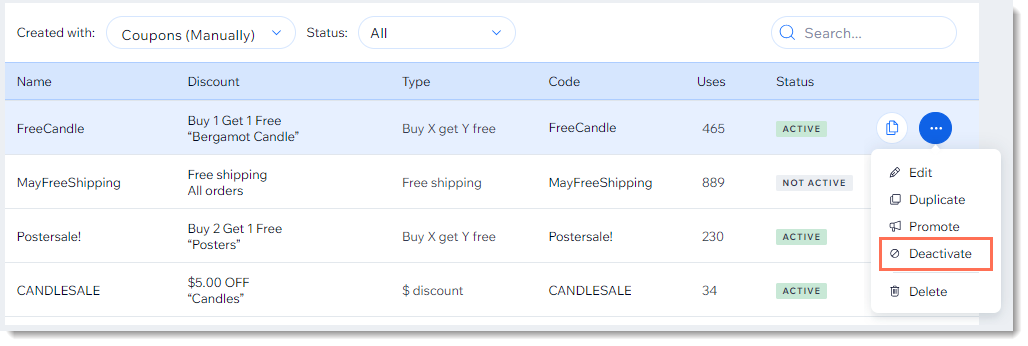
Screenshot of the coupon list in the Wix dashboard with the deactivate coupon option outlined

  1. Go to Coupons in your site's dashboard.

  2. Click the More Actions icon    next to the relevant coupon.

  3. Click Activate or Deactivate.

Deleting a coupon

Keep your Coupons page clean by deleting coupons that can no longer be used.

Note:

Once you delete a coupon, you can't undo this action. You can, however, recreate a coupon with the same details.
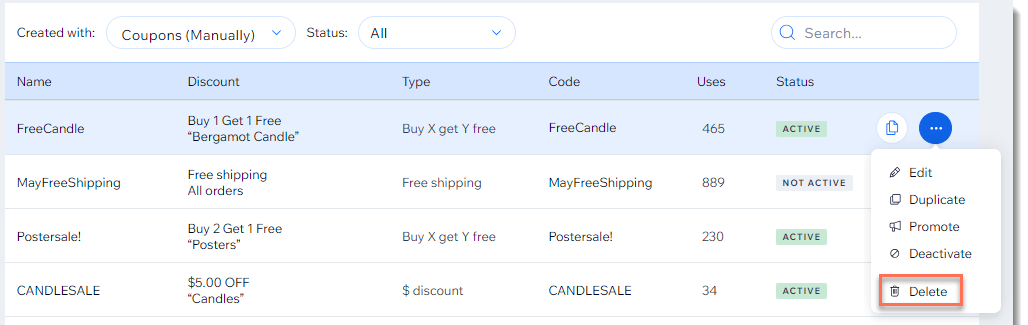
Screenshot of the coupon list in the Wix dashboard with the Delete  option outlined

To delete a coupon:

  1. Go to Coupons in your site's dashboard.

  2. Click the More Actions icon   at the top right of the coupon you want to delete.

  3. Click Delete.

  4. Click Yes, Delete to confirm.

Need A Professional Website?
Contact Us 
Today!

Third-Party Apps: Marketing Apps

Third Party App: Gifted by Gifted

Third-Party App: Melhor Envio by Melhor Envio

Third-Party App: Etsy Integration by Webkul

Third-Party App: Product Auction by Webkul

Third-Party App: POSTA by TORAB

Third-Party App: Uploadly - File Upload by Inspon

Redeeming Your Smile: Points & Rewards Promo Code

Third Party App: Smile Points & Rewards by Smile

Third-Party App: skuIQ Real-Time Inventory Sync by skuIQ

Third-Party App: Shippo by Shippo

Third-Party App: QuickBooks Connector By Intuit

Third-Party App: Printify by Printify

Third-Party App: Online Store by Ecwid Inc.

Third-Party App: NetSuite Sync by Webgility

Third-Party App: Modalyst - Dropshipping by Modalyst

Offering Gift Cards with the Gifted App

Third-Party App: Barcode Man Label Printing by Gookit

Third-Party Apps: E-commerce Apps

Claiming My Free Apps

Refunds for Third-Party App Upgrades

Canceling an App Subscription

Using an Existing App Subscription for an App on Your Site

Upgrading an App from the Wix App Market

Managing Your Wix Apps from the 'My Business' Panel

Creating a Third-Party App for the Wix App Market

Troubleshooting: Unable to Open App Settings Panel

App Disappearing from Page with Hidden Footer

Reasons an App Review Was Removed

Adding a Pending App in Your Editor

wix experts
Graphic2Traffic web design
©
bottom of page