top of page

Setting up shipping & fulfillment

Wix Stores: Integrating with Envia

Important:

To print shipping labels, you must first enter your business's address in the Business Info page. Learn how

Envia is a third-party app that integrates with Wix Stores so you can create domestic and international shipping labels with reliable couriers - all at a great price.
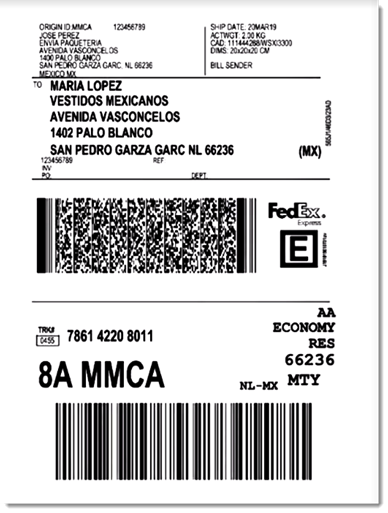
Sample shipping label created through Envia

Choose from a wide variety of shipping carriers, including:

  • FedEx

  • DHL

  • iVoy

  • Redpack

  • UPS

  • Sendex

  • Carssa

  • Paquete Express

  • 99 Minutos

  • Quiken

Notes:

  • Envia is currently available for stores located in the US, Mexico, Colombia, Spain, Brazil, Argentina, Chile, Guatemala, Canada, India, and Australia.

  • Envia is free to use. You pay only for the shipping labels you purchase.

  • You can connect one Wix store to one Envia account.

To integrate with Envia:

  1. Click here to access the app.

  2. Click Add to Site.

  3. Click Agree & Add.

  4. Click Continue.

  5. Enter your email address and click Continue.
    Note: You will be logged into your existing account or a new one will be created.

  6. For new accounts: Fill in the required information and click Continue.

  7. Select an address from the Saved addresses drop-down or complete the fields to add a new one.
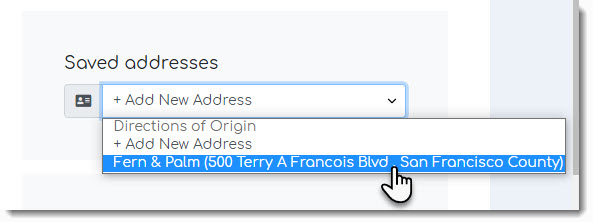
Screenshot of the address list drop-down in the Envia dashboard

  1. Click See Orders.

After integration, new Wix store orders appear in the Envia dashboard every time you make a sale. In the Envia dashboard you can manage your shipments, printing labels and track orders.

When a shipping label is created, the order in your Wix dashboard is updated so that the order status changes to "Fulfilled" and the tracking number is added.

To learn more, check out the Envia help center.

Need A Professional Website?
Contact Us 
Today!

Third-Party Apps: Marketing Apps

Third Party App: Gifted by Gifted

Third-Party App: Melhor Envio by Melhor Envio

Third-Party App: Etsy Integration by Webkul

Third-Party App: Product Auction by Webkul

Third-Party App: POSTA by TORAB

Third-Party App: Uploadly - File Upload by Inspon

Redeeming Your Smile: Points & Rewards Promo Code

Third Party App: Smile Points & Rewards by Smile

Third-Party App: skuIQ Real-Time Inventory Sync by skuIQ

Third-Party App: Shippo by Shippo

Third-Party App: QuickBooks Connector By Intuit

Third-Party App: Printify by Printify

Third-Party App: Online Store by Ecwid Inc.

Third-Party App: NetSuite Sync by Webgility

Third-Party App: Modalyst - Dropshipping by Modalyst

Offering Gift Cards with the Gifted App

Third-Party App: Barcode Man Label Printing by Gookit

Third-Party Apps: E-commerce Apps

Claiming My Free Apps

Refunds for Third-Party App Upgrades

Canceling an App Subscription

Using an Existing App Subscription for an App on Your Site

Upgrading an App from the Wix App Market

Managing Your Wix Apps from the 'My Business' Panel

Creating a Third-Party App for the Wix App Market

Troubleshooting: Unable to Open App Settings Panel

App Disappearing from Page with Hidden Footer

Reasons an App Review Was Removed

Adding a Pending App in Your Editor

wix experts
Graphic2Traffic web design
©
bottom of page