top of page

Dropshipping with Wix Stores

Wix Stores: Fulfilling Modalyst Orders

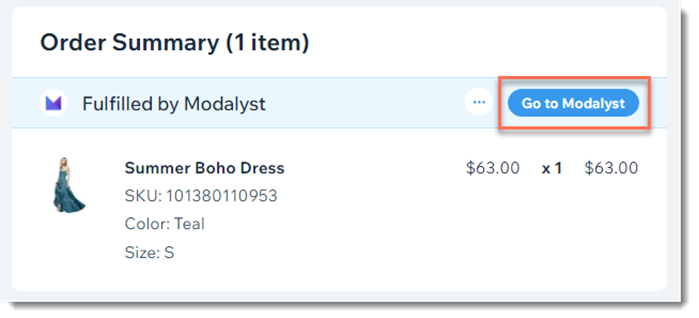
When a customer buys Modalyst products in your store, the items are shipped by the Modalyst supplier. To trigger the process, you need to pay the supplier for the order.

To pay for Modalyst products so they can be shipped:

  1. Go to Orders in your site's dashboard.

  2. Click the relevant order.

  3. Click Go to Modalyst.

  1. Pay the supplier for the order.

After you complete payment, the following happens:

  • The supplier ships the order to your customer.

  • A shipping confirmation email with the tracking number is sent to your customer. This email is sent from your store brand and looks identical to other emails sent to your customers
    Note: Sending shipping confirmation emails when an order is fulfilled by a third party can be disabled in the eCommerce Settings tab.

  • The tracking number, carrier name, and tracking link are added automatically to the relevant order in your Wix dashboard.

Note:

If a customer purchases both your own products and Modalyst products, you need to fulfill your products in the regular way. Learn more about adding tracking number to orders with your products and Modalyst products.

Need A Professional Website?
Contact Us 
Today!

Google Workspace Error Message: "Your subscription has been suspended by your reseller"

Google Workspace Error Message: Service Is Temporarily Suspended until Your Customer Accepts the New Terms of Service

Google Workspace Error Message: "You already have a Google Workspace business email account. You can manage it from the Google Admin Console"

Google Workspace: Data Migration from an External Email to Your Google Workspace

Google Workspace: Revoking Admin Status to Delete a Workspace Account

Google Workspace: Connecting Your Business Email to a Mail Client Using IMAP and SMTP

Google Workspace: Changing the Language of Your Business Email

Google Workspace: Emails Missing from Your Business Email

Google Workspace: Allowing Access for ‘Less Secure Apps’ in Your Business Email

Google Workspace: Adding Google Workspace MX Records to Your Wix Account

Google Workspace: Setting Up a Domain Alias

Google Workspace: Manually Verifying Your Domain with Google

Google Workspace: Connecting a Business Email for a Domain Pointing to Wix

Google Workspace: Setting Up an Email Alias for an Existing Workspace User Email Address

Google Workspace: Resetting a Workspace User's Password

Google Workspace: Renaming a Workspace User

Google Workspace: Accessing Your Additional Workspace Users

Google Workspace: Purchasing Additional Business Emails from Wix

Google Workspace: Setting Up Business Email Users

Gemini for Google Workspace: An Overview

Google Workspace: Upgrading a Workspace Plan

Google Workspace: Choosing a Plan

Google Workspace: Business Email Sending Limits

Google Workspace: Forwarding Emails From Your Business Email to Another Email Address

Google Workspace: Resetting Your Admin Password

Google Workspace: Accessing Your Admin Console

Google Workspace: Identifying Your Admin Workspace User

Google Workspace: Setting Up Your Business Email on Mobile Devices

Google Workspace: Username and Password Guidelines

Google Workspace: Accessing your Business Email Through Your Wix Account

wix experts
Graphic2Traffic web design
©
bottom of page