top of page

Managing products and categories

Wix Stores: Allowing Customers to Add a Message When Purchasing a Product

Add a custom text box to your Product Page so that your customers can leave you a message when they purchase a specific product. This could be used to add personalization options to products, or for adding gift wrap options.
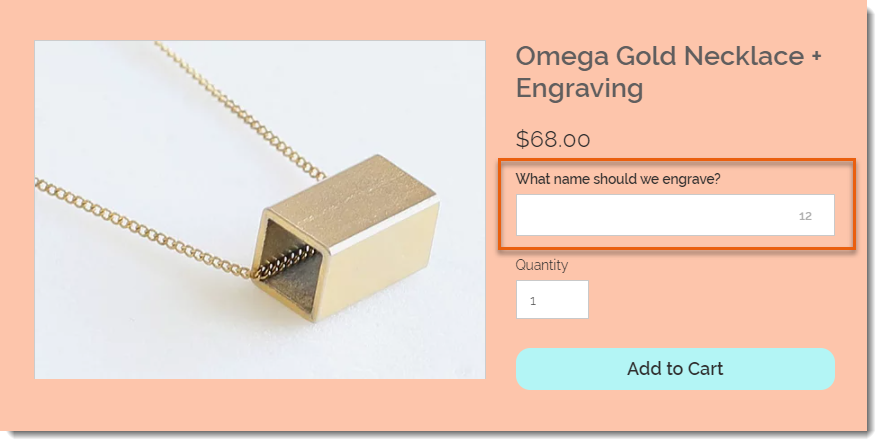
Screenshot of a product displayed on the product page in a Wix stores with a customer message field outlined

To add a custom text field to your Product Page:

  1. Go to Products in your site's dashboard.

  2. Select the relevant product or click New Product to add a new one.

  3. Scroll down and click Add Custom Text Field.

  4. Enter the title of the text field (e.g. What name should we engrave?).

  5. Enter the character limit for the text field.

  6. Select or deselect the Mandatory field checkbox:Selected: The customer must fill in the text field.
    Deselected: The customer can leave it blank.

  7. (Optional) Click Add Another to add a second custom text field.
    Tip: You can add up to 2 fields.

  8. Click Save.

After a customer makes an order, you can see the information they wrote in the Orders tab.
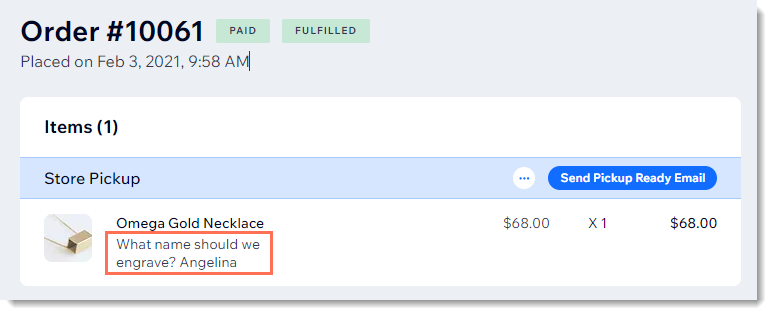
Screenshot of a store order in the Wix dashboard with a customer's message outlined

Need A Professional Website?
Contact Us 
Today!

Troubleshooting Third Party Provider Connection Issues

Connecting GB Prime Pay as a Payment Provider

Payze No Longer Available to Connect as a Payment Provider

Connecting Pagsmile as a Payment Provider

Connecting Rakuten as a Payment Method (through KOMOJU)

Receiving Payouts from Third-Party Payment Providers

Connecting Paidy as a Payment Method (through KOMOJU)

Connecting Param as a Payment Provider

Connecting HitPay as a Payment Provider

Connecting MagicPay as a Payment Provider

Connecting Payflex as a Payment Provider

Connecting Paytm for Business as a Payment Provider

Connecting Opn Payments as a Payment Provider

Connecting PayWay by Hrvatski Telekom as a Payment Provider

Connecting CoinGate as a Payment Provider for Cryptocurrency Payments

Connecting Vyne as a Payment Provider

Connecting iKhokha as a Payment Provider

Connecting Triple-A Crypto Payment Gateway as a Payment Provider

Connecting Payzone as a Payment Provider

Connecting Payguru as a Payment Provider

Connecting Grow by Meshulam as a Payment Provider

Refunding Your Customers with Third Party Payment Providers

Connecting PayZen by Lyra as a Payment Provider

Connecting Twint (Provided by PEND) as a Payment Provider

Connecting Pelecard as a Payment Provider

Connecting Dragonpay as a Payment Provider

Connecting Cashfree Payments as a Payment Provider

Connecting Priority Payments as a Payment Provider

Connecting Sipay as a Payment Provider

Connecting Nuvei as a Payment Provider

wix experts
Graphic2Traffic web design
©
bottom of page