top of page

Setting up shipping & fulfillment

Wix Stores: About Delivery to Pickup Points

Offer customers the convenience of collecting their orders from pickup points nearby.

During checkout, the customer enters their address. Then, when they select how they want their order shipped, they can see nearby pickup points.
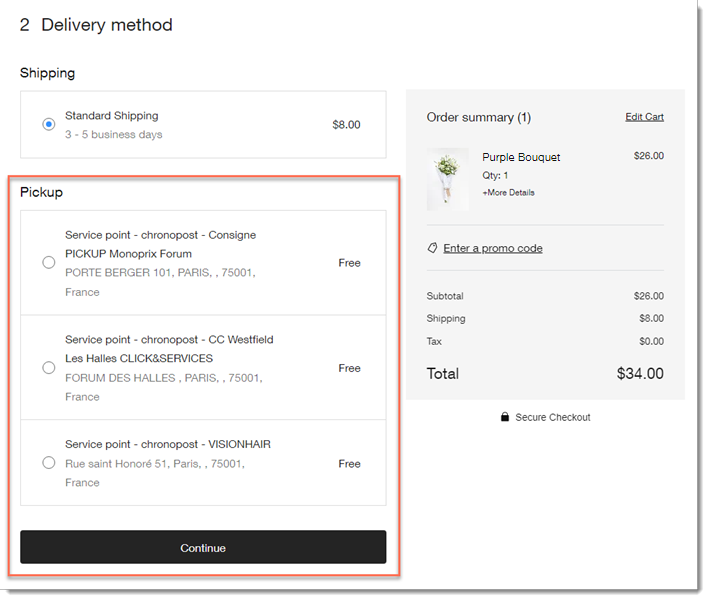
Setting up delivery to pickup points

Shipping to pickup points is offered through 3rd-party apps - Boxtal or Sendcloud. After adding one of these apps and integrating it with your store, you can configure and enable it in relevant locations.
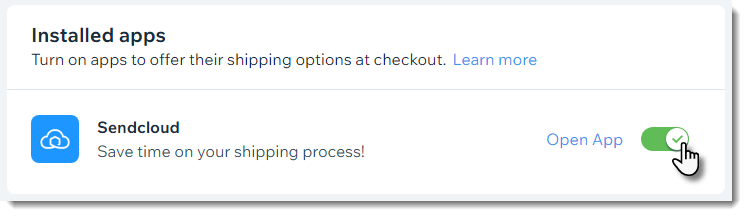
Then, when you receive an order, you send it to one of the relevant carriers' pickup points and they'll make sure it gets to the location your customer selected.

Available pickup point apps

You can integrate your store with any of the following third-party shipping apps to offer delivery to pickup points:

  • Pickup Points via BoxtalAvailable to merchants in France

    Delivers to pickup points in the following regions:Belgium
    France
    Italy
    Germany
    Luxembourg
    Netherlands
    Portugal
    Spain
    Sweden
    United Kingdom

  • Pickup Points via Sendcloud -
    Sendcloud is available to merchants located in the following countries:Andorra
    Austria
    Belgium
    Denmark
    France
    Germany
    Great Britain
    Italy
    Luxembourg
    Monaco
    Netherlands
    Portugal
    Spain

    Pickup Point via ColissimoFrance

Need A Professional Website?
Contact Us 
Today!

Google Workspace Error Message: "Your subscription has been suspended by your reseller"

Google Workspace Error Message: Service Is Temporarily Suspended until Your Customer Accepts the New Terms of Service

Google Workspace Error Message: "You already have a Google Workspace business email account. You can manage it from the Google Admin Console"

Google Workspace: Data Migration from an External Email to Your Google Workspace

Google Workspace: Revoking Admin Status to Delete a Workspace Account

Google Workspace: Connecting Your Business Email to a Mail Client Using IMAP and SMTP

Google Workspace: Changing the Language of Your Business Email

Google Workspace: Emails Missing from Your Business Email

Google Workspace: Allowing Access for ‘Less Secure Apps’ in Your Business Email

Google Workspace: Adding Google Workspace MX Records to Your Wix Account

Google Workspace: Setting Up a Domain Alias

Google Workspace: Manually Verifying Your Domain with Google

Google Workspace: Connecting a Business Email for a Domain Pointing to Wix

Google Workspace: Setting Up an Email Alias for an Existing Workspace User Email Address

Google Workspace: Resetting a Workspace User's Password

Google Workspace: Renaming a Workspace User

Google Workspace: Accessing Your Additional Workspace Users

Google Workspace: Purchasing Additional Business Emails from Wix

Google Workspace: Setting Up Business Email Users

Gemini for Google Workspace: An Overview

Google Workspace: Upgrading a Workspace Plan

Google Workspace: Choosing a Plan

Google Workspace: Business Email Sending Limits

Google Workspace: Forwarding Emails From Your Business Email to Another Email Address

Google Workspace: Resetting Your Admin Password

Google Workspace: Accessing Your Admin Console

Google Workspace: Identifying Your Admin Workspace User

Google Workspace: Setting Up Your Business Email on Mobile Devices

Google Workspace: Username and Password Guidelines

Google Workspace: Accessing your Business Email Through Your Wix Account

wix experts
Graphic2Traffic web design
©
bottom of page