Taking online orders
Wix Restaurants: Using Wix Restaurants to Offer Catering Services
Important:
This article is about the original Restaurants Orders app.
We've released a new online ordering app. Learn how to add and set up the new Wix Restaurants Orders (New) app.
Catering services are services that customers can order in advance for a specific date and time. You can offer catering using the Wix Restaurants online ordering feature. You'll just have to make a few updates to the pickup and delivery settings, and set how far in advance customers can place their orders.
Before you begin:
Make sure you've already set up online ordering for your restaurant site.
To offer catering services using Wix Restaurants:
Go to Order Settings in your site's dashboard.
Click the Pickup tab.Set the pickup time for 0 minutes.
Click Save at the top right.
Click the Delivery tab.Click into each delivery area to edit them.
Set the Maximum Delivery Time to 0 minutes.
Click Save at the top right.
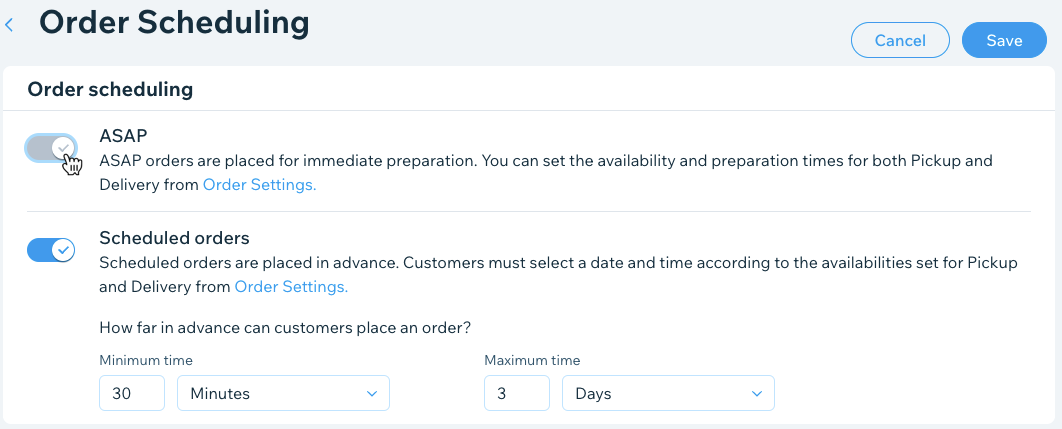
Click the Order scheduling tab.Click the Scheduled orders toggle to enable it and set how far in advance customers can place orders:
Minimum time: Enter a number and select Minutes, Hours or Days from the drop-down list.
Note: This is the minimum time customers can place a future order in advance.
Maximum time: Enter a maximum number and select Minutes, Hours or Days from the drop-down list.
Note: This is the maximum time customers can place a future order in advance.
Disable the ASAP toggle.
Click Save at the top right.