top of page

Taking online orders

Wix Restaurants: Designing Your Orders App

Important:

Personalize the online ordering experience to match your restaurant's brand by choosing the font and colors. You can also customize the design of your dish labels and special dishes.
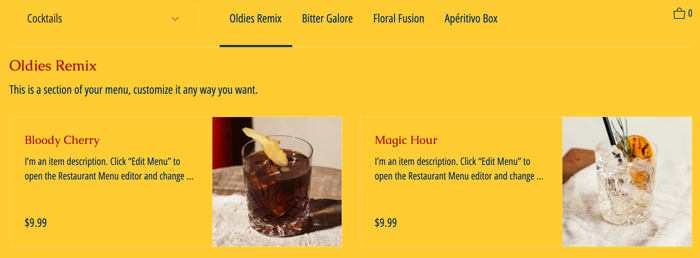
A screenshot of your online ordering page on a live site.

In this article, learn how to:

Changing the fonts of your Orders app

Choose a font that best represents your restaurant. You can choose different fonts for the titles and the main text on the online ordering app.

To change the fonts:

  1. Go to the page that includes the Order Online app in your Editor.

  2. Click the Order Online app in the Editor.

  3. Click Settings.

  4. Click the Design tab.

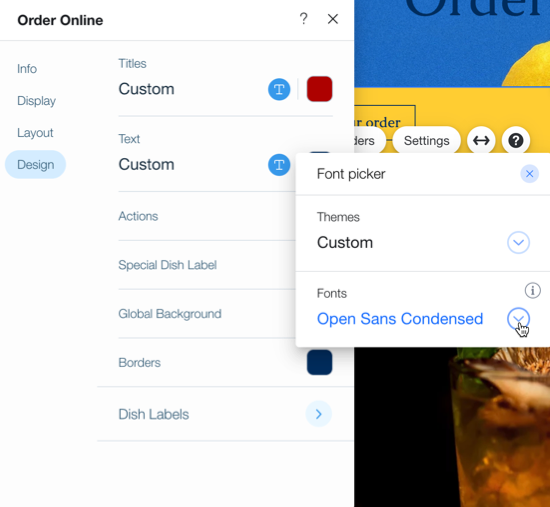
  5. Click the dropdown icon under Titles or Text to open the font picker.

  6. Select the desired font.

A screenshot of designing the orders app.

Tip:

Keep your site to 2 or 3 fonts to make it look clean and professional. Having less fonts also improves your site loading time.

Changing the colors of your Orders app

Change the colors of your Wix Restaurant Orders app to match your business.

Note:

Some aspects of the online ordering checkout flow, such as collecting payment information, pull colors from your site colors rather than the online ordering settings. To update your site colors, click here.

To change the online ordering colors:

  1. Go to the page that includes the Order Online app.

  2. Click the Order Online app in the Editor.

  3. Click Settings.

  4. Click the Design tab.

  5. Select the color you want to change:Titles: Edit the color of your menu's titles.
    Text: Edit the color of your menu's text.
    Actions: Edit the color of the prices, order button and accent colors and selected menu tab.
    Special Dish Label: Edit the color of your Special Dish label.
    Global Background: Edit the color of your menu background.
    Borders: Edit the color of the borders of your online menu.
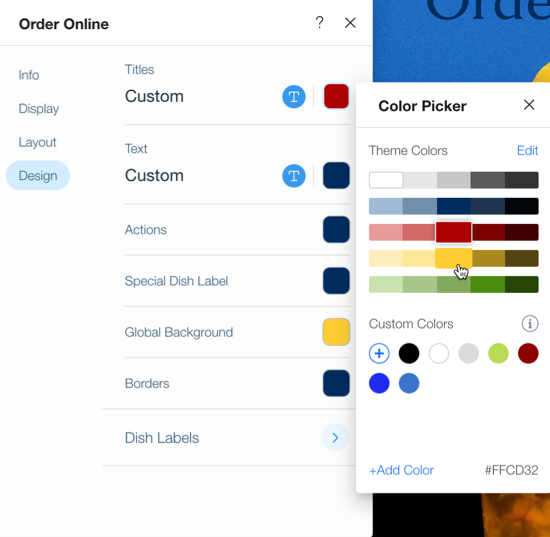
A screenshot of changing the online ordering colors.

  1. Click Dish Labels to select a theme for your menu's labels. Choose from a preset color scheme, or click Customize Design at the bottom to pick your own colors.
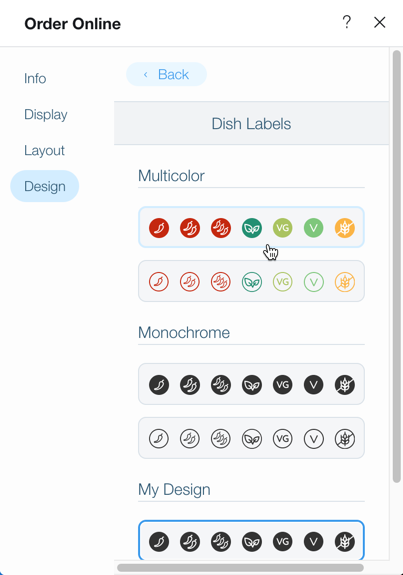
A screenshot of customizing the design of dish labels.

Need A Professional Website?
Contact Us 
Today!

Google Workspace Error Message: "Your subscription has been suspended by your reseller"

Google Workspace Error Message: Service Is Temporarily Suspended until Your Customer Accepts the New Terms of Service

Google Workspace Error Message: "You already have a Google Workspace business email account. You can manage it from the Google Admin Console"

Google Workspace: Data Migration from an External Email to Your Google Workspace

Google Workspace: Revoking Admin Status to Delete a Workspace Account

Google Workspace: Connecting Your Business Email to a Mail Client Using IMAP and SMTP

Google Workspace: Changing the Language of Your Business Email

Google Workspace: Emails Missing from Your Business Email

Google Workspace: Allowing Access for ‘Less Secure Apps’ in Your Business Email

Google Workspace: Adding Google Workspace MX Records to Your Wix Account

Google Workspace: Setting Up a Domain Alias

Google Workspace: Manually Verifying Your Domain with Google

Google Workspace: Connecting a Business Email for a Domain Pointing to Wix

Google Workspace: Setting Up an Email Alias for an Existing Workspace User Email Address

Google Workspace: Resetting a Workspace User's Password

Google Workspace: Renaming a Workspace User

Google Workspace: Accessing Your Additional Workspace Users

Google Workspace: Purchasing Additional Business Emails from Wix

Google Workspace: Setting Up Business Email Users

Gemini for Google Workspace: An Overview

Google Workspace: Upgrading a Workspace Plan

Google Workspace: Choosing a Plan

Google Workspace: Business Email Sending Limits

Google Workspace: Forwarding Emails From Your Business Email to Another Email Address

Google Workspace: Resetting Your Admin Password

Google Workspace: Accessing Your Admin Console

Google Workspace: Identifying Your Admin Workspace User

Google Workspace: Setting Up Your Business Email on Mobile Devices

Google Workspace: Username and Password Guidelines

Google Workspace: Accessing your Business Email Through Your Wix Account

wix experts
Graphic2Traffic web design
©
bottom of page