top of page

Taking online orders

Wix Restaurants: Automatically Responding to Incoming Orders

Important:

Use Wix Automations to automatically respond to customers when they place orders on your Wix Restaurants site. You can choose how to respond or what you'd like to do when customers place orders. For example, send an automated email or receive an email, award customers with loyalty points, assign tasks to your team and more.
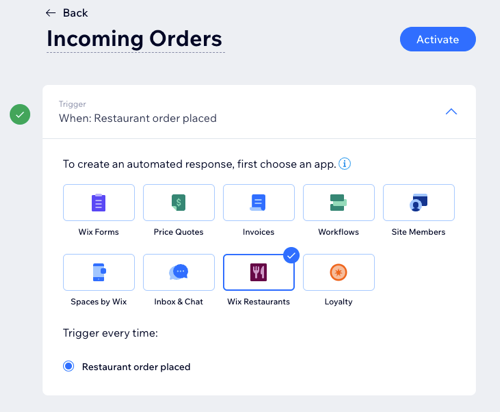
Screenshot of Automations screen in Wix Restaurant with triggering every time a restaurant order is placed

Tip:

Learn more about creating a new automation and how you can respond to customers when they place orders on your site.

To respond to incoming restaurant orders:

  1. Go to Automations in your site's dashboard.

  2. Click + New Automation.

  3. Click + Start from Scratch.

  4. Click the title to give your automation a name.

  5. Click Wix Restaurants app in the Trigger section.

  6. Select your chosen action in the Action section and set up the action using the available options.
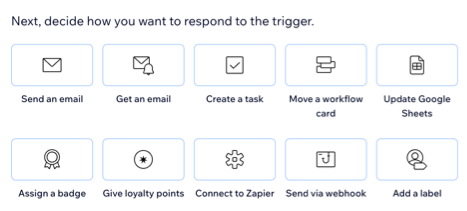
Screenshot of selection the action once a customer places an order on your site

  1. Click the Timing section to expand it.

  2. Click the Choose a time to send this action drop-down to select when the action should be carried out:Immediately: The action is performed as soon as the trigger occurs.
    Set custom time: The action is performed after the trigger, at a time set by you. Click the up and down arrows to set the number and click the drop-down to choose between days, hours and minutes.

  3. Click the Limit frequency to drop-down to set trigger frequency:Don't limit (trigger every time): Your action will take place every time it is triggered by a visitor.
    Once per contact: Your action will take place only once per contact.
    Once per contact every 24hrs: Your action will take place only once per contact in any 24hr period.

  4. (Optional) Click + Add an Action at the bottom to set up a multi-action automation.

  5. Click Activate to save your new automation.

Need A Professional Website?
Contact Us 
Today!

Google Workspace Error Message: "Your subscription has been suspended by your reseller"

Google Workspace Error Message: Service Is Temporarily Suspended until Your Customer Accepts the New Terms of Service

Google Workspace Error Message: "You already have a Google Workspace business email account. You can manage it from the Google Admin Console"

Google Workspace: Data Migration from an External Email to Your Google Workspace

Google Workspace: Revoking Admin Status to Delete a Workspace Account

Google Workspace: Connecting Your Business Email to a Mail Client Using IMAP and SMTP

Google Workspace: Changing the Language of Your Business Email

Google Workspace: Emails Missing from Your Business Email

Google Workspace: Allowing Access for ‘Less Secure Apps’ in Your Business Email

Google Workspace: Adding Google Workspace MX Records to Your Wix Account

Google Workspace: Setting Up a Domain Alias

Google Workspace: Manually Verifying Your Domain with Google

Google Workspace: Connecting a Business Email for a Domain Pointing to Wix

Google Workspace: Setting Up an Email Alias for an Existing Workspace User Email Address

Google Workspace: Resetting a Workspace User's Password

Google Workspace: Renaming a Workspace User

Google Workspace: Accessing Your Additional Workspace Users

Google Workspace: Purchasing Additional Business Emails from Wix

Google Workspace: Setting Up Business Email Users

Gemini for Google Workspace: An Overview

Google Workspace: Upgrading a Workspace Plan

Google Workspace: Choosing a Plan

Google Workspace: Business Email Sending Limits

Google Workspace: Forwarding Emails From Your Business Email to Another Email Address

Google Workspace: Resetting Your Admin Password

Google Workspace: Accessing Your Admin Console

Google Workspace: Identifying Your Admin Workspace User

Google Workspace: Setting Up Your Business Email on Mobile Devices

Google Workspace: Username and Password Guidelines

Google Workspace: Accessing your Business Email Through Your Wix Account

wix experts
Graphic2Traffic web design
©
bottom of page