top of page

Setting up Photo Albums

Wix Photo Albums: Displaying Specific Albums on Different Pages

With Wix Photo Albums, you can choose which of your albums to display and on what pages of your site. This also allows you to apply a custom design to each individual album gallery.

Installing Wix Photo Albums automatically generates a dedicated gallery page with a new photo album. This article shows you how to use Wix Photo Albums to add any gallery to any page you want.

To display an album on another page:

  1. Open your site in the editor.

  2. Click Pages  on the left side of the editor.

  3. Click the page that includes Wix Photo Albums.
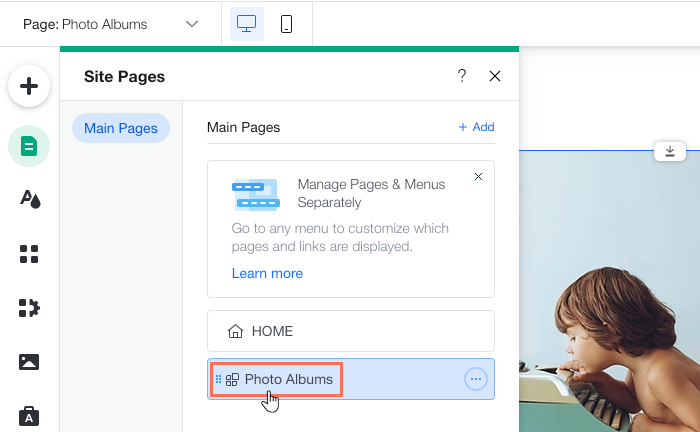
  1. Click the photo album in your editor and select Settings.

  2. Click Add Ons.

  3. Click the Select page drop-down.

  4. Select the page where you want to add Wix Photo Albums to.

  5. Click the photo album in your editor and select Settings.

  6. Click Albums.

  7. Click Show or Hide Albums.

  8. Enable the Show on page toggle next to each album you want to display.

Tip:

In addition to adding Wix Photo Albums to different pages, you can add it multiple times to the same page, with each displaying a different album. This allows you to organize and display your albums any way you choose. Repeat the above steps to add another album on the same page.

Need A Professional Website?
Contact Us 
Today!

Google Workspace Error Message: "Your subscription has been suspended by your reseller"

Google Workspace Error Message: Service Is Temporarily Suspended until Your Customer Accepts the New Terms of Service

Google Workspace Error Message: "You already have a Google Workspace business email account. You can manage it from the Google Admin Console"

Google Workspace: Data Migration from an External Email to Your Google Workspace

Google Workspace: Revoking Admin Status to Delete a Workspace Account

Google Workspace: Connecting Your Business Email to a Mail Client Using IMAP and SMTP

Google Workspace: Changing the Language of Your Business Email

Google Workspace: Emails Missing from Your Business Email

Google Workspace: Allowing Access for ‘Less Secure Apps’ in Your Business Email

Google Workspace: Adding Google Workspace MX Records to Your Wix Account

Google Workspace: Setting Up a Domain Alias

Google Workspace: Manually Verifying Your Domain with Google

Google Workspace: Connecting a Business Email for a Domain Pointing to Wix

Google Workspace: Setting Up an Email Alias for an Existing Workspace User Email Address

Google Workspace: Resetting a Workspace User's Password

Google Workspace: Renaming a Workspace User

Google Workspace: Accessing Your Additional Workspace Users

Google Workspace: Purchasing Additional Business Emails from Wix

Google Workspace: Setting Up Business Email Users

Gemini for Google Workspace: An Overview

Google Workspace: Upgrading a Workspace Plan

Google Workspace: Choosing a Plan

Google Workspace: Business Email Sending Limits

Google Workspace: Forwarding Emails From Your Business Email to Another Email Address

Google Workspace: Resetting Your Admin Password

Google Workspace: Accessing Your Admin Console

Google Workspace: Identifying Your Admin Workspace User

Google Workspace: Setting Up Your Business Email on Mobile Devices

Google Workspace: Username and Password Guidelines

Google Workspace: Accessing your Business Email Through Your Wix Account

wix experts
Graphic2Traffic web design
©
bottom of page