top of page

Setting up Photo Albums

Wix Photo Albums: Displaying Specific Albums on Different Pages

With Wix Photo Albums, you can choose which of your albums to display and on what pages of your site. This also allows you to apply a custom design to each individual album gallery.

Installing Wix Photo Albums automatically generates a dedicated gallery page with a new photo album. This article shows you how to use Wix Photo Albums to add any gallery to any page you want.

To display an album on another page:

  1. Open your site in the editor.

  2. Click Pages  on the left side of the editor.

  3. Click the page that includes Wix Photo Albums.
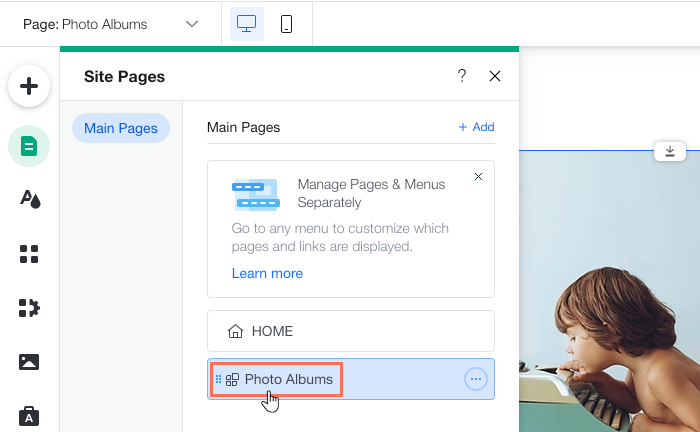
  1. Click the photo album in your editor and select Settings.

  2. Click Add Ons.

  3. Click the Select page drop-down.

  4. Select the page where you want to add Wix Photo Albums to.

  5. Click the photo album in your editor and select Settings.

  6. Click Albums.

  7. Click Show or Hide Albums.

  8. Enable the Show on page toggle next to each album you want to display.

Tip:

In addition to adding Wix Photo Albums to different pages, you can add it multiple times to the same page, with each displaying a different album. This allows you to organize and display your albums any way you choose. Repeat the above steps to add another album on the same page.

Need A Professional Website?
Contact Us 
Today!

Connecting Authorize.net Powered by Bankful as a Payment Provider

Connecting Klarna as a Payment Provider

Connecting SeerBit as a Payment Provider

Connecting Webpay Plus-Transbank as a Payment Provider

Connecting Atome as a Payment Provider

Connecting Affirm as a Payment Provider

Connecting Pay TR as a Payment Provider

Connecting Sezzle as a Payment Provider

Connecting CXPay as a Payment Provider

Connecting Afterpay as a Payment Provider

Connecting Rapyd Payments as a Payment Provider

Connecting Clearpay as a Payment Provider

Connecting Yoco as a Payment Provider

Connecting Titre Restaurants Conecs as a Payment Method (Through Lyra)

Connecting Multibanco as a Payment Method (Through Lyra Collect)

Connecting Fondy as a Payment Provider

Connecting Xendit as a Payment Provider

Connecting Razorpay as a Payment Provider

Connecting Laybuy as a Payment Provider

Connecting Lyra Collect as a Payment Provider

Connecting UAPay as a Payment Provider

Connecting Paysafecash as a Payment Method (through Skrill)

Connecting Rapid Transfer as a Payment Method (through Skrill)

Connecting Przelewy24 as a Payment Method (through Skrill)

Connecting Skrill Digital Wallet as a Payment Method

Connecting Skrill as a Payment Provider for Credit/Debit Card Transactions

Connecting Mobile Payment as a Payment Method (Through KOMOJU)

Connecting Pay-Easy as a Payment Method (Through KOMOJU)

Connecting WeChat Pay as a Payment Method (Through Oceanpayment)

Connecting AliPay as a Payment Method (Through Oceanpayment)

wix experts
Graphic2Traffic web design
©
bottom of page