top of page

Working with Wix Payments

Wix Payments: Changing Your Payout Schedule

Wix Payments gives you control over when payouts are sent to your bank account. Select a payout schedule that meets your needs and change it at any time.

There are three payout schedules to choose from:

  • Daily: Payouts are sent every day, including transactions that were processed before the daily cut-off time*. Any transactions received after that time will be included in the next day's payout.

  • Weekly: Payouts are sent every Monday. You can change this to any other day of the week through your account settings.

  • Monthly: Payouts are sent on the 1st of every month. You can change this to any other day of the month through your account settings.

Changing your payout schedule

  1. Go to Accept Payments in your site's dashboard.

  2. Click Manage next to Wix Payments.

  3. Scroll down to Payout Schedule.

  4. Select the checkbox next to the relevant option:Daily

    Weekly
    Use the drop-down menu to select a day.
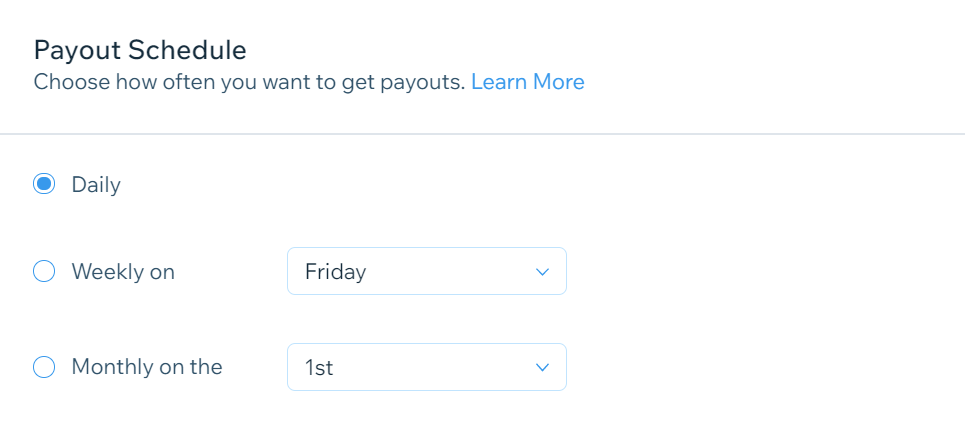
    MonthlyUse the drop-down menu to select a day.

setting a weekly payout schedule,

  1. Click Save.

FAQs

Click a question below to learn more about payouts from Wix Payments.

Is there a minimum balance required for payouts?

Yes, payouts are only made if there's an available balance of at least $1 in your Wix Payments account.

What time are daily payouts processed?

Daily payouts are processed at 6AM EST for the United States and Canada and 6AM GMT for Europe. Transactions processed before the cut-off time are included in that day's payout, while transactions after the cut-off time are included in the next day's payout.

What happens to my monthly payout if the month has fewer than 29 days?

If the month has fewer than 29 days, payouts are sent on the last day of the month.

Need A Professional Website?
Contact Us 
Today!

Google Workspace Error Message: "Your subscription has been suspended by your reseller"

Google Workspace Error Message: Service Is Temporarily Suspended until Your Customer Accepts the New Terms of Service

Google Workspace Error Message: "You already have a Google Workspace business email account. You can manage it from the Google Admin Console"

Google Workspace: Data Migration from an External Email to Your Google Workspace

Google Workspace: Revoking Admin Status to Delete a Workspace Account

Google Workspace: Connecting Your Business Email to a Mail Client Using IMAP and SMTP

Google Workspace: Changing the Language of Your Business Email

Google Workspace: Emails Missing from Your Business Email

Google Workspace: Allowing Access for ‘Less Secure Apps’ in Your Business Email

Google Workspace: Adding Google Workspace MX Records to Your Wix Account

Google Workspace: Setting Up a Domain Alias

Google Workspace: Manually Verifying Your Domain with Google

Google Workspace: Connecting a Business Email for a Domain Pointing to Wix

Google Workspace: Setting Up an Email Alias for an Existing Workspace User Email Address

Google Workspace: Resetting a Workspace User's Password

Google Workspace: Renaming a Workspace User

Google Workspace: Accessing Your Additional Workspace Users

Google Workspace: Purchasing Additional Business Emails from Wix

Google Workspace: Setting Up Business Email Users

Gemini for Google Workspace: An Overview

Google Workspace: Upgrading a Workspace Plan

Google Workspace: Choosing a Plan

Google Workspace: Business Email Sending Limits

Google Workspace: Forwarding Emails From Your Business Email to Another Email Address

Google Workspace: Resetting Your Admin Password

Google Workspace: Accessing Your Admin Console

Google Workspace: Identifying Your Admin Workspace User

Google Workspace: Setting Up Your Business Email on Mobile Devices

Google Workspace: Username and Password Guidelines

Google Workspace: Accessing your Business Email Through Your Wix Account

wix experts
Graphic2Traffic web design
©
bottom of page