top of page

Selling and promoting your music

Wix Music: Setting Up Your Payment Methods

Your fans can buy your music in Wix Music and Wix does not charge a cent.

Important:

  • Set up your payment methods by following the steps below before selling your music.

  • The album should not be edited after a purchase is made as this can cause an error with the download link.

To set up your payments:

  1. Go to Accept Payments in your site's dashboard.

  2. Set up the payment methods you want to use.

To change your currency:

  1. Go to Music Library in your site's dashboard.

  2. Hover over the relevant single/album/playlist and click the More Actions icon.

  3. Click Edit.

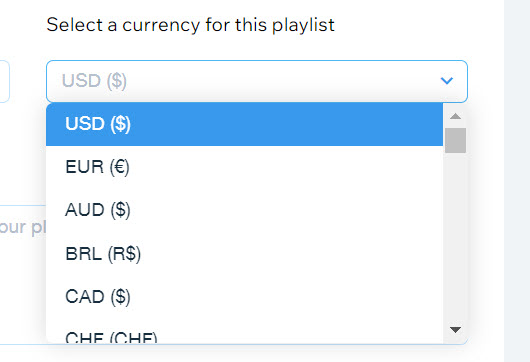
  4. Click the drop-down under Select a currency for this playlist.

  5. Select a currency.

  6. Click Save.

A screenshot of the currency selection drop-down menu.

Notes:

  • Currently, the following payment processors are not supported with Wix Music:pagueloFacil
    Isracard
    Offline.

  • For Wix Payments, there is a minimum amount of $1 per transaction. Make sure your release/track/album's price is over $1 if you're using this payment processor.

Need A Professional Website?
Contact Us 
Today!

Google Workspace Error Message: "Your subscription has been suspended by your reseller"

Google Workspace Error Message: Service Is Temporarily Suspended until Your Customer Accepts the New Terms of Service

Google Workspace Error Message: "You already have a Google Workspace business email account. You can manage it from the Google Admin Console"

Google Workspace: Data Migration from an External Email to Your Google Workspace

Google Workspace: Revoking Admin Status to Delete a Workspace Account

Google Workspace: Connecting Your Business Email to a Mail Client Using IMAP and SMTP

Google Workspace: Changing the Language of Your Business Email

Google Workspace: Emails Missing from Your Business Email

Google Workspace: Allowing Access for ‘Less Secure Apps’ in Your Business Email

Google Workspace: Adding Google Workspace MX Records to Your Wix Account

Google Workspace: Setting Up a Domain Alias

Google Workspace: Manually Verifying Your Domain with Google

Google Workspace: Connecting a Business Email for a Domain Pointing to Wix

Google Workspace: Setting Up an Email Alias for an Existing Workspace User Email Address

Google Workspace: Resetting a Workspace User's Password

Google Workspace: Renaming a Workspace User

Google Workspace: Accessing Your Additional Workspace Users

Google Workspace: Purchasing Additional Business Emails from Wix

Google Workspace: Setting Up Business Email Users

Gemini for Google Workspace: An Overview

Google Workspace: Upgrading a Workspace Plan

Google Workspace: Choosing a Plan

Google Workspace: Business Email Sending Limits

Google Workspace: Forwarding Emails From Your Business Email to Another Email Address

Google Workspace: Resetting Your Admin Password

Google Workspace: Accessing Your Admin Console

Google Workspace: Identifying Your Admin Workspace User

Google Workspace: Setting Up Your Business Email on Mobile Devices

Google Workspace: Username and Password Guidelines

Google Workspace: Accessing your Business Email Through Your Wix Account

wix experts
Graphic2Traffic web design
©
bottom of page